MCP server · Security
Domain Deliverability Checker MCP server
by mambalabsdev
Lets your AI check a domain's email setup (SPF, DKIM, DMARC, MX) and give it a health score.
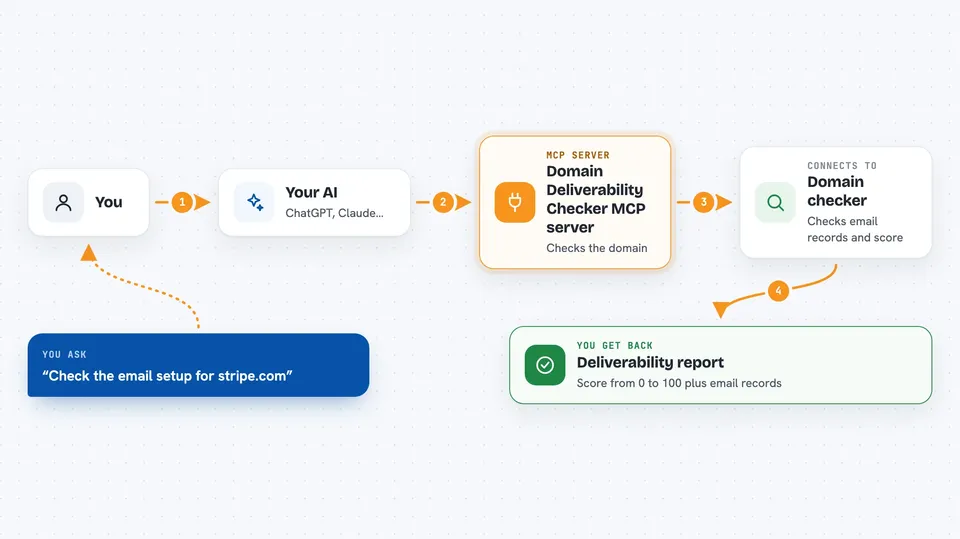
This is a small helper you connect to your AI so it can check whether a domain's email setup is healthy. You give it a domain name, and it comes back with a report and a score out of 100. It is handy if you work with outreach, marketing, or IT and want a quick read on whether emails from a domain are likely to land in inboxes.
What is an MCP server? The 30-second version
On its own, your AI can only chat with you. An MCP server is a small helper program you plug in that gives your AI a new skill or a connection to another service. This one connects your AI to a domain checking service, so when you ask about a domain, the AI can actually go look it up instead of guessing. You just ask in normal words, and the helper does the technical part behind the scenes.
What this MCP server does
You ask your AI something like whether a domain has its email records set up properly. The AI passes that request to this helper, which sends the domain to a checking service running on Apify. That service looks at the domain's email records, mail provider, blacklist status, and other signals. It sends back a report with a score from 0 to 100, and your AI shows it to you in the chat. You can check one domain at a time or hand over a list.
 Click to zoom
What you can do with it
- Check whether a domain has SPF, DKIM, and DMARC records set up
- See which mail provider a domain uses
- Find out if a domain appears on any DNS blacklist
- Get a deliverability score from 0 to 100 for a domain
- Check the age of a domain
- Audit a list of domains in one go
- Ask about a domain's DMARC policy
Try asking your AI
- “Check the email deliverability of stripe.com.”
- “Does github.com have SPF, DKIM, and DMARC set up, and what is its DMARC policy?”
- “Audit these domains for deliverability: stripe.com, notion.so, figma.com.”
- “Is acme.com on any DNS blacklist, and what is its mail provider?”
What it gives back to you
You get back a report in the chat with the domain's email records, its mail provider, blacklist status, domain age, and a deliverability score from 0 to 100. If you sent a list of domains, you get a result for each one. The results come back as structured data, so your AI can summarize them or turn them into a table for you.
Before you start
What you need
- Node.js 18 or newer installed on your computer
- An Apify account with an API token (a kind of password for apps; you get it free from your Apify account page)
Good to know
Each check runs on Apify and may use up your Apify account credits, so keep an eye on usage if you check many domains.
Install it with your AI
Add Domain Deliverability Checker MCP server to your AI, no technical skills needed
You don't install anything by hand. You copy one prompt, paste it into an AI that can work on your computer, and it checks, installs and connects the server for you, asking you when it needs something.
Sign in to get the install prompt
Members get a ready-made prompt that lets the Claude desktop app check Domain Deliverability Checker MCP server, install it and connect it for them, step by step. You don't need any technical skills: you copy, paste and answer a few questions. Your connected AI can also find and install any of the 4,609 MCP servers here for you.
Who it's for
People who do outreach, email marketing, sales operations, or IT support and want a quick read on whether a domain's email setup looks healthy.