MCP server · Developer tools
4DA MCP server
Lets your AI check your project's dependencies for security problems and plan upgrades.

This is a helper for your AI that looks at the list of building blocks your project uses (called dependencies) and tells you if any of them have known security problems or are out of date. It is handy if you work on a coding project and want a quick health check without digging through files yourself. You install it once, then just ask your AI questions in plain English.
What is an MCP server? The 30-second version
On its own, your AI can only chat with you. An MCP server is a small helper program that gives your AI a new skill or a connection to something outside the chat. This one connects your AI to your project's dependency files and to public databases that track security issues. So when you ask about your dependencies, the AI can actually look them up and give you real answers instead of guessing.
What this MCP server does
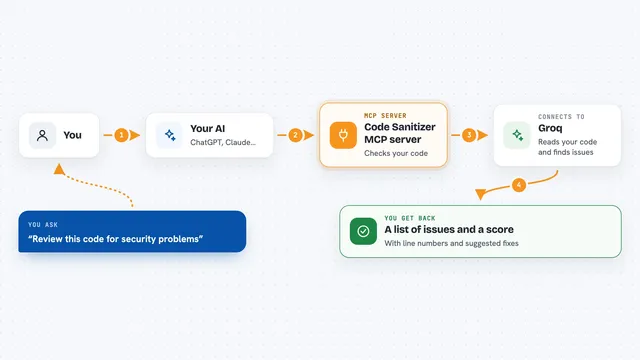
You ask your AI something like check my dependency health. The AI passes that request to this helper program. The helper reads your project's dependency files, figures out the exact versions you have, and asks public databases whether any of those versions have known security problems or are out of date. Then it hands the results back to your AI, which explains them to you in the chat.
 Click to zoom
What you can do with it
- Scan your project for known security problems in your dependencies
- Get a health score for your dependencies with a list of what is outdated or deprecated
- See a ranked plan for which dependencies to upgrade first
- Get a short briefing about your project before you start working
- Read recent news about the tools and languages your project uses
- Save notes about decisions your team made so your AI remembers them later
- Check whether a new idea fits with decisions you already recorded
Try asking your AI
- “Check my dependency health”
- “Scan for vulnerabilities”
- “Which dependencies should I upgrade first?”
- “What should I know before I start coding today?”
What it gives back to you
You get back a short report in the chat. It usually includes a health score, a list of dependencies with problems, and suggested newer versions to move to. For upgrade planning you get a ranked list that separates easy safe upgrades from ones that might break things.
Before you start
What you need
- A coding project with a dependency file like package.json, Cargo.toml, go.mod, or pyproject.toml
- Node.js installed on your computer so the npx command works
- An AI tool that supports MCP, like Claude Desktop, Claude Code, Cursor, Windsurf, or VS Code
Good to know
It reads your project's dependency files and sends package names and versions to public websites to look them up, so avoid running it on a project whose dependency list is secret.
Install it with your AI
Add 4DA MCP server to your AI, no technical skills needed
You don't install anything by hand. You copy one prompt, paste it into an AI that can work on your computer, and it checks, installs and connects the server for you, asking you when it needs something.
Sign in to get the install prompt
Members get a ready-made prompt that lets the Claude desktop app check 4DA MCP server, install it and connect it for them, step by step. You don't need any technical skills: you copy, paste and answer a few questions. Your connected AI can also find and install any of the 4,066 MCP servers here for you.
Who it's for
Developers and anyone who works on a coding project and wants a quick, plain-English check on their dependencies.