
MCP server · Finance and crypto
AletaIndex Narrative MCP server
by AletaIndex
Lets your AI track how financial news stories about stocks change over time, with sentiment and risk.
AletaIndex is a service that watches financial news and groups articles into bigger stories, called narratives. This MCP server connects that service to your AI, so you can ask about what the market is talking about around a stock and how the mood is shifting. It is handy for anyone who follows stocks and wants a quick read on the news without scrolling through hundreds of articles.
What is an MCP server? The 30-second version
On its own, your AI can only chat with you using what it already learned. An MCP server is a small helper program that gives your AI a new skill or a connection to an outside service. This one connects your AI to AletaIndex, a financial news tracking service. Once it is set up, your AI can look up narratives, sentiment and mention counts for you when you ask.
What this MCP server does
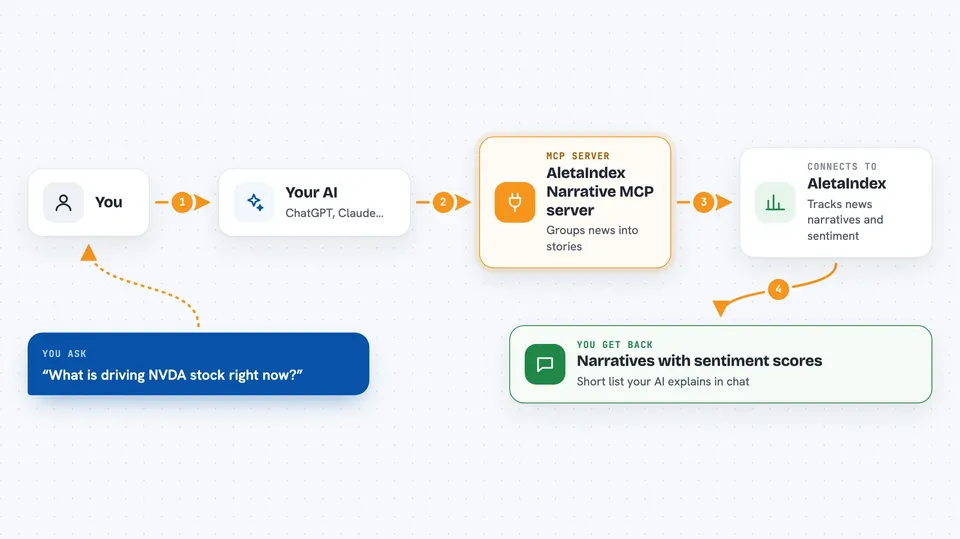
You ask your AI something like what is driving a stock right now. Your AI sends that question to this helper, which talks to the AletaIndex service. AletaIndex looks at its collection of news articles and groups them into narratives, then measures how positive or negative the coverage is and how that is changing. Your AI gets the results back and explains them to you in the chat, usually as a short list of narratives with sentiment scores.
 Click to zoom
What you can do with it
- See which narratives are dominating a stock right now
- Check whether sentiment on a narrative is rising or falling
- Compare narratives across several tickers in your portfolio
- Track how many articles are mentioning a story each day
- Spot narrative risk building up around a holding
- Look back over weeks or months to see how a story evolved
Try asking your AI
- “What narratives are driving NVDA right now and is sentiment shifting?”
- “Compare the top narratives for TSLA and JPM over the last two weeks.”
- “Which narratives around my portfolio have turned negative this month?”
- “Show me the daily mention counts for the AI infrastructure narrative on NVDA.”
What it gives back to you
You get back a short list of narratives for each ticker, each with a title, a sentiment score and label, and a direction like rising or stable. You also see how many articles mentioned each story and how dominant it is compared to others. Your AI usually turns this into a few sentences or a small table in the chat. You do not get the raw articles themselves, just the grouped summary.
Before you start
What you need
- An AletaIndex API key (a kind of password; you get one by signing up on their site, free trial available)
- An MCP-compatible AI app like Claude Desktop, Claude Code, Cursor or Windsurf
- Python with uvx installed if you choose the local install option
Good to know
The service is a paid subscription after the free trial, and the free tier only covers 10 tickers, so check your plan before relying on it.
Install it with your AI
Add AletaIndex Narrative MCP server to your AI, no technical skills needed
You don't install anything by hand. You copy one prompt, paste it into an AI that can work on your computer, and it checks, installs and connects the server for you, asking you when it needs something.
Sign in to get the install prompt
Members get a ready-made prompt that lets the Claude desktop app check AletaIndex Narrative MCP server, install it and connect it for them, step by step. You don't need any technical skills: you copy, paste and answer a few questions. Your connected AI can also find and install any of the 4,609 MCP servers here for you.
Who it's for
Investors, analysts and finance-minded office workers who follow stocks and want a quick, organized read on the news.



