
MCP server · Security
Aperion Shield MCP guardrail
by AperionAI
Stops your AI agent before it runs a dangerous command, and checks the tools it uses for tampering.
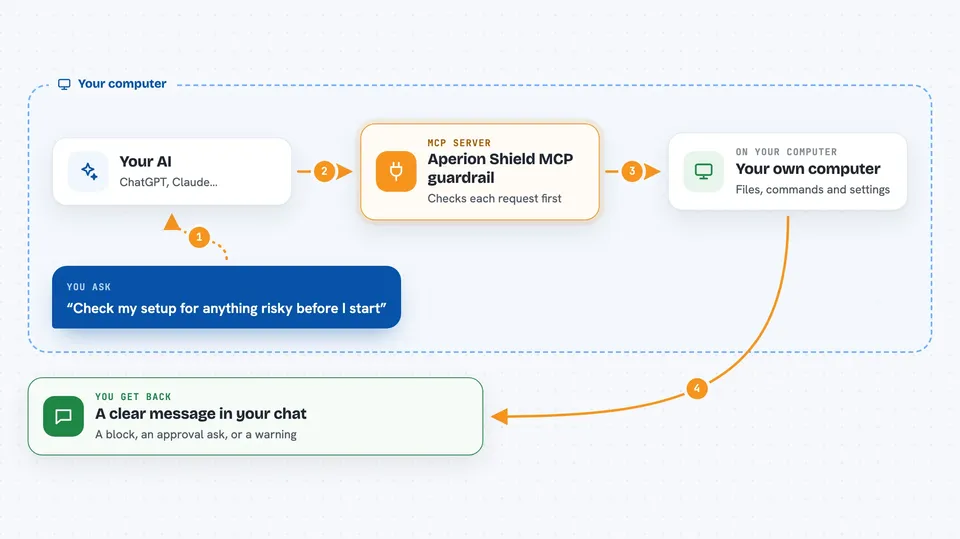
Aperion Shield is a small safety program that sits between your AI coding helper and the tools it can use, like your database, your files, or your shell. It watches each action your AI tries to take and blocks the risky ones, or asks you first. It is handy if you let an AI assistant work on real projects and you want a seatbelt on it.
What is an MCP server? The 30-second version
On its own, your AI can only chat with you. An MCP server is a small helper program that gives your AI a new skill or a connection to an app or service. This one, Aperion Shield, is a guardrail helper: it stands between your AI and the other helpers it talks to, so it can check each action before it happens. You install it once, and from then on it quietly watches what your AI is about to do.
What this MCP server does
When your AI wants to run a command, delete a file, or change something in your database, the request passes through Shield first. Shield compares the request against a long list of safety rules covering things like databases, git, files, cloud accounts, and system settings. If the request looks dangerous, Shield blocks it, asks you to approve it, or lets it through with a warning. Shield also watches the other direction: it remembers what each tool looked like the first time, and if a tool suddenly changes, it raises a flag. It can also scan a tool before you connect it, and hide real passwords behind placeholders so they never reach the AI.
 Click to zoom
What you can do with it
- Block a destructive command before your AI runs it
- Ask you for approval on risky actions instead of letting them through
- Detect when a tool's description changes unexpectedly
- Scan an MCP server before you connect it to your AI
- Hide real passwords behind placeholders so they never reach the model
- Check your editor's MCP config files for unwrapped or unpinned servers
- Keep a record of which actions were blocked or approved
Try asking your AI
- “Check my MCP setup for anything risky before I start working”
- “Why was my last command blocked?”
- “Scan this MCP server before I connect it”
- “Show me the list of secrets I have registered with Shield”
What it gives back to you
You get clear messages in your chat: a block with the reason, an approval prompt, or a warning banner next to the action. When you run a scan, you get a list of findings with file names and short explanations. Shield can also print a summary of what it caught, so you can see at a glance what your AI tried to do.
Before you start
What you need
- A Mac, Linux, or Windows computer where you run your AI coding agent
- Your AI agent installed, such as Cursor or Claude Code
- Permission to install a small program on your machine
Good to know
Shield can block or change what your AI is allowed to do, and if you approve a risky action it will go through, so read the prompts before you click yes.
Install it with your AI
Add Aperion Shield MCP guardrail to your AI, no technical skills needed
You don't install anything by hand. You copy one prompt, paste it into an AI that can work on your computer, and it checks, installs and connects the server for you, asking you when it needs something.
Sign in to get the install prompt
Members get a ready-made prompt that lets the Claude desktop app check Aperion Shield MCP guardrail, install it and connect it for them, step by step. You don't need any technical skills: you copy, paste and answer a few questions. Your connected AI can also find and install any of the 4,609 MCP servers here for you.
Who it's for
Developers and engineers who let AI coding agents work on real projects and want a safety net before anything destructive happens.



