
MCP server · Developer tools
Maven Tools MCP server
by arvindand
Lets your AI check Java library versions, spot old or risky dependencies, and suggest upgrades.
This is a helper for people who work with Java projects and want their AI assistant to answer questions about the libraries the project uses. It looks up live information from Maven Central, the big public library store for Java code. It is handy if you maintain a Java project and want a quick check on what is out of date or risky.
What is an MCP server? The 30-second version
On its own, your AI can only chat with you. An MCP server is a small helper program that gives your AI a new skill or a connection to an app or service. This one connects your AI to Maven Central, the public store where Java libraries live. Once it is connected, your AI can look up library versions and health details for you when you ask.
What this MCP server does
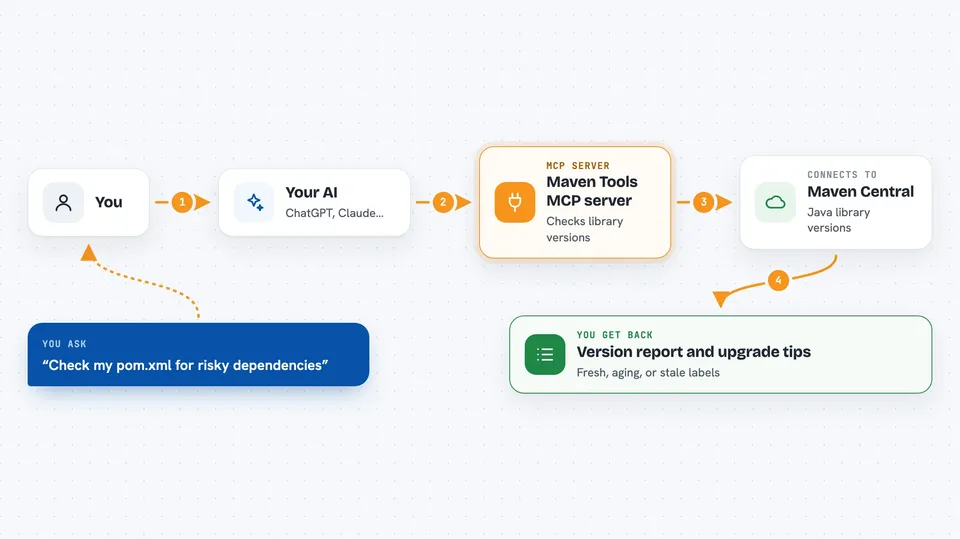
You ask your AI something about the libraries in your Java project. The AI passes your question to this helper. The helper talks to Maven Central and checks the real, current information there. It sends the results back to your AI, which explains them to you in plain words. If you share your pom.xml file, it can also work out which versions your project actually ends up using.
 Click to zoom
What you can do with it
- Find the latest stable version of a Java library
- Compare your current versions against newer ones available
- Check whether a library looks fresh, aging, or stale
- Look for known security issues and license details
- Read your pom.xml and work out the real versions in use
- Suggest upgrade edits for your pom.xml and flag risky ones
- Fetch library documentation through Context7
Try asking your AI
- “Check all latest versions of the dependencies in my pom.xml and call out anything risky.”
- “Is this library version stable, or is it a preview release?”
- “How old is this dependency and is it still being maintained?”
- “Which of my dependencies have known security issues?”
What it gives back to you
You get answers in the chat, not files. Expect lists of current versus latest versions, notes on whether an upgrade is major, minor, or patch, and simple labels like fresh, aging, or stale. If you ask about your pom.xml, it can also suggest specific version edits and flag the ones that need a human look.
Before you start
What you need
- Docker installed and running on your computer
- The Claude desktop app or VS Code with GitHub Copilot
- A CONTEXT7_API_KEY only if you want the documentation lookups and your network needs it (optional)
Good to know
It reads your pom.xml and looks things up online, but it does not change your files by itself, so you still review and apply any suggested edits yourself.
Install it with your AI
Add Maven Tools MCP server to your AI, no technical skills needed
You don't install anything by hand. You copy one prompt, paste it into an AI that can work on your computer, and it checks, installs and connects the server for you, asking you when it needs something.
Sign in to get the install prompt
Members get a ready-made prompt that lets the Claude desktop app check Maven Tools MCP server, install it and connect it for them, step by step. You don't need any technical skills: you copy, paste and answer a few questions. Your connected AI can also find and install any of the 4,609 MCP servers here for you.
Who it's for
Java developers and anyone maintaining a Java project who wants a quick, plain check on their libraries.



