
MCP server · Analytics
Yandex Direct MCP server
by askads
Lets your AI look at your Yandex Direct ad account and, if you want, change campaigns, ads and keywords for you.
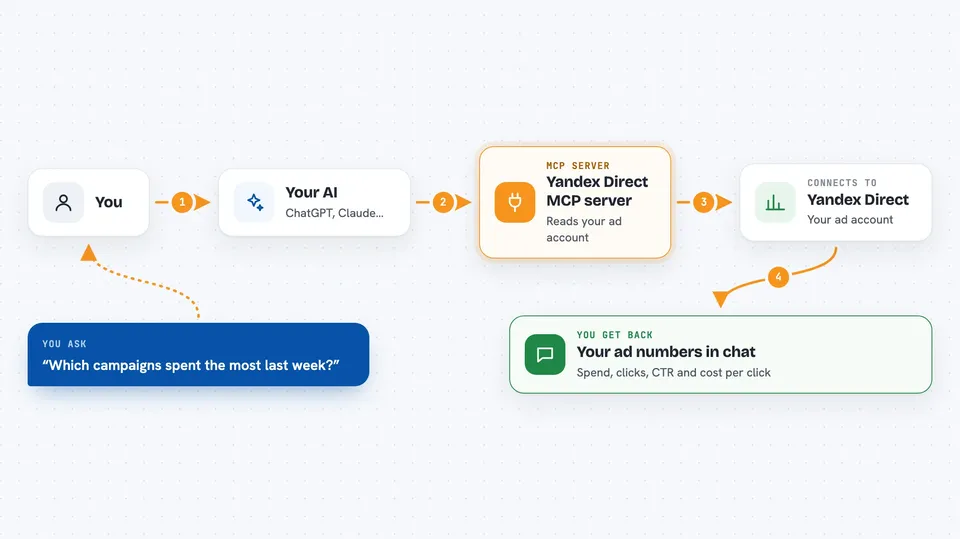
This is a helper that connects your AI assistant to your Yandex Direct advertising account. You can ask in plain words where your ad money is going, and you can also ask it to prepare or make changes. It is handy if you run Yandex ads and want to check or adjust things without clicking through every screen of the account.
What is an MCP server? The 30-second version
On its own, your AI can only chat. An MCP server is a small helper program that gives your AI a new skill or a connection to an app or service. This one connects your AI to Yandex Direct, your ad account. Once it is connected, the AI can look up your campaigns, ads and keywords, and, if you use the full version, change them when you ask.
What this MCP server does
You ask your AI a question about your ads, like which campaigns spent the most last week. The AI passes that request to this helper. The helper talks to Yandex Direct and pulls back the numbers or the list of objects. Then the AI turns that into a normal answer in your chat, in your account's currency. If you use the full local version and clearly ask for a change, the helper can also create, update, pause or delete things in your live account.
 Click to zoom
What you can do with it
- See which campaigns spent the most in a given period
- Compare spend, clicks and average cost per click across campaigns
- Find keywords that spend money but get no clicks
- Check the account balance and how much daily API quota is left
- Look at bid adjustments, sitelinks and callouts on a campaign
- Create a text campaign, ad group, ad or keywords
- Pause, resume, archive or delete ads and campaigns
Try asking your AI
- “Show my campaigns and last week's spend by ad group”
- “Which keywords are burning budget but getting no clicks?”
- “Suggest new bids for keywords with high CTR and show me the changes before applying”
- “Pause ad 456”
What it gives back to you
You get answers in the chat: lists of campaigns, groups, ads or keywords, plus numbers like spend, clicks, CTR and average cost per click, shown in your account's currency. Reports are built in the background and the helper waits until they are ready, so you may see a short pause. When it changes something, it tells you what it did. If a list is too long and gets cut off, it says so instead of hiding it.
Before you start
What you need
- A Yandex account with access to the ad account you want to use
- For the read-only option: an AI app that supports MCP over a URL
- For the full option: Node.js 20 or newer on your computer
- Nothing else to start: no token needed up front, you sign in during the chat
Good to know
The local version makes real changes in your live ad account, and some actions like deleting cannot be undone, so check before you confirm and use the sandbox for tests.
Install it with your AI
Add Yandex Direct MCP server to your AI, no technical skills needed
You don't install anything by hand. You copy one prompt, paste it into an AI that can work on your computer, and it checks, installs and connects the server for you, asking you when it needs something.
Sign in to get the install prompt
Members get a ready-made prompt that lets the Claude desktop app check Yandex Direct MCP server, install it and connect it for them, step by step. You don't need any technical skills: you copy, paste and answer a few questions. Your connected AI can also find and install any of the 4,361 MCP servers here for you.
Who it's for
People who run or check Yandex Direct ads, like marketers, PPC specialists and small business owners, who want quick answers and edits without clicking through the whole account.





