
MCP server · Analytics
Yandex Metrica MCP server
by askads
Ask your AI about your website traffic and conversions from Yandex Metrica, in plain language.
This is a small helper that connects your AI assistant to Yandex Metrica, the web analytics tool many sites use to track visitors. Once it is connected, you can just ask questions about your traffic and conversions in normal words. It is handy for anyone who looks after a website and wants quick answers without clicking through reports.
What is an MCP server? The 30-second version
On its own, your AI can only chat with you. An MCP server is a small helper program that gives your AI a new skill or a connection to an app or service. This one connects your AI to Yandex Metrica, so it can look up your counters, goals and reports for you when you ask. You do not need to know any technical details to use it.
What this MCP server does
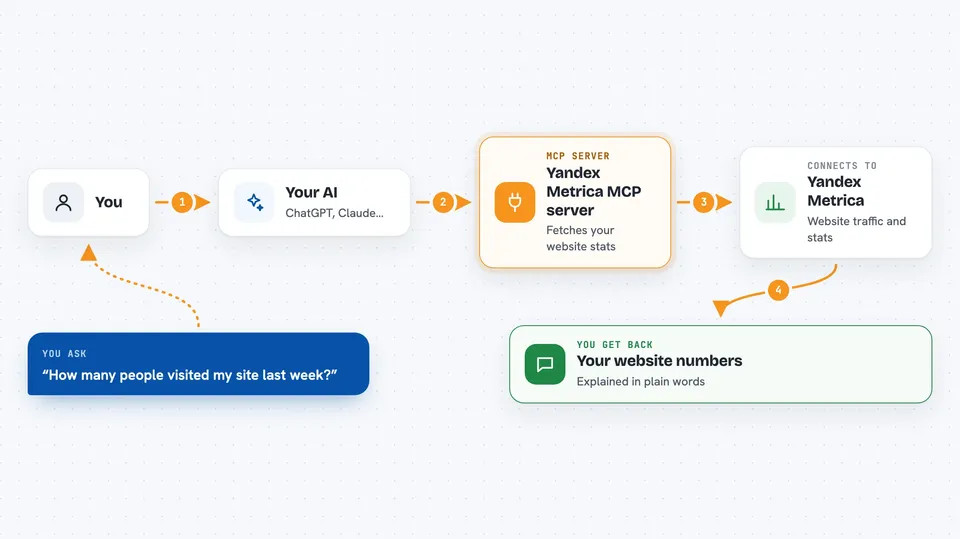
You ask your AI a question about your website, like how many people visited last week. The AI passes your question to this helper. The helper talks to Yandex Metrica and pulls the numbers you asked for. Then the AI explains the result back to you in the chat, in normal words. If the report is based on a sample, the helper tells the AI so it can warn you.
 Click to zoom
What you can do with it
- List the Yandex Metrica counters you have access to
- Show the goals set up on a counter
- Pull visits, users, page views, bounce rate and visit duration for a period
- Break traffic down by source, device or day
- Show conversion numbers for a specific goal
- Check whether a report is exact or based on a sample
- Connect or disconnect your Yandex Metrica access from the chat
Try asking your AI
- “How many visits, users and bounces did my site get last week?”
- “Show me traffic sources for the last 30 days, sorted by visits”
- “What is the conversion rate for the Checkout goal over 30 days?”
- “Which devices have the highest bounce rate?”
What it gives back to you
You get answers in the chat: lists of counters or goals, tables of numbers by day, source or device, and totals for the period. The AI usually adds a short explanation of what the numbers mean. If Metrica used a sample, you will see a note that the figures are approximate. If a report is too big, it is marked as cut off so you know.
Before you start
What you need
- A Yandex account with access to the Metrica counters you want to read
- Node.js 20 or newer on your computer
- An AI app that supports MCP servers, like Claude Desktop, Cursor or VS Code
Good to know
The normal tools only read your Metrica data, but the raw API request tool can change or delete real objects if you confirm a write, so check carefully before saying yes.
Install it with your AI
Add Yandex Metrica MCP server to your AI, no technical skills needed
You don't install anything by hand. You copy one prompt, paste it into an AI that can work on your computer, and it checks, installs and connects the server for you, asking you when it needs something.
Sign in to get the install prompt
Members get a ready-made prompt that lets the Claude desktop app check Yandex Metrica MCP server, install it and connect it for them, step by step. You don't need any technical skills: you copy, paste and answer a few questions. Your connected AI can also find and install any of the 4,361 MCP servers here for you.
Who it's for
Marketers, site owners and analysts who want quick answers about website traffic and conversions without opening Metrica reports by hand.





