MCP server · Customer communication · official
Asyntai MCP server
by asyntai · official
Let your AI manage your Asyntai support agent: knowledge, instructions, chats and leads.
Asyntai puts an AI support agent on your website that answers visitors using your own content. This is the connector that lets your own AI assistant (like Claude or ChatGPT) work with that agent for you. It is handy if you run a website with Asyntai and want to update things or check conversations without clicking around the dashboard.
What is an MCP server? The 30-second version
On its own, your AI can only chat with you. An MCP server is a small helper that gives your AI a new skill or a connection to an app. This one connects your AI to your Asyntai account, so it can look things up and make changes there when you ask. You stay in charge: the AI only does what you tell it.
What this MCP server does
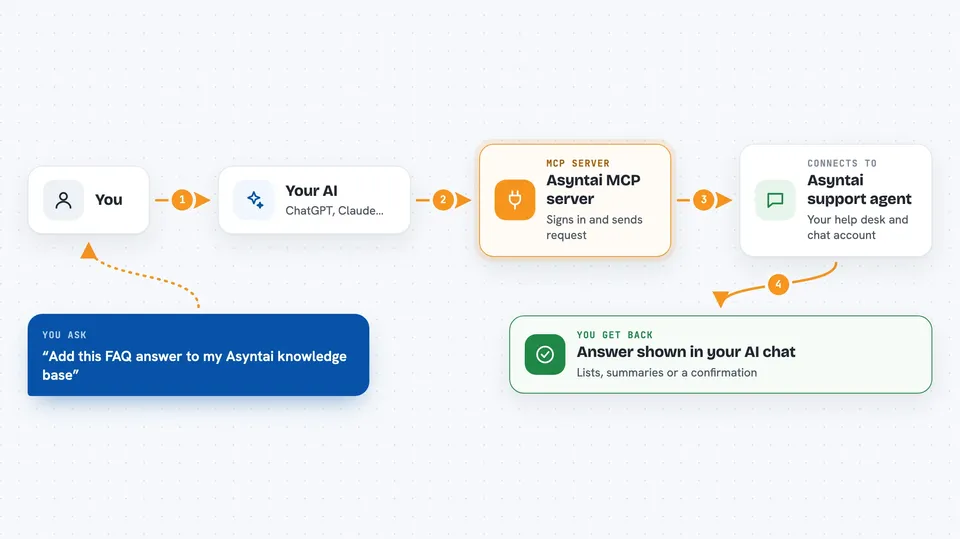
You ask your AI something about your Asyntai support agent, like adding a help article or reading recent chats. Your AI passes the request to this helper. The helper signs you in to Asyntai and sends the request to your account. Asyntai does the work and sends the answer back. Your AI then shows you the result in plain words in the chat.
 Click to zoom
What you can do with it
- Add or update articles in your agent's knowledge base
- Edit the instructions your support agent follows
- Read recent conversations with website visitors
- See the leads your agent collected
- Reply to a live visitor yourself through your AI
- Check how much of your plan you have used
Try asking your AI
- “Add this FAQ answer to my Asyntai knowledge base”
- “Show me the last five conversations my support agent had”
- “Change my agent's instructions so it always offers a demo call”
- “List the new leads from this week”
What it gives back to you
You get answers in the chat: lists of conversations or leads, short summaries, and confirmations when something was added or changed. If you ask about usage, you get numbers. If you reply to a visitor, you see that your message was sent.
Before you start
What you need
- An Asyntai account (the free plan works)
- An MCP client that can run a local command, such as Claude Desktop, Cursor or VS Code
- Node.js 18 or newer on your computer
Good to know
It can change your knowledge base, agent instructions and replies, so check what your AI is about to do before approving big edits.
Install it with your AI
Add Asyntai MCP server to your AI, no technical skills needed
You don't install anything by hand. You copy one prompt, paste it into an AI that can work on your computer, and it checks, installs and connects the server for you, asking you when it needs something.
Sign in to get the install prompt
Members get a ready-made prompt that lets the Claude desktop app check Asyntai MCP server, install it and connect it for them, step by step. You don't need any technical skills: you copy, paste and answer a few questions. Your connected AI can also find and install any of the 4,361 MCP servers here for you.
Who it's for
Website owners and support teams who use Asyntai and want to manage their AI agent from their own AI assistant.