MCP server · Customer communication
Freshdesk MCP server
by omnom62
Lets your AI look up Freshdesk tickets, read conversations and pull text out of attachments for you.
This is a small helper program that connects your AI assistant to your Freshdesk support account. Once it is running, you can ask your AI things like "what is happening with ticket 12345" and it will go and check for you. It is handy for support agents, team leads and anyone who spends their day inside Freshdesk.
What is an MCP server? The 30-second version
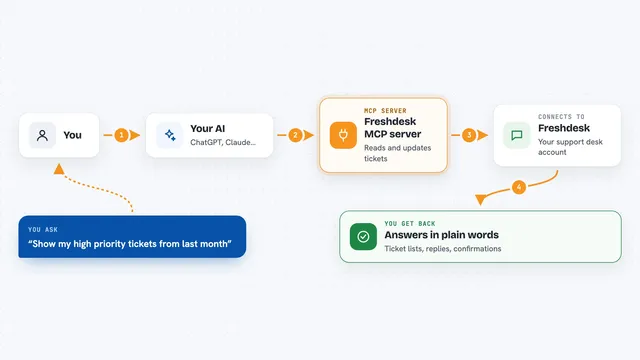
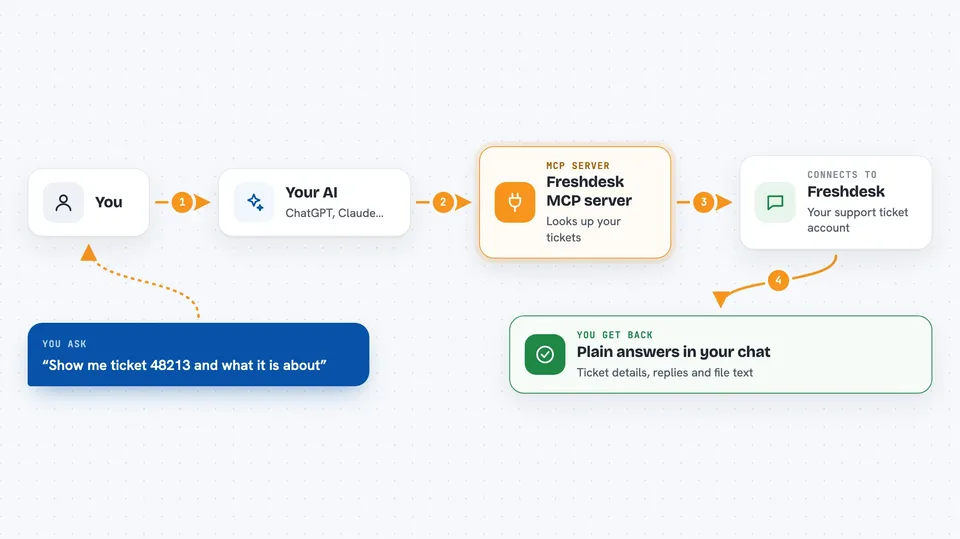
On its own, your AI can only chat with you. An MCP server is a small helper program that gives your AI a new skill, in this case a connection to Freshdesk. You run this helper yourself (on your own computer or on a cloud service), and it talks to Freshdesk on your behalf. When you ask a question about a ticket, your AI passes the question to this helper, the helper fetches the answer from Freshdesk, and your AI tells you what it found.
What this MCP server does
You ask your AI a question about your support tickets. The AI sends that request to this helper program, which is running somewhere you set up. The helper then talks to Freshdesk using your account details and pulls back the ticket, the replies, the notes or the attachment you asked about. If the attachment is an image like a screenshot, the helper can read the text inside it too, as long as you have set up the optional image reading service. Finally, your AI shows you the result in the chat, in plain words.
 Click to zoom
What you can do with it
- Look up a single ticket by its number and see its status, group and company
- Search tickets by keyword, status, priority, dates, company, requester, agent or group
- Read all the replies and internal notes on a ticket
- List every attachment on a ticket and its conversations
- Pull the text out of attachments like Word, Excel, CSV, text, JSON and screenshots
- Find a contact, a company or an agent and get their ID
- List all your agent groups
Try asking your AI
- “Show me ticket 48213 and tell me what it is about”
- “Find all open tickets from Acme Corp that are overdue”
- “Summarise the last five replies on ticket 48213”
- “What does the screenshot attached to ticket 48213 say”
What it gives back to you
You get back plain answers in the chat: the ticket details, a list of matching tickets, the text of a conversation, or the words found inside an attachment. For searches you get a list you can skim, with status and group names already filled in so you do not have to look up what each number means. For a single ticket you get the full picture in one go, including replies and attachments. Nothing is changed in Freshdesk; this helper only reads.
Before you start
What you need
- A Freshdesk account with API access
- Your Freshdesk API key, found under Profile, then Profile Settings, then API Key
- Docker installed, or a cloud service that can run a container
- A random secret word you make up, used as a password between your AI and this helper
Good to know
This helper can read your Freshdesk tickets, conversations and attachments, so keep your API key and secret word private and only run it somewhere you trust.
Install it with your AI
Add Freshdesk MCP server to your AI, no technical skills needed
You don't install anything by hand. You copy one prompt, paste it into an AI that can work on your computer, and it checks, installs and connects the server for you, asking you when it needs something.
Sign in to get the install prompt
Members get a ready-made prompt that lets the Claude desktop app check Freshdesk MCP server, install it and connect it for them, step by step. You don't need any technical skills: you copy, paste and answer a few questions. Your connected AI can also find and install any of the 4,361 MCP servers here for you.
Who it's for
Support agents, support team leads and anyone who works in Freshdesk all day and wants to ask questions in plain English instead of clicking around.