MCP server · Research
Russian Company Registry (EGRUL/EGRIP) MCP server
by atomno-mcp
Look up Russian companies and sole traders by tax number or name, straight from your AI chat.
This is a helper that lets your AI look up official information about Russian companies and individual entrepreneurs from the state tax registry. It works with the open data the Russian tax service publishes, and you keep a copy of that data on your own computer. It is handy if you check suppliers, clients, or business partners and want quick answers without opening a government website.
What is an MCP server? The 30-second version
On its own, your AI can only chat with you. An MCP server is a small helper program that gives your AI a new skill or a connection to an app or service. This one connects your AI to the Russian state registries EGRUL (companies) and EGRIP (individual entrepreneurs). Once it is set up, you can just ask your AI about a company and it will fetch the details for you.
What this MCP server does
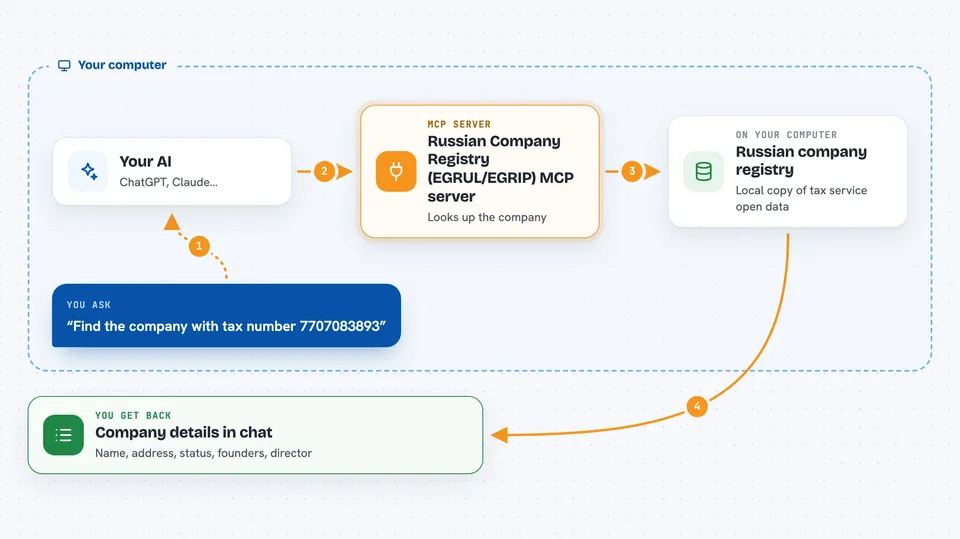
You ask your AI something like "find the company with this tax number" or "who is the director of this firm". Your AI passes the question to this helper program running on your computer. The helper looks the company up in a local copy of the tax service open data, stored in a small database file. It then sends the matching details back to your AI, which shows them to you in the chat. You never have to open the tax service website yourself.
 Click to zoom
What you can do with it
- Look up a company or sole trader by their tax number (INN)
- Look up a company by its registration number (OGRN or OGRNIP)
- Search for companies by name, even with typos
- Get the full card of a company with all its details
- See who the founders are and what shares they hold
- See who the current director is
- Check up to 100 tax numbers at once in a single request
Try asking your AI
- “Find the company with INN 7707083893 and show me its full card”
- “Who is the director of the company with OGRN 1027700132195”
- “Search for companies with the word Sberbank in the name, only active ones”
- “Check these 20 tax numbers for me and tell me which ones are still active”
What it gives back to you
You get back clear answers in the chat: company names, addresses, status, registration dates, founders with their shares, and the current director. For a search by name you get a short list of matching companies. For a bulk check you get a summary of each tax number you asked about. Everything appears as normal text you can read and copy.
Before you start
What you need
- Python 3.11 or newer installed on your computer
- The uv tool (a small program that runs Python apps; the README shows how to get it)
- The tax service open data files, which you download yourself from the tax service website after accepting their license
Good to know
The data comes from a snapshot you downloaded yourself, so it can be a day or more out of date; for anything urgent, check the official tax service website.
Install it with your AI
Add Russian Company Registry (EGRUL/EGRIP) MCP server to your AI, no technical skills needed
You don't install anything by hand. You copy one prompt, paste it into an AI that can work on your computer, and it checks, installs and connects the server for you, asking you when it needs something.
Sign in to get the install prompt
Members get a ready-made prompt that lets the Claude desktop app check Russian Company Registry (EGRUL/EGRIP) MCP server, install it and connect it for them, step by step. You don't need any technical skills: you copy, paste and answer a few questions. Your connected AI can also find and install any of the 4,609 MCP servers here for you.
Who it's for
Anyone who checks Russian companies or sole traders for work, like accountants, lawyers, sales teams, and small business owners.