
MCP server · Analytics
SEO Audit MCP server
by atomno-mcp
Let your AI run real technical SEO checks on a website and hand you a score with a list of things to fix.
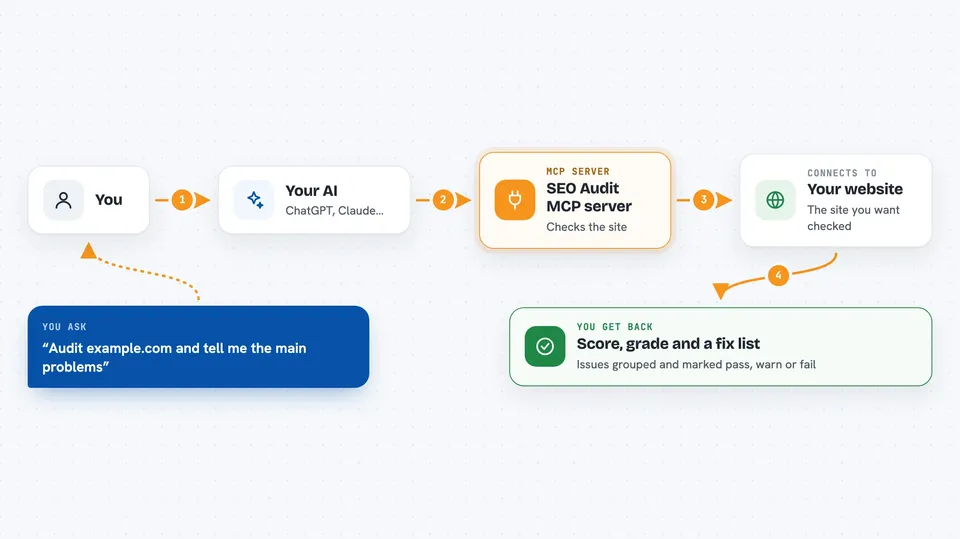
This is a helper that lets your AI actually inspect a website instead of guessing about it. You ask for an audit, and it runs real checks on the site and gives you a health score plus a list of problems. It is handy if you look after a website and want a quick, honest picture of what is wrong.
What is an MCP server? The 30-second version
On its own, your AI can only chat with you. It cannot open a website and measure things. An MCP server is a small helper program that gives your AI a new skill, and here that skill is running technical SEO checks on a site through the detail.web engine. So when you ask your AI to audit a page, it uses this helper to do the real work and then explains the results to you.
What this MCP server does
You ask your AI to check a website. Your AI passes the web address to this helper. The helper makes real requests to the site and looks at things like security, redirects, response time, robots.txt, sitemap and structured data. It comes back with a score from 0 to 100, a letter grade, and a list of issues sorted by category. Your AI then reads that back to you and can explain any item in more detail.
 Click to zoom
What you can do with it
- Audit a website and get a health score with a letter grade
- See issues grouped by category like security, indexing and performance
- Compare a site to its previous audit to see what changed
- Validate a robots.txt file and check which AI crawlers are blocked
- Check a sitemap for format and common problems
- Build ready-to-paste JSON-LD structured data and meta tags
- Ask for a plain explanation of a single issue and how to fix it
Try asking your AI
- “Audit https://example.com and tell me the main problems”
- “What changed on my site since the last audit?”
- “Check this robots.txt and tell me if GPTBot is blocked”
- “Build meta tags for a page titled Our Services with a short description”
What it gives back to you
You get back a score from 0 to 100, a letter grade, and a short summary in plain words. The issues come as a list, grouped by category, each marked as pass, warn or fail. For other tools you get things like a validation report, a list of missing fields, or a block of code you can copy. Everything shows up right in the chat.
Before you start
What you need
- The uvx tool installed on your computer (a small program runner)
- An MCP client such as Claude Desktop or Cursor
- Optional: an API key from a PRO+ plan for deeper checks and comparisons
Good to know
It only reads websites, so it does not change anything, but the deeper checks and the compare feature need a paid key.
Install it with your AI
Add SEO Audit MCP server to your AI, no technical skills needed
You don't install anything by hand. You copy one prompt, paste it into an AI that can work on your computer, and it checks, installs and connects the server for you, asking you when it needs something.
Sign in to get the install prompt
Members get a ready-made prompt that lets the Claude desktop app check SEO Audit MCP server, install it and connect it for them, step by step. You don't need any technical skills: you copy, paste and answer a few questions. Your connected AI can also find and install any of the 4,361 MCP servers here for you.
Who it's for
Website owners, marketers and SEO people who want quick technical checks without learning a separate audit tool.





