
MCP server · Developer tools
React Analyzer MCP server
by azer
Let your AI read your React components and write docs or an llm.txt file for the whole project.
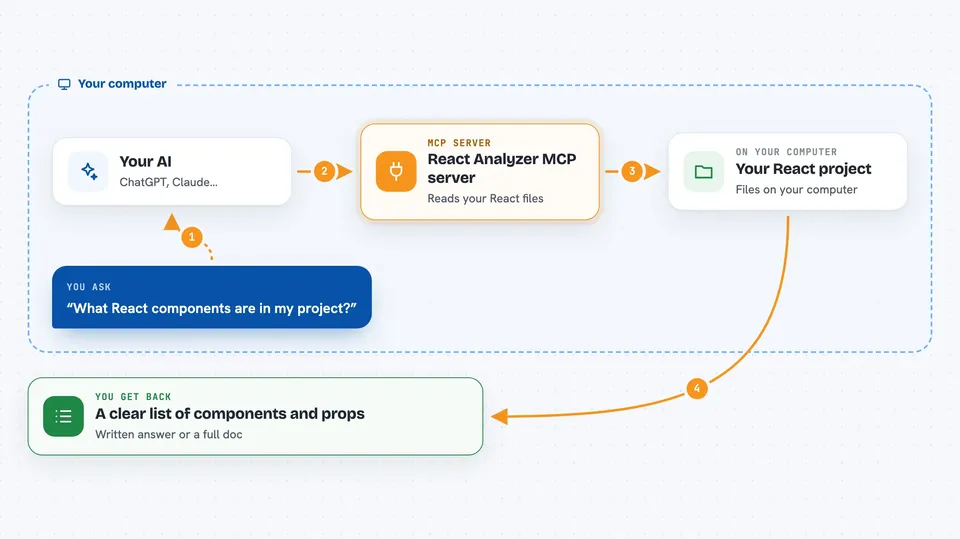
This is a small helper that lets your AI look at React code on your own computer. It reads your component files and pulls out what each component is and which props it takes. It is handy if you work with React and want docs written for you without doing it by hand.
What is an MCP server? The 30-second version
On its own, your AI can only chat. An MCP server is a small helper program that gives your AI a new skill or a connection to something. This one connects your AI to React code sitting in a folder on your machine. Once it is set up, you can just ask your AI about your components and it can actually read the files and answer.
What this MCP server does
You ask your AI something about your React code, like which components you have or what props a button takes. Your AI passes that request to this helper program running on your computer. The helper opens your React files, reads the components and their props, and hands the details back. Your AI then turns that into a clear answer or a written doc for you. You never have to open the files or copy code into the chat yourself.
 Click to zoom
What you can do with it
- Analyze a single React component and see its props
- Generate documentation for every React component in a project folder
- List the projects under your root folder
- Get a table of props with types, whether they are optional, and default values
- Ask which components exist in a given folder
- Produce an llm.txt style summary of a whole project
Try asking your AI
- “Analyze my project's React components in the ui folder.”
- “What React components do I have in my project?”
- “Can you analyze the components in my foobar folder?”
- “Write docs for the Button component and its props.”
What it gives back to you
You get back written answers in the chat, usually as a list of components with a table of props for each one. The table shows the prop name, its type, whether it is optional, and any default value. For a whole folder, you get a longer document covering all the components at once. It reads your code and reports on it, it does not change your files.
Before you start
What you need
- Node.js installed on your computer
- The react-analyzer-mcp project downloaded and built
- The Claude desktop app, with the server added to its config
- The path to the folder where your React projects live
Good to know
It reads the React files in the folder you point it at, so make sure that folder only holds code you are happy for the AI to see.
Install it with your AI
Add React Analyzer MCP server to your AI, no technical skills needed
You don't install anything by hand. You copy one prompt, paste it into an AI that can work on your computer, and it checks, installs and connects the server for you, asking you when it needs something.
Sign in to get the install prompt
Members get a ready-made prompt that lets the Claude desktop app check React Analyzer MCP server, install it and connect it for them, step by step. You don't need any technical skills: you copy, paste and answer a few questions. Your connected AI can also find and install any of the 4,609 MCP servers here for you.
Who it's for
React developers and anyone who works with React code and wants quick docs or a project overview without writing it by hand.




