
MCP server · Finance and crypto
Bankless Onchain MCP server
by Bankless
Lets your AI look up blockchain contracts, tokens and transactions through the Bankless API.
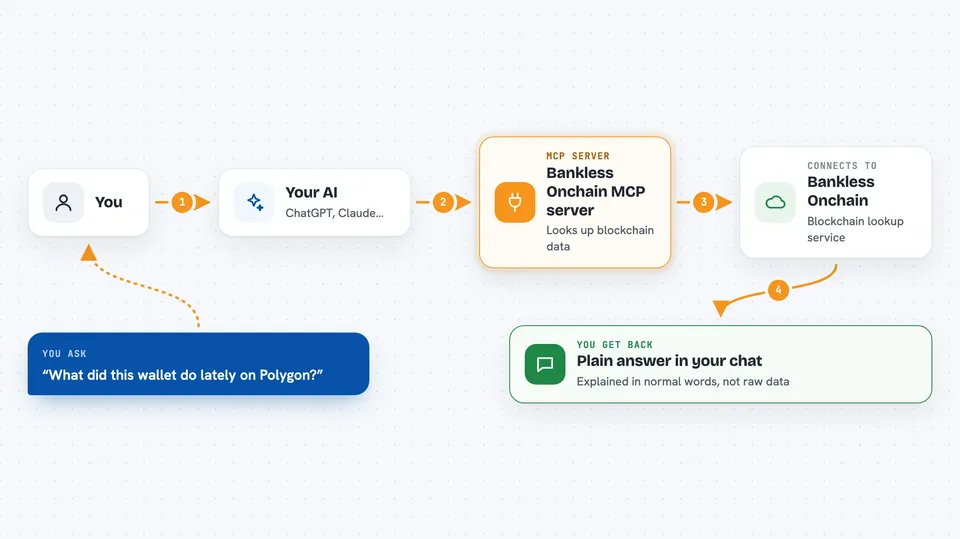
This is a helper that connects your AI assistant to blockchain data through the Bankless Onchain API. It is handy if you work with crypto and want to ask plain questions about a contract, a token or a wallet without clicking through block explorers. You still need a Bankless API token, and the project is no longer receiving updates.
What is an MCP server? The 30-second version
On its own, your AI can only chat with you. An MCP server is a small helper program that gives your AI a new skill or a connection to an outside service. This one connects your AI to the Bankless Onchain API, which holds blockchain information. Once it is set up, your AI can look up contracts, events and transactions for you when you ask.
What this MCP server does
You ask your AI a question about something on a blockchain, like what a contract does or what a wallet has been up to. Your AI sends that request to this helper, and the helper calls the Bankless Onchain API for you. The API returns the raw blockchain data, such as contract results, event logs or transaction details. The helper passes it back to your AI, and your AI explains it in normal words in the chat.
 Click to zoom
What you can do with it
- Read the current state of a smart contract on a network like Ethereum or Polygon
- Find the real implementation address behind a proxy contract
- Fetch a contract's ABI and its verified source code
- Look up event logs for a contract using a topic filter
- Build an event topic signature from an event name and argument types
- Get the transaction history for a wallet address
- Get the details of one specific transaction by its hash
Try asking your AI
- “Read the balanceOf for this wallet address on this token contract on Ethereum”
- “Is this contract a proxy? If so, give me the implementation address and its source code”
- “Show me the recent Transfer events for this token contract on Base”
- “What did this wallet address do in its last ten transactions on Polygon?”
What it gives back to you
You get answers in the chat, built from the raw data the API sends back. That can be a list of transactions with hashes and timestamps, event logs, contract call results with their types, or a contract's source code and ABI. Your AI usually turns these into a short explanation or a table instead of dumping the raw JSON on you.
Before you start
What you need
- A Bankless API token, which is a kind of password you get from the Bankless docs site
- Node.js installed on your computer so the npx command can run
- An AI app that supports MCP servers, like the Claude desktop app
Good to know
It only reads blockchain data through the Bankless API, so it does not move funds or change contracts, but it does use your API token and may hit rate limits.
Install it with your AI
Add Bankless Onchain MCP server to your AI, no technical skills needed
You don't install anything by hand. You copy one prompt, paste it into an AI that can work on your computer, and it checks, installs and connects the server for you, asking you when it needs something.
Sign in to get the install prompt
Members get a ready-made prompt that lets the Claude desktop app check Bankless Onchain MCP server, install it and connect it for them, step by step. You don't need any technical skills: you copy, paste and answer a few questions. Your connected AI can also find and install any of the 4,361 MCP servers here for you.
Who it's for
Crypto analysts, developers and anyone who needs to check contracts, tokens or wallet activity without using a block explorer by hand.




