
MCP server · Research
OmniSeek MCP server
by Battam1111
Lets your AI search across languages, read pages behind your own logins, and transcribe audio and video on your computer.
OmniSeek is a helper program you run on your own computer. It gives your AI extra senses: it can listen to audio, look at images and video frames, search in more than one language, and read pages that normally sit behind a login. It is handy for people who research things deeply and keep hitting walls that plain search cannot get past.
What is an MCP server? The 30-second version
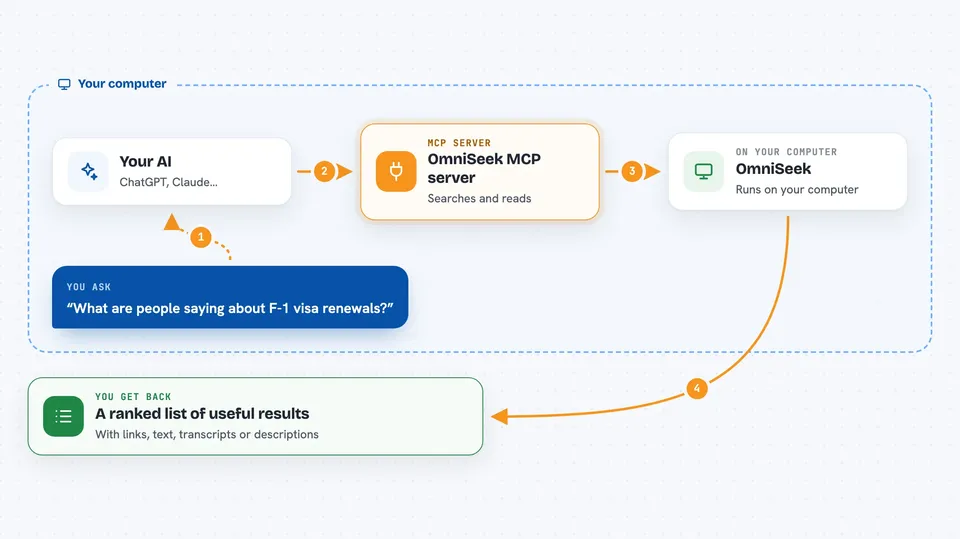
On its own, your AI can only chat with you using what it already knows. An MCP server is a small helper program that gives your AI a new skill or a connection to something outside the chat. OmniSeek is that helper, and it connects your AI to a set of research sources plus your own computer's ability to read text, hear audio, and see images. When you ask a question, your AI passes it to OmniSeek, OmniSeek goes and looks, and the answer comes back into your chat.
What this MCP server does
You ask your AI a question, like what people are saying about a visa rule in another country. Your AI hands that question to OmniSeek. OmniSeek searches across many sources at once, in more than one language, and can also read pages you are logged into, listen to audio, and look at images or video frames. It tidies up what it finds, removes duplicates, and ranks the results. Then it hands the useful bits back to your AI, which shows them to you in the chat.
 Click to zoom
What you can do with it
- Search many research sources at once and get one ranked list
- Read a web page, PDF, or arXiv paper as clean text
- Look at images, figures, and video frames and describe what is in them
- Transcribe audio or video on your own computer, in two languages
- Search in one language and find results in another
- Read pages behind a login you already have, using your own browser
- Keep a memory of what you have found and how things connect
Try asking your AI
- “Search for recent discussions about F-1 visa renewals in a third country, in English and Chinese”
- “Transcribe this bilibili video and tell me what it says about the four-year cap”
- “Read this PDF and summarize the main findings”
- “Look at these video frames and tell me what document is shown”
What it gives back to you
You get back a ranked list of results with short snippets and links to the sources. It can also give you clean text from a page or PDF, a transcript with timestamps, or a description of what is in an image or video frame. Over time it keeps a local memory of what you have looked at and how things relate, so later questions can build on earlier ones. Everything shows up in your normal chat window.
Before you start
What you need
- A computer you can run programs on (Docker is the easiest path)
- Docker installed, or Python if you prefer the non-Docker route
- A bearer token, which OmniSeek prints for you on first start
- Your own logins for any login-walled sites you want it to read
Good to know
If you turn on login-walled sources, OmniSeek uses your own browser session to read pages you are logged into, so only enable sites you are comfortable having it read on your behalf.
Install it with your AI
Add OmniSeek MCP server to your AI, no technical skills needed
You don't install anything by hand. You copy one prompt, paste it into an AI that can work on your computer, and it checks, installs and connects the server for you, asking you when it needs something.
Sign in to get the install prompt
Members get a ready-made prompt that lets the Claude desktop app check OmniSeek MCP server, install it and connect it for them, step by step. You don't need any technical skills: you copy, paste and answer a few questions. Your connected AI can also find and install any of the 4,609 MCP servers here for you.
Who it's for
Researchers, analysts, journalists, and anyone who digs into topics across languages and sources and keeps running into login walls or audio and video that plain search cannot reach.




