
MCP server · Analytics
Aether-X Port Congestion MCP server
Ask your AI about port congestion, ETA delays and freight volatility for major world ports.
This is a small helper that connects your AI assistant to the Aether-X Port Congestion Oracle. That service watches global ports and produces signals like how congested a port is, how late ships are running and how jumpy freight prices look. It is handy if you follow shipping, trade or anything finance related to ports.
What is an MCP server? The 30-second version
On its own, your AI can only chat with you using what it already knows. An MCP server is a small helper program that gives your AI a new skill or a connection to an outside service. This one connects your AI to the Aether-X Port Congestion Oracle, so when you ask about a port, your AI can go and fetch the latest numbers for you. You do not need to understand how it works under the hood; you just ask in normal words.
What this MCP server does
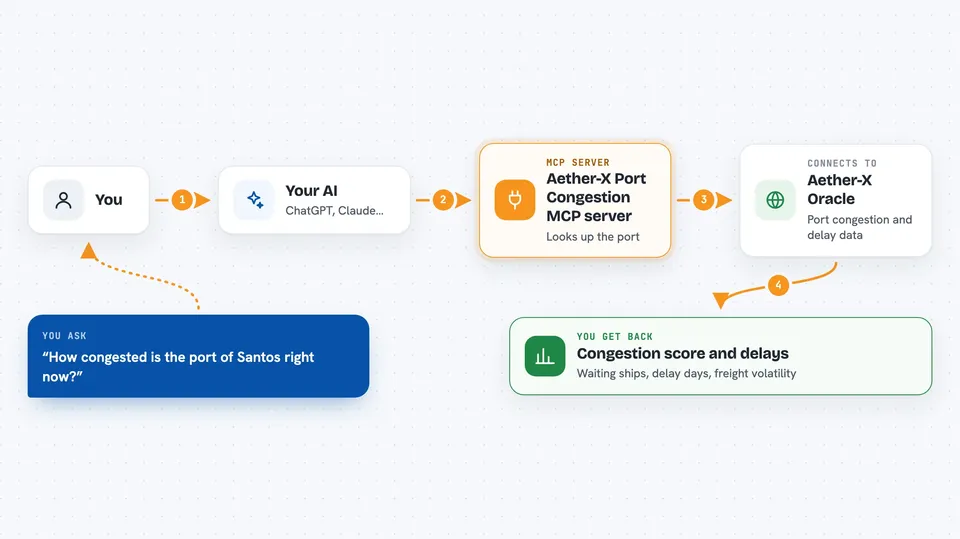
You ask your AI a question about a port, for example how congested Santos is right now. Your AI passes that question to this helper. The helper talks to the Aether-X Oracle service, which returns a small set of numbers for that port. Your AI then reads those numbers back to you in plain language. If you ask about several ports at once, the helper fetches them together so you get one combined answer.
 Click to zoom
What you can do with it
- Check the congestion score for a single port
- Compare congestion across a list of ports
- See how many days ships are delayed on average
- Look up how many vessels are waiting at a port
- Read the freight volatility index for a port
- List the ports the service currently covers
Try asking your AI
- “What's the congestion risk at Santos right now?”
- “Rank these ports by congestion: BRSSZ, CNSHA, NLRTM, USLAX.”
- “Which of my Asian ports has the highest freight volatility index?”
- “How many vessels are waiting at Rotterdam today?”
What it gives back to you
You get back a short set of numbers for each port: a congestion score, an ETA delay in days, the number of waiting vessels and a freight volatility index, plus the time it was last updated. Your AI usually turns this into a sentence or a small comparison table in the chat. If you asked about several ports, you get the same numbers for each one side by side. Nothing is changed on your side; it is read-only information.
Before you start
What you need
- An MCP-compatible AI app such as Claude Desktop, Cursor or VS Code
- Python with uv or pip available on your computer
- Optional: a RapidAPI key if you want to route requests through RapidAPI instead of the public API
Good to know
The signals are provided as is and are not investment advice, so treat the numbers as one input, not a decision on their own.
Install it with your AI
Add Aether-X Port Congestion MCP server to your AI, no technical skills needed
You don't install anything by hand. You copy one prompt, paste it into an AI that can work on your computer, and it checks, installs and connects the server for you, asking you when it needs something.
Sign in to get the install prompt
Members get a ready-made prompt that lets the Claude desktop app check Aether-X Port Congestion MCP server, install it and connect it for them, step by step. You don't need any technical skills: you copy, paste and answer a few questions. Your connected AI can also find and install any of the 4,361 MCP servers here for you.
Who it's for
People who track shipping, trade or port-related finance and want quick congestion and delay numbers without leaving their AI chat.





