
MCP server · Developer tools
Bristlecone Guard MCP server
Lets your AI check web links for safety, fix broken JSON, do math, and validate data before acting.
Bristlecone Guard is a helper service you connect to your AI so it can check things before it trusts them. It is handy if you use AI to process data, pull text from web pages, or run small calculations and you want fewer mistakes and fewer surprises. You do not install anything on your computer; it runs online.
What is an MCP server? The 30-second version
On its own, your AI can only chat with you. An MCP server is a small helper program that gives your AI a new skill or a connection to another service. This one connects your AI to Bristlecone Guard, a web service that checks links, repairs messy text, and does careful math. Once connected, your AI can ask Bristlecone Guard to do those checks and then tell you the answer.
What this MCP server does
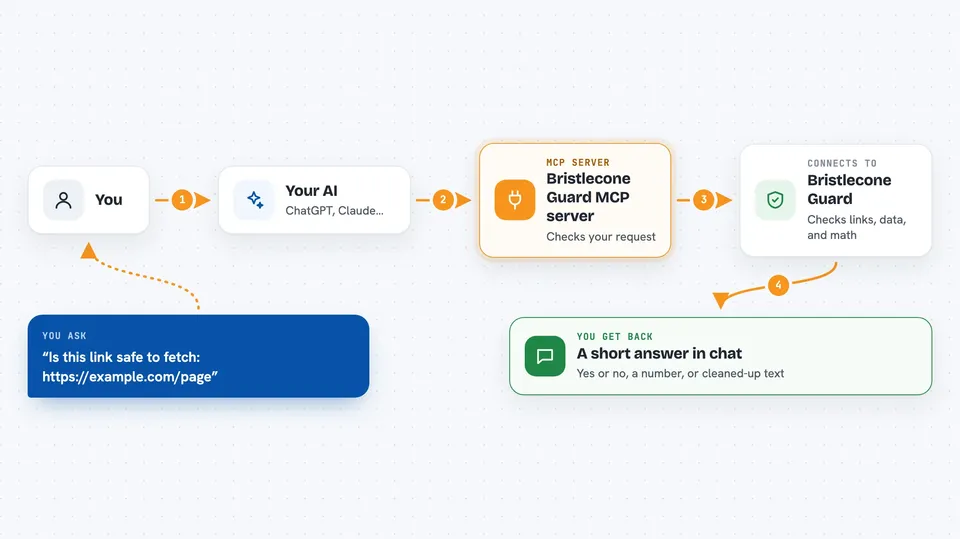
You ask your AI something, like whether a web link is safe to fetch or whether a chunk of data follows the rules you set. Your AI passes that request to Bristlecone Guard through this connection. Bristlecone Guard does the check on its own servers, in a locked-down way, and sends back a result. Your AI then explains that result to you in the chat, in plain words. You never have to touch the technical parts yourself.
 Click to zoom
What you can do with it
- Check whether a web address is safe to fetch before your AI visits it
- Fix broken or unfinished JSON text that an AI wrote
- Run a math or true/false expression and get a reliable answer
- Pull clean readable text out of a public web page
- Split a long piece of text into smaller pieces with some overlap
- Check that a set of data has all the fields and types you expect
Try asking your AI
- “Is this link safe to fetch: https://example.com/page”
- “Fix this broken JSON for me: {name: 'Sam', age: 34,”
- “What is 18 percent of 2450 plus 12”
- “Pull the main text from https://example.com/article”
- “Check that this data has a name field that is text and an age field that is a number”
What it gives back to you
You get back short answers in the chat: a yes or no on link safety, a cleaned-up version of your JSON, a number from a calculation, or a tidy block of text from a web page. For data checks, it tells you which fields passed and which did not. Everything shows up as normal chat text you can copy and reuse.
Before you start
What you need
- The Claude desktop app or another AI tool that supports MCP
- An internet connection
- An API key from Bristlecone if you use a paid or metered plan (a kind of password for apps)
Good to know
It can fetch public web pages and check links on your behalf, so avoid sending private addresses or sensitive data if you are not sure how the service handles them.
Install it with your AI
Add Bristlecone Guard MCP server to your AI, no technical skills needed
You don't install anything by hand. You copy one prompt, paste it into an AI that can work on your computer, and it checks, installs and connects the server for you, asking you when it needs something.
Sign in to get the install prompt
Members get a ready-made prompt that lets the Claude desktop app check Bristlecone Guard MCP server, install it and connect it for them, step by step. You don't need any technical skills: you copy, paste and answer a few questions. Your connected AI can also find and install any of the 4,361 MCP servers here for you.
Who it's for
People who use AI to process data, check links, or clean up text and want a second pair of eyes before trusting the output.



