
MCP server · Research
LastSearch MCP server
by BrowseAI-HQ
Lets your AI search the web and give you answers with real sources and a confidence score.
LastSearch is a helper that lets your AI assistant search the web and answer questions using real pages, not guesses. Every answer comes with links to the sources it used and a confidence score. It is handy for anyone who needs to check facts, compare options, or gather research without opening twenty browser tabs.
What is an MCP server? The 30-second version
On its own, your AI can only chat with you using what it already learned. An MCP server is a small helper program that gives your AI a new skill or a connection to another service. This one connects your AI to LastSearch, a web research service. Once connected, your AI can look things up on the live web and bring back answers with sources when you ask.
What this MCP server does
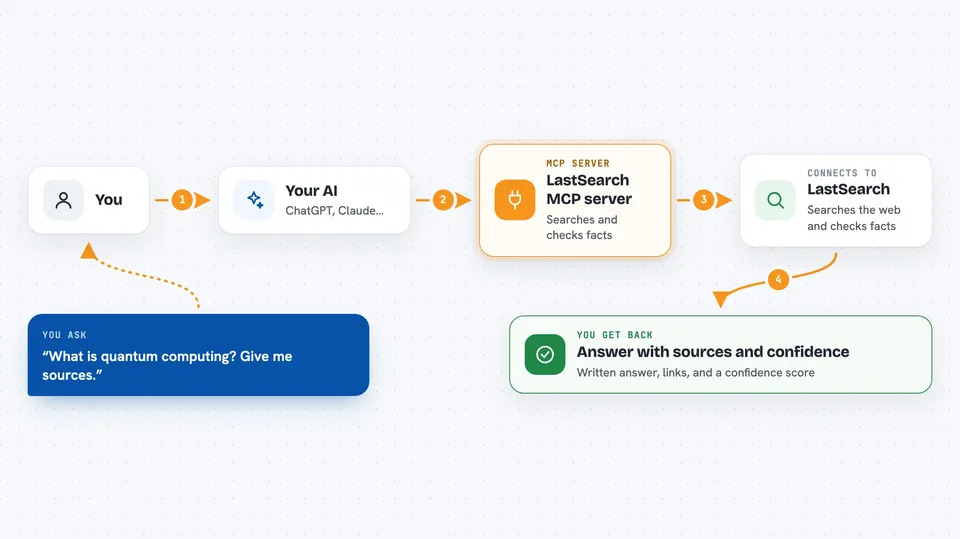
You ask your AI a question in plain words. Your AI passes that question to the LastSearch helper. The helper searches the web, reads the pages it finds, and checks each claim against the actual text on those pages. Then it hands your AI a written answer with links to the sources and a confidence score, and your AI shows it to you in the chat.
 Click to zoom
What you can do with it
- Search the web and get answers with cited sources
- Check whether a claim is supported by real pages
- Compare two things side by side using evidence
- Run a deeper research pass on a tricky question
- See a confidence score for each answer
- Keep a research session that remembers earlier findings
- Rate an answer as good or bad to help it improve
Try asking your AI
- “What is quantum computing? Give me sources.”
- “Compare CRISPR approaches for sickle cell disease.”
- “Is it true that coffee stunts your growth? Check the evidence.”
- “Research the current state of solid-state batteries and cite your sources.”
What it gives back to you
You get a written answer in the chat, followed by a list of the sources it used with their titles and links. Each answer comes with a confidence score, and claims are marked as verified or weak. In deeper modes you also see the steps the research took and any contradictions it found.
Before you start
What you need
- A free LastSearch API key from lastsearch.ai/dashboard (a kind of password for apps)
- Node.js installed if you run it with npx
- The Claude desktop app or another tool that supports MCP servers
Good to know
It reads public web pages and sends your questions to the LastSearch service, so avoid pasting private or confidential text into your queries.
Install it with your AI
Add LastSearch MCP server to your AI, no technical skills needed
You don't install anything by hand. You copy one prompt, paste it into an AI that can work on your computer, and it checks, installs and connects the server for you, asking you when it needs something.
Sign in to get the install prompt
Members get a ready-made prompt that lets the Claude desktop app check LastSearch MCP server, install it and connect it for them, step by step. You don't need any technical skills: you copy, paste and answer a few questions. Your connected AI can also find and install any of the 4,361 MCP servers here for you.
Who it's for
Anyone who does research, fact-checking, or writing and wants answers they can actually verify.





