MCP server · Research
Maigret MCP server
by BurtTheCoder
Let your AI look up a username across hundreds of public sites and analyze profile URLs for you.

This is a small helper that connects your AI assistant to Maigret, a free tool that checks where a username appears across public websites. It is handy if you do research, verify identities, or check your own online footprint. You ask in plain words, and the helper runs the search and hands you a report.
What is an MCP server? The 30-second version
On its own, your AI can only chat with you. An MCP server is a small helper program that gives your AI a new skill or a connection to another service. This one connects your AI to Maigret, a public search tool. Once it is set up, your AI can run Maigret searches for you whenever you ask, and bring the results back into the chat.
What this MCP server does
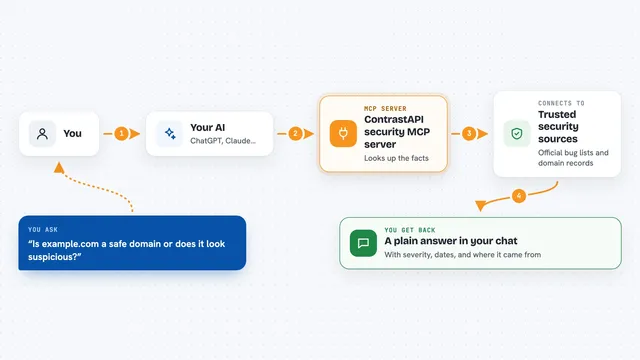
You ask your AI something like: check where the username jane_doe appears online. The AI passes that request to this helper. The helper runs Maigret inside Docker, which checks hundreds of public sites for that username. When it finishes, it saves a report file and tells your AI what it found. Your AI then shows you the summary and points you to the report.
 Click to zoom
What you can do with it
- Search a username across hundreds of public sites
- Analyze a profile URL and look for related usernames
- Save results as txt, html, pdf, json, csv, or xmind
- Filter the search by site tags such as photo or dating
- Run a broader search using all available sites instead of the top 500
Try asking your AI
- “Search for the username jane_doe and give me an HTML report”
- “Check where the username mike_92 appears, only on photo sites”
- “Analyze this profile URL and tell me what usernames show up: https://example.com/profile”
- “Run a full search for the username test_user123 using all sites and save it as JSON”
What it gives back to you
You get a short summary in the chat plus a saved report file. The report lists the sites where the username was found, with links and basic details. Depending on the format you pick, it can be a text file, a web page, a PDF, a spreadsheet, or a JSON file. The helper tells you where the file was saved so you can open it.
Before you start
What you need
- Docker installed and running (Docker Desktop on Mac or Windows)
- Node.js version 18 or newer
- A folder on your computer where reports can be saved
- The Claude desktop app or another app that supports MCP servers
Good to know
This tool only looks at public information, but you should still respect privacy laws, site terms, and the people you search for, and be aware that some sites may block or rate-limit automated searches.
Install it with your AI
Add Maigret MCP server to your AI, no technical skills needed
You don't install anything by hand. You copy one prompt, paste it into an AI that can work on your computer, and it checks, installs and connects the server for you, asking you when it needs something.
Sign in to get the install prompt
Members get a ready-made prompt that lets the Claude desktop app check Maigret MCP server, install it and connect it for them, step by step. You don't need any technical skills: you copy, paste and answer a few questions. Your connected AI can also find and install any of the 4,361 MCP servers here for you.
Who it's for
People who do light online research, verify identities, or check their own public footprint, such as journalists, recruiters, and security-minded office workers.