MCP server · Security
NIST Vulnerability Database MCP server
Lets your AI look up known software security flaws from the official NIST database.

This is a small helper that connects your AI to the NIST National Vulnerability Database, the official public list of known security flaws in software. Once it is set up, you can just ask your AI questions in normal words and it will go and look up the answers for you. It is handy for anyone who has to keep an eye on security news, like IT staff, system admins, or people who write security reports.
What is an MCP server? The 30-second version
On its own, your AI can only chat with you using what it already learned. An MCP server is a small helper program that gives your AI a new skill or a connection to another service. This one connects your AI to the NIST vulnerability database, so when you ask about a security flaw, your AI can go and fetch the real, current details instead of guessing. You do not need to know how it works inside; you just ask, and it does the looking up.
What this MCP server does
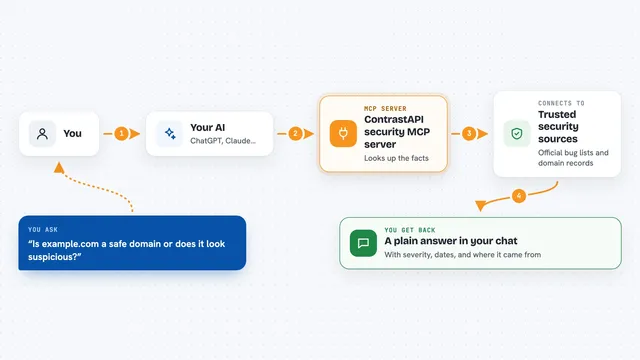
You ask your AI something like which security flaws were found in a certain product, or what a specific flaw is about. Your AI passes that question to this helper. The helper then talks to the official NIST database over the internet and pulls back the matching records. It tidies the results into readable text, newest first, and hands them back to your AI. Your AI then shows you the answer in the chat, in plain language.
 Click to zoom
What you can do with it
- Search for security flaws by keyword, like a product or a type of bug
- Look up the full details of one specific flaw by its ID
- Find flaws that affect a particular piece of software
- See which flaws were recently added to the US government's known exploited list
- Check when a flaw's record was last changed
- Filter results by a date range or by the last few days
- Ask about time phrases like this year or last month and get the right dates
Try asking your AI
- “What security flaws were reported in Microsoft Exchange in the last 7 days?”
- “Tell me about CVE-2024-21413.”
- “Which flaws were added to the known exploited list between January and March 2024?”
- “Show me recent buffer overflow flaws from this year.”
What it gives back to you
You get back a list of matching flaws with their ID, a short description, and the date they were published, sorted with the newest first. If you asked about one specific flaw, you get its full details and links to more information. The results come back as tidy text in the chat, so you can read them or copy them into a report. If nothing matches, it tells you that clearly instead of making something up.
Before you start
What you need
- Docker installed on your computer (the recommended way to run it)
- An MCP-compatible app, such as the Claude desktop app
- An internet connection, since it reads from the public NIST website
Good to know
The information comes straight from a public database and can be technical or incomplete, so double-check anything important before you act on it.
Install it with your AI
Add NIST Vulnerability Database MCP server to your AI, no technical skills needed
You don't install anything by hand. You copy one prompt, paste it into an AI that can work on your computer, and it checks, installs and connects the server for you, asking you when it needs something.
Sign in to get the install prompt
Members get a ready-made prompt that lets the Claude desktop app check NIST Vulnerability Database MCP server, install it and connect it for them, step by step. You don't need any technical skills: you copy, paste and answer a few questions. Your connected AI can also find and install any of the 4,361 MCP servers here for you.
Who it's for
IT staff, system administrators, and anyone who tracks software security issues and wants quick answers without browsing the NIST website by hand.