MCP server · Security
DataNexus MCP server
by datanexusmcp
Look up security risks, licences, nonprofits, patents, and domains straight from your AI chat.

DataNexus is a helper that connects your AI to a big pile of public records: security flaws in software packages, licence rules, nonprofit tax filings, patents, government contracts, and domain details. It is handy if you need to check facts about companies, packages, or organisations without hopping between ten different websites. You just ask in plain words, and the AI pulls the answer back into the chat.
What is an MCP server? The 30-second version
On its own, your AI can only chat with you using what it already learned. An MCP server is a small helper program that gives your AI a new skill or a connection to an outside service. This one connects your AI to DataNexus, which gathers verified public data from places like NVD, OSV, and CISA. Once connected, your AI can look things up there for you and bring the results back as a readable answer.
What this MCP server does
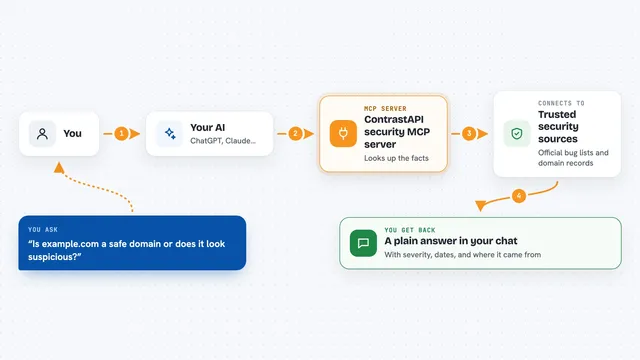
You ask your AI a question, like whether a software package has known security problems or whether a charity is in good financial shape. The AI sends that request to the DataNexus helper, which then looks up the official public source, such as the CVE database for security flaws or the IRS filings for nonprofits. DataNexus gathers the details, checks them against its sources, and hands back a tidy summary. Your AI shows you that summary in the chat, often with a clear verdict like SHIP, CAUTION, or BLOCK. You never have to visit the source websites yourself.
 Click to zoom
What you can do with it
- Check a software package for known security flaws and get a risk verdict
- Compare software licences to see if they clash for commercial use
- Look up a US nonprofit's tax filings, revenue, and executive pay
- Check whether a company is banned from federal contracts
- Find patent records by number, keyword, or inventor name
- Inspect a domain's DNS, email security, and SSL certificates
- Search open government contract opportunities
Try asking your AI
- “Get the full risk summary for CVE-2021-44228 including CVSS, CISA KEV status, and patch availability”
- “Check the licences of requests, flask, and numpy and tell me if they are compatible for a commercial product”
- “Find education nonprofits in California and show me one with its 5-year revenue trend”
- “Check whether example.com has proper SPF and DMARC email security set up”
What it gives back to you
You get back plain answers in the chat: lists of packages with their flaws, a verdict like SHIP or BLOCK, revenue numbers for a nonprofit, or details about a domain. Some answers come as short summaries with severity labels and links to the source. Others are tables or bullet lists you can read at a glance. Everything is formatted so you can copy it into a report if you need to.
Before you start
What you need
- An MCP client like Claude Desktop or another tool that supports MCP
- Nothing else for the free anonymous tier (100 calls a month)
- An email address if you want a free API key for 500 calls a month
Good to know
Some tools can create or revoke API keys and register persistent watches, so double-check before you confirm those actions.
Install it with your AI
Add DataNexus MCP server to your AI, no technical skills needed
You don't install anything by hand. You copy one prompt, paste it into an AI that can work on your computer, and it checks, installs and connects the server for you, asking you when it needs something.
Sign in to get the install prompt
Members get a ready-made prompt that lets the Claude desktop app check DataNexus MCP server, install it and connect it for them, step by step. You don't need any technical skills: you copy, paste and answer a few questions. Your connected AI can also find and install any of the 4,361 MCP servers here for you.
Who it's for
Security engineers, compliance analysts, nonprofit researchers, and anyone doing due diligence on packages, companies, or organisations.