MCP server · Research
Fetch Guard MCP server
by Erodenn
Let your AI read web pages safely, with hidden text and trick instructions stripped out first.
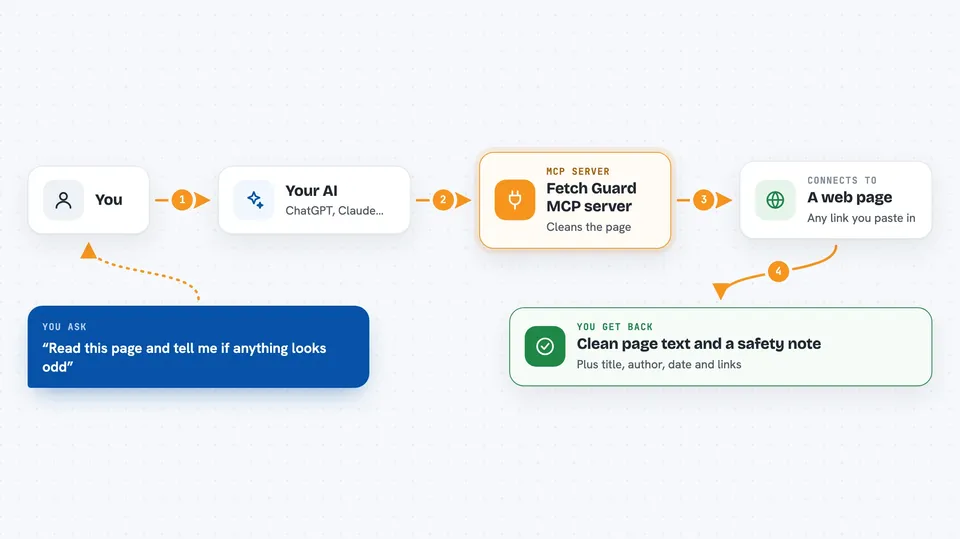
Fetch Guard is a small helper that lets your AI open a web page and read it as clean text instead of messy code. It also checks the page for sneaky instructions that someone might have hidden inside it. It is handy if you often ask your AI to look things up online and want it to be careful about what it reads.
What is an MCP server? The 30-second version
On its own, your AI can only chat with you. It cannot open a web page by itself. An MCP server is a small helper program that gives your AI a new skill. Fetch Guard is that helper for reading web pages: you ask your AI to look at a link, and the helper quietly fetches the page, cleans it up, and hands back safe text for the AI to read.
What this MCP server does
You give your AI a web address. The AI passes it to Fetch Guard. Fetch Guard downloads the page, strips out hidden text, invisible characters, and anything meant to trick the AI, then turns what is left into neat markdown. It also grabs the page title, author, and date, and lists the outside links it found. You get a tidy summary back in the chat, along with a note if anything risky was spotted.
 Click to zoom
What you can do with it
- Read any web page as clean text instead of raw HTML
- Check a page for hidden or trick instructions before trusting it
- Pull out the title, author, date, and description of an article
- List the outside websites a page links to
- Read feeds, JSON, CSV, and plain text files as tidy output
- Fetch pages that only appear after JavaScript runs (with an extra install)
- Use a saved token to read private pages like GitHub's API
Try asking your AI
- “Fetch this article and give me a short summary: https://example.com/news/story”
- “Read this page and tell me if it contains anything suspicious: https://someblog.com/post”
- “Get the title, author, and date from this link: https://example.com/report”
- “What outside websites does this page link to? https://example.com/resources”
What it gives back to you
You get a short status line first, like OK or a warning if something risky was found. Then the page text as clean markdown, followed by details like title, author, date, and description. It also lists the outside links it found and, if anything suspicious was spotted, a short note about what it was.
Before you start
What you need
- Python 3.10 or newer installed on your computer
- The pip tool (comes with Python)
- An MCP client like Claude Desktop, Claude Code, or Cursor
Good to know
It reads whatever is at the link you give it, so avoid pointing it at private or sensitive pages unless you are fine with that content being read.
Install it with your AI
Add Fetch Guard MCP server to your AI, no technical skills needed
You don't install anything by hand. You copy one prompt, paste it into an AI that can work on your computer, and it checks, installs and connects the server for you, asking you when it needs something.
Sign in to get the install prompt
Members get a ready-made prompt that lets the Claude desktop app check Fetch Guard MCP server, install it and connect it for them, step by step. You don't need any technical skills: you copy, paste and answer a few questions. Your connected AI can also find and install any of the 4,361 MCP servers here for you.
Who it's for
Anyone who asks their AI to read web pages, especially people who want a safety check before trusting what a page says.