MCP server · Security
OSINT Toolbox MCP server
by renkagod
Lets your AI run public-records searches like username, email, domain and phone lookups on your own computer.
This is a helper that connects your AI assistant to a box of public-information search tools. You ask a question in plain words, and the AI picks the right tool, runs it on your machine, and reads the results back to you. It is handy for people who need to check what is publicly visible about a domain, an email address, a username or a phone number.
What is an MCP server? The 30-second version
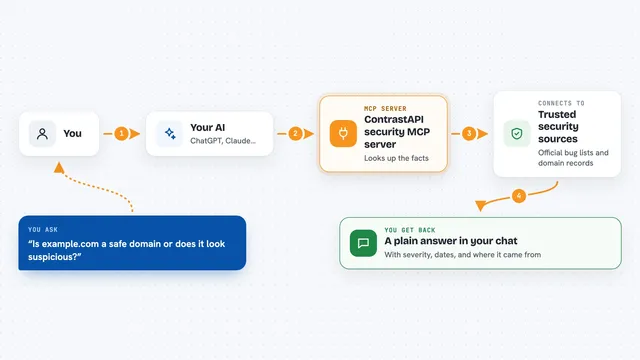
On its own, your AI can only chat. An MCP server is a small helper program that gives your AI a new skill or a connection to something else. This one connects your AI to a set of public-information search tools that run on your own computer. So when you ask a question, the AI can actually go and look things up for you instead of guessing.
What this MCP server does
You type a question like which sites have an account for this email address. Your AI reads the question, picks the right tool from the box, and runs it on your machine. The tool queries public sources directly, like websites, public records and certificate logs. The AI then reads the output and explains it back to you in the chat. Some searches finish in seconds, while a full scan can take up to half an hour.
What you can do with it
- Find which websites have an account for a username or email address
- Look up who owns a domain, when it expires, and its name servers
- Find subdomains and email addresses that are publicly linked to a domain
- Spot lookalike domains that could be used to impersonate a brand
- Check what a website looked like in the past using archived snapshots
- Read the hidden details inside a photo, like GPS location and camera model
- See which of these tools are installed and which are missing
Try asking your AI
- “Which sites have an account registered to jane.doe@example.com?”
- “Search for the username jdoe_1987 and tell me where it appears”
- “What subdomains and email addresses are public for example.com?”
- “Who owns example.com, when does it expire, and how did its homepage look in 2015?”
What it gives back to you
You get a written answer in the chat, often with a list of sites, domains, records or dates. For example, you might see a list of websites where a username was found, or a table of domain details like owner and expiry date. For a photo, you get the metadata fields it contains. Long results are trimmed by default so the chat stays readable.
Before you start
What you need
- Docker, or the uv tool installed on your computer
- A desktop AI client that supports MCP servers, like Claude Desktop or Cursor
- For some tools, a one-time login (GHunt) or a separate download (SpiderFoot, Blackbird)
Good to know
These searches look up public information, but they can reveal personal details about real people, so use them only where you have a legitimate reason and follow your organization's rules.
Install it with your AI
Add OSINT Toolbox MCP server to your AI, no technical skills needed
You don't install anything by hand. You copy one prompt, paste it into an AI that can work on your computer, and it checks, installs and connects the server for you, asking you when it needs something.
Sign in to get the install prompt
Members get a ready-made prompt that lets the Claude desktop app check OSINT Toolbox MCP server, install it and connect it for them, step by step. You don't need any technical skills: you copy, paste and answer a few questions. Your connected AI can also find and install any of the 4,609 MCP servers here for you.
Who it's for
People who need to check public information about domains, emails, usernames or phone numbers, like security reviewers, IT staff, journalists or anyone doing due diligence.