
MCP server · Productivity
BOSS Zhipin MCP server
Let your AI search BOSS Zhipin jobs, filter by benefits, and help with recruiter messages and resumes.
This is a helper for BOSS Zhipin (zhipin), a Chinese job platform. It lets your AI search jobs, filter them by benefits, and help with messages and resumes. It is handy if you are job hunting or hiring on BOSS Zhipin and want your AI to do the clicking and reading for you.
What is an MCP server? The 30-second version
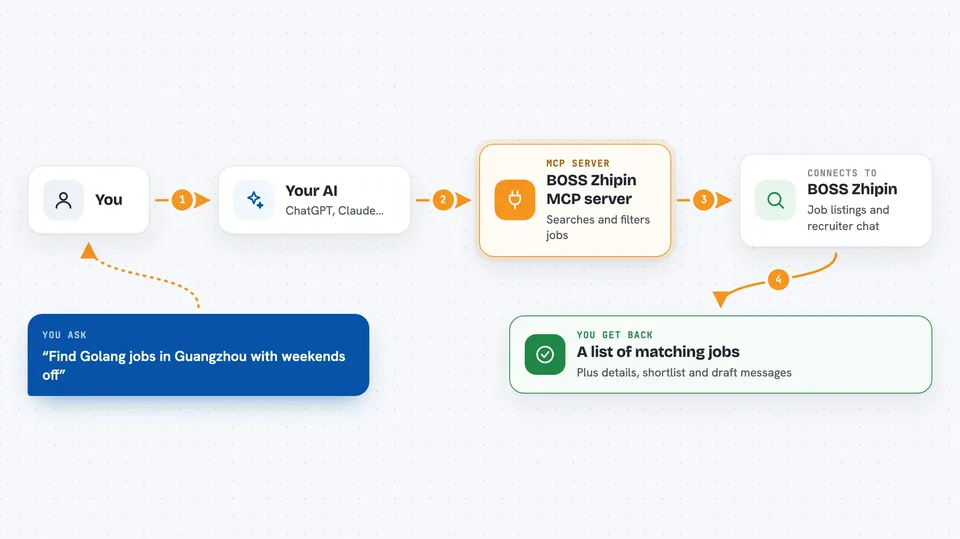
On its own, your AI can only chat. An MCP server is a small helper program that gives your AI a new skill or a connection to an app. This one connects your AI to BOSS Zhipin, so it can look up jobs, check details, and help with messages when you ask. You stay in charge; the AI just does the legwork.
What this MCP server does
You ask your AI something like find Golang jobs in Guangzhou with weekends off. The AI uses this helper, which talks to BOSS Zhipin for you. It searches, filters by the benefits you want, and brings back a list. It can also save jobs to a local shortlist, compare them, and help with resume and message drafts. Everything comes back as a clean answer in your chat.
 Click to zoom
What you can do with it
- Search jobs by keyword and city
- Filter jobs by benefits like weekends off or insurance
- View job details and save them to a local shortlist
- Compare saved jobs offline by tag
- Get funnel stats on your job search
- Analyze a job description and polish your resume
- Draft recruiter messages and replies
Try asking your AI
- “Find Python jobs in Shanghai with weekends off and five insurances”
- “Show me the details for job number 3 from the last search”
- “Add this job to my shortlist with the tag backend”
- “Help me polish my resume for this job description”
What it gives back to you
You get back lists of jobs, job details, shortlist comparisons, and simple stats. When you ask for resume or message help, you get draft text you can edit. Changes like adding to your shortlist happen locally on your computer. The chat shows the results as plain text or tables.
Before you start
What you need
- Python 3.10 or newer
- The uv tool (a way to install Python programs)
- A BOSS Zhipin account (you log in yourself)
- The Claude desktop app or another app that supports MCP
Good to know
It can send messages and change your local shortlist, and it uses your BOSS Zhipin login, so be careful with bulk actions and keep your account safe.
Install it with your AI
Add BOSS Zhipin MCP server to your AI, no technical skills needed
You don't install anything by hand. You copy one prompt, paste it into an AI that can work on your computer, and it checks, installs and connects the server for you, asking you when it needs something.
Sign in to get the install prompt
Members get a ready-made prompt that lets the Claude desktop app check BOSS Zhipin MCP server, install it and connect it for them, step by step. You don't need any technical skills: you copy, paste and answer a few questions. Your connected AI can also find and install any of the 4,361 MCP servers here for you.
Who it's for
Job seekers and recruiters who use BOSS Zhipin and want their AI to help with searching, filtering, and messaging.





