
MCP server · Productivity · official
HumanPen MCP server
by humanpen · official
Rewrite flagged parts of a Word or PowerPoint file so it reads more human, keeping your formatting.
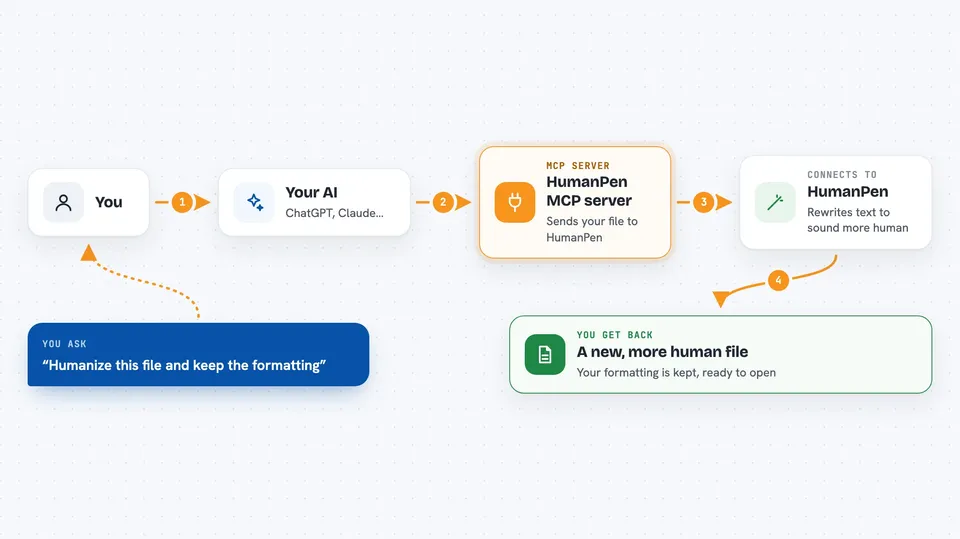
HumanPen is a service that rewrites text so it sounds less like it came from an AI, and this server lets your AI assistant use it for you. You hand it a .docx or .pptx file, and it edits the file in place while keeping your tables, images, citations and formulas. It is handy if you write papers, reports or slides and want them to read more naturally.
What is an MCP server? The 30-second version
On its own, your AI can only chat with you. An MCP server is a small helper program that gives your AI a new skill or a connection to another service. This one connects your AI to HumanPen, a document humanizer. Once it is set up, you can ask your AI to humanize a file and it will send the file to HumanPen for you and bring the result back.
What this MCP server does
You ask your AI to humanize a document, and you point it at a file on your computer. Your AI passes that request to this helper, which uploads the file to HumanPen's service. HumanPen rewrites the text and sends back a new file. Your AI then tells you the job is done and where the result is, so you can open it. If you have a Turnitin or iThenticate report, you can give that too, and only the flagged passages get rewritten.
 Click to zoom
What you can do with it
- Humanize a whole Word or PowerPoint file and keep the formatting
- Rewrite only the passages a Turnitin or iThenticate report flagged
- Re-humanize a finished job for free if it is still flagged
- Convert citations to APA 7, MLA 9, Harvard, Chicago, IEEE and more
- Shorten a document to a target word count
- Translate a document between 12 languages
- Check your remaining credits
Try asking your AI
- “Humanize this file and keep the formatting: /Users/me/paper.docx”
- “Here is my Turnitin report, only rewrite the flagged parts of my thesis”
- “Convert the citations in my essay to APA 7”
- “Shorten my report to about 1500 words”
What it gives back to you
You get back a short message in the chat telling you the job started or finished, plus a job id you can ask about later. When the job is done, your AI can download the result file to your computer. For a detection report, it gives you the overall AI percentage and the flagged passages as text.
Before you start
What you need
- A HumanPen account (sign up at humanpen.net; new accounts get free credits)
- A HumanPen API key from your account settings (a kind of password for apps)
- Node.js installed on your computer so the npx command can run
Good to know
Each humanize, citation, condense or translate job spends credits, and your file is uploaded to HumanPen's servers and kept there for about 7 days.
Install it with your AI
Add HumanPen MCP server to your AI, no technical skills needed
You don't install anything by hand. You copy one prompt, paste it into an AI that can work on your computer, and it checks, installs and connects the server for you, asking you when it needs something.
Sign in to get the install prompt
Members get a ready-made prompt that lets the Claude desktop app check HumanPen MCP server, install it and connect it for them, step by step. You don't need any technical skills: you copy, paste and answer a few questions. Your connected AI can also find and install any of the 4,361 MCP servers here for you.
Who it's for
Students, researchers, writers and anyone who edits long Word or PowerPoint documents and wants them to read more naturally.





