MCP server · Analytics
PlaceRoot MCP server
by chuofringer
Lets your AI answer map questions: what's nearby, what's in a neighborhood, and how to get there.
PlaceRoot is a helper that gives your AI assistant a sense of place. Once it is connected, you can ask things like what is around a certain address, what a neighborhood is like, or how long a walk takes, and get a real answer instead of a guess. It is handy for anyone who plans trips, compares areas, or just wants to know what is nearby.
What is an MCP server? The 30-second version
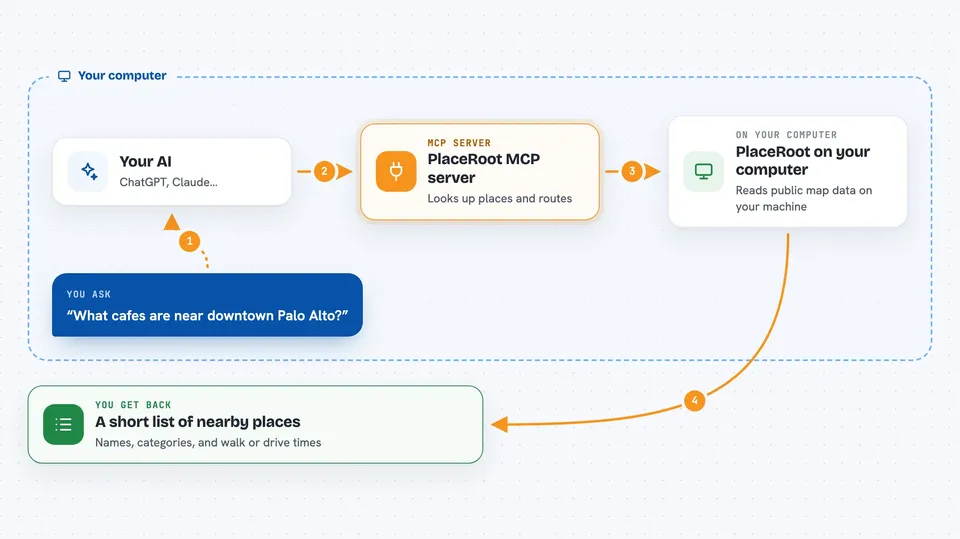
On its own, your AI can only chat with you using what it already learned. An MCP server is a small helper program that gives your AI one new skill or one new connection. PlaceRoot is that helper for maps: it connects your AI to Overture Maps, a big public collection of map data. When you ask a location question, your AI passes it to PlaceRoot, PlaceRoot looks it up in the map data, and hands the answer back to your AI to tell you.
What this MCP server does
You ask your AI a question about places, like what is near a spot or how far a walk is. Your AI sends that question to PlaceRoot on your computer. PlaceRoot reads the public Overture Maps data and works out the answer, including real street routes when you ask for travel times. It sends back a short, tidy result, not a giant pile of raw map data. Your AI then explains it to you in the chat.
 Click to zoom
What you can do with it
- Find places near a point or inside a named neighborhood
- Look up the coordinates of an address or name
- Summarize what kinds of places make up an area
- Compare two neighborhoods side by side
- Work out walking, cycling, or driving routes between places
- Show what you can reach within a set number of minutes
- Draw a result on an interactive map
Try asking your AI
- “What cafes are near downtown Palo Alto?”
- “Compare these two neighborhoods for a bike shop.”
- “How long does it take to walk from my hotel to the museum?”
- “What can I reach in 15 minutes on foot from this address?”
What it gives back to you
You get short, ranked answers in the chat, like a list of nearby places with names and categories, or a summary of what an area contains. For routes, you get distances and travel times, not just a straight line. For maps, you get an interactive map you can open. Everything is kept small so it fits neatly in the conversation.
Before you start
What you need
- An MCP client such as Claude Desktop, Claude Code, or Cursor
- uvx (comes with the uv tool) or npx (comes with Node.js) to run it
Good to know
The map data is open and honest about its limits: it has no live traffic, no opening hours, and no ratings or photos, so treat those details as missing rather than wrong.
Install it with your AI
Add PlaceRoot MCP server to your AI, no technical skills needed
You don't install anything by hand. You copy one prompt, paste it into an AI that can work on your computer, and it checks, installs and connects the server for you, asking you when it needs something.
Sign in to get the install prompt
Members get a ready-made prompt that lets the Claude desktop app check PlaceRoot MCP server, install it and connect it for them, step by step. You don't need any technical skills: you copy, paste and answer a few questions. Your connected AI can also find and install any of the 4,361 MCP servers here for you.
Who it's for
People who plan trips, compare neighborhoods, run errands, or do local research, and want their AI to answer map questions without a paid map service.