MCP server · Analytics · official
Swath MCP server
by vibecodebeast · official
Ask your AI about radar-verified hail and wind storms, and get storm history for any US address.
Swath is a service that tracks hail and damaging wind storms across the continental US, using radar data. This MCP server connects your AI assistant to Swath, so you can ask about storms and properties in plain language. It is handy for insurance agents, roofers, property managers, and anyone who needs to know what weather hit a specific address.
What is an MCP server? The 30-second version
On its own, your AI can only chat with you. An MCP server is a small helper program that gives your AI a new skill or a connection to an outside service. This one connects your AI to Swath, a storm intelligence service. Once connected, your AI can look up storms and property history for you when you ask, instead of you having to visit a website and search by hand.
What this MCP server does
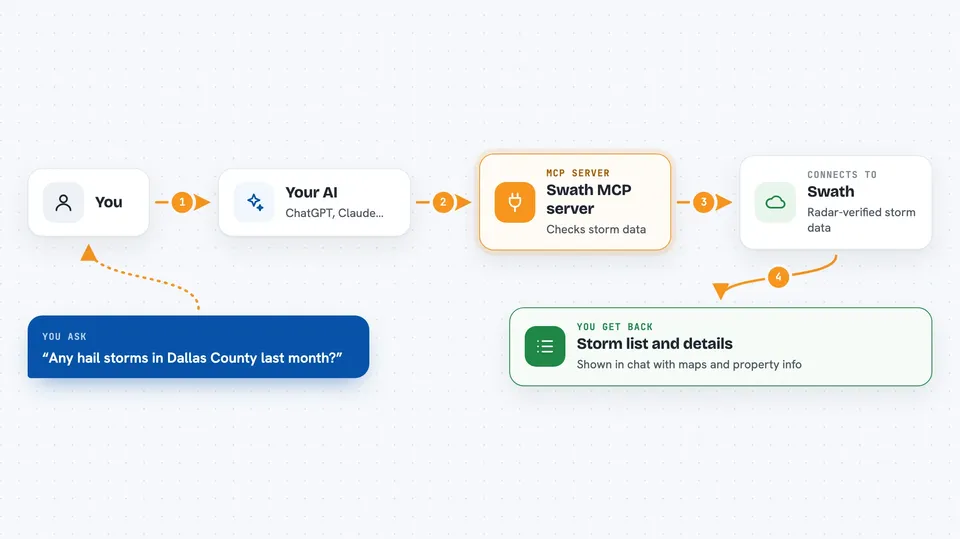
You ask your AI something like which hail storms hit a certain area last month. Your AI passes that request to this helper, which talks to the Swath service. Swath checks its radar-verified storm data and sends back the matching storms, or the properties under them. Your AI then shows you the answer in the chat, in plain words or as a list.
 Click to zoom
What you can do with it
- Find radar-verified hail and wind storms for an area and time period
- Look up the storm history and property details for one address
- See every property under a storm swath, with roof age and assessed value
- Check how many credits a report will cost before running it
- Email yourself a report summary
- Set up a monitor that alerts you when a new storm is verified in a territory
- See a map image of a storm swath
- Check how many credits you have used and how many remain
Try asking your AI
- “Were there any hail storms over 1 inch in Dallas County in the last 30 days?”
- “Give me the storm history for 123 Main Street, Norman, Oklahoma.”
- “Show me every property under that hail swath with roof age and owner-occupancy.”
- “How much will this report cost in credits before I run it?”
- “Set up a monitor for my territory and email me when a new storm is verified.”
What it gives back to you
You get back lists of storms or properties, short summaries, and answers to your questions, all shown in the chat. Reports can include details like roof age, owner-occupancy, and assessed value for each property. You can also ask for a map image of the storm swath. If you set up a monitor, alerts arrive by email or webhook when a new storm is verified.
Before you start
What you need
- A Swath API key (a kind of password for apps; you can get a free one with 100 credits at swathapi.com)
- The Claude desktop app or another MCP client, if you install it yourself
- Nothing extra if you use the hosted connector at swathapi.com/mcp
Good to know
Reports cost credits, so check the quote before running one, and monitors can send you email or webhook alerts.
Install it with your AI
Add Swath MCP server to your AI, no technical skills needed
You don't install anything by hand. You copy one prompt, paste it into an AI that can work on your computer, and it checks, installs and connects the server for you, asking you when it needs something.
Sign in to get the install prompt
Members get a ready-made prompt that lets the Claude desktop app check Swath MCP server, install it and connect it for them, step by step. You don't need any technical skills: you copy, paste and answer a few questions. Your connected AI can also find and install any of the 4,609 MCP servers here for you.
Who it's for
Insurance agents, roofers, property managers, and anyone who needs to check storm history for US addresses.