MCP server · Research
Sovereign AI Blog MCP server
by cipherfoxie
Lets your AI search and read a blog about running AI on your own NVIDIA DGX Spark hardware.
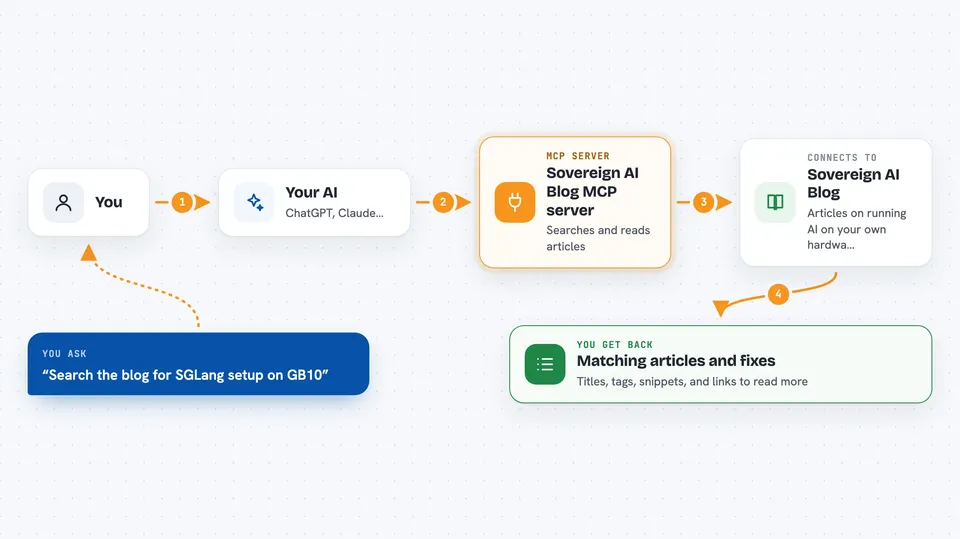
This is a small helper that connects your AI assistant to the Sovereign AI Blog, a hands-on diary of running AI models on your own NVIDIA DGX Spark machine. It is handy if you tinker with self-hosted AI and want your assistant to pull real notes instead of making things up. You do not need to install anything: it lives online and you just point your AI at it.
What is an MCP server? The 30-second version
On its own, your AI can only chat with you using what it already learned. An MCP server is a small helper program that gives your AI one extra skill or a connection to a place with information. This one connects your AI to the Sovereign AI Blog, a public site full of articles about self-hosted AI. Once connected, your AI can look things up there and bring answers back to you when you ask.
What this MCP server does
You ask your AI a question about running AI on your own hardware, like a DGX Spark. Your AI sends that question to this helper. The helper searches the blog and reads the matching articles. Then your AI shows you the useful parts in the chat, with the article names so you can read more. If you paste an error message, it can also look for known fixes.
 Click to zoom
What you can do with it
- Search the blog for articles about a topic you name
- List the newest articles or browse by tag
- See all topic tags with how many articles each one has
- Open a full article and read it in the chat
- Paste an SGLang error and get matching fixes with links
- Filter results by tag or sort them by date or quality
Try asking your AI
- “Search the Sovereign AI blog for SGLang setup on GB10”
- “List the newest articles about quantization”
- “Show me the tags with the most articles”
- “I got this SGLang error, what does the blog say about it: CUDA out of memory on SM121A”
What it gives back to you
You get back a short list of matching articles with their titles, tags, a quality score, and a snippet of text. If you open one, you get the full article text in the chat. For error messages, you get the fixes the blog has collected, each with a link to the article it came from. Everything is read-only, so nothing on the blog changes.
Before you start
What you need
- An AI app that can connect to MCP servers, like Claude Code, Cline, or Continue
- The server address https://mcp.sovgrid.org/self-hosted-ai
Good to know
It only reads a public blog, so it cannot change anything, but the blog is a personal engineering log and its advice may not fit your exact setup.
Install it with your AI
Add Sovereign AI Blog MCP server to your AI, no technical skills needed
You don't install anything by hand. You copy one prompt, paste it into an AI that can work on your computer, and it checks, installs and connects the server for you, asking you when it needs something.
Sign in to get the install prompt
Members get a ready-made prompt that lets the Claude desktop app check Sovereign AI Blog MCP server, install it and connect it for them, step by step. You don't need any technical skills: you copy, paste and answer a few questions. Your connected AI can also find and install any of the 4,609 MCP servers here for you.
Who it's for
People who run or debug AI models on their own machines, especially NVIDIA DGX Spark owners and anyone working with SGLang or vLLM on ARM64.