
MCP server · Research
Overtone News MCP server
by CKBrennan
Lets your AI pull live news on any topic and tell you the mood, spikes, and shifting stories behind the headlines.
This is a small helper you connect to your AI so it can look up real news and, more usefully, tell you how that news feels. Instead of just handing you headlines, it can say whether coverage of a topic is angry, hopeful, or calm, what brand new stories are popping up, and where the mood is changing fast. It is handy for anyone who has to keep an eye on a topic, a company, or a market and wants a quick read on what people are actually saying.
What is an MCP server? The 30-second version
On its own, your AI can only chat with you using what it already learned. An MCP server is a small helper program you plug in that gives your AI a new skill or a connection to a service. This one connects your AI to Overtone's news network, so it can look up current articles and analyse their tone for you. You just ask a question in normal words, and your AI uses this helper behind the scenes to fetch the answer.
What this MCP server does
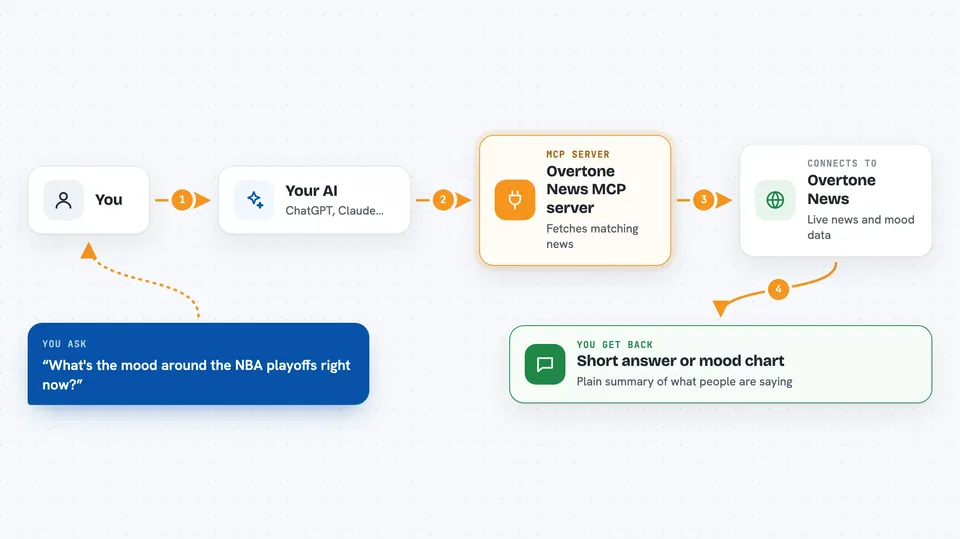
You ask your AI something like what is happening with a topic, or how people feel about it. Your AI passes that question to this helper, which talks to Overtone's news service. The service sends back matching articles along with tags for tone, brand safety, and the concepts mentioned. Your AI then reads all that and writes you a short, plain answer, or shows you a chart if you asked for one over time.
 Click to zoom
What you can do with it
- Find recent articles on any topic you name
- Tell you the overall mood of coverage, like angry, hopeful, or informational
- Spot brand new stories that had no coverage a day or two ago
- Show which topics are changing tone the fastest
- Watch for sudden spikes in anger or fear around something you care about
- Chart how the tone of a story has moved over hours or days
- Filter results to only brand-safe articles
Try asking your AI
- “What's the mood around the NBA playoffs right now?”
- “Anything breaking on the FDA I should know about?”
- “Show me the last week of sentiment on Tesla as a chart”
- “Give me five positive stories about space exploration”
What it gives back to you
You get back a written answer in the chat, usually a short summary of the articles and what their tone is. If you asked for a trend, your AI can draw a simple line chart or sparkline of how the mood changed over time. For spike alerts, you only hear something when there is a real jump worth mentioning. Everything is shown as text or a small chart, not as files.
Before you start
What you need
- A tool that can run MCP servers, like Claude Desktop, Claude Code, Cursor, or Windsurf
- uv installed on your computer (a small free tool that runs Python programs)
- An internet connection
Good to know
Article text comes from outside publishers and could contain sneaky instructions aimed at your AI, so treat what it returns as untrusted and check anything surprising before acting on it.
Install it with your AI
Add Overtone News MCP server to your AI, no technical skills needed
You don't install anything by hand. You copy one prompt, paste it into an AI that can work on your computer, and it checks, installs and connects the server for you, asking you when it needs something.
Sign in to get the install prompt
Members get a ready-made prompt that lets the Claude desktop app check Overtone News MCP server, install it and connect it for them, step by step. You don't need any technical skills: you copy, paste and answer a few questions. Your connected AI can also find and install any of the 4,361 MCP servers here for you.
Who it's for
Anyone who tracks a topic, brand, or market and wants a quick read on how the news feels, like comms teams, analysts, and curious office workers.


