MCP server · Analytics
Clamp Analytics MCP server
by clamp-sh
Ask your AI about your website traffic, top pages, referrers, revenue and errors, and let it build funnels and alerts.
This is a small helper that connects your AI assistant to Clamp Analytics, a web analytics service. Once it is set up, you can ask plain questions about your website traffic in the chat instead of clicking around a dashboard. It is handy for anyone who checks site numbers, like marketers, founders, and product people.
What is an MCP server? The 30-second version
On its own, your AI can only chat with you. An MCP server is a small helper program that gives your AI a new skill or a connection to an app. This one connects your AI to Clamp Analytics, so it can look up your traffic, pages, events, revenue and errors for you. You just ask a question, and the AI uses this helper behind the scenes to fetch the answer.
What this MCP server does
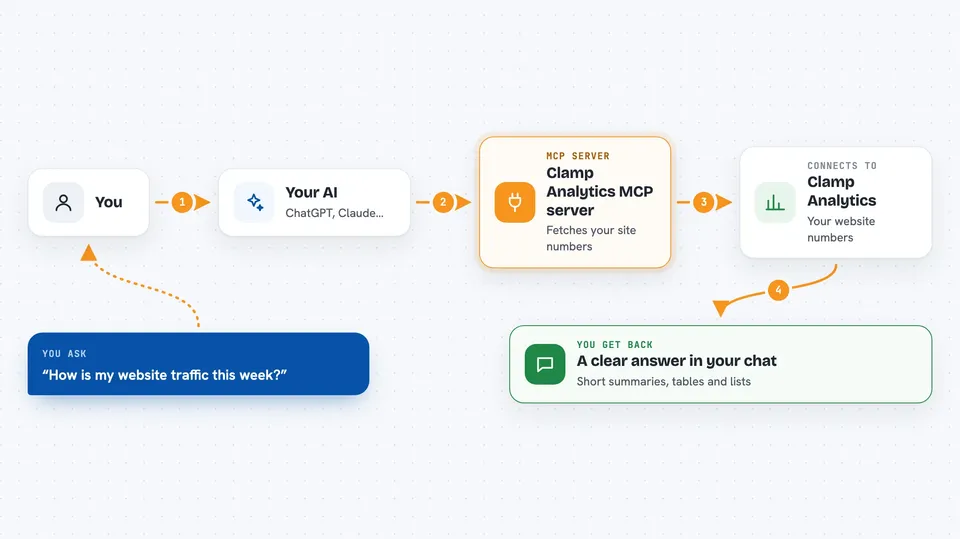
You ask your AI something about your website, like how traffic is doing this week. The AI picks the right action from this helper, and the helper talks to your Clamp Analytics account. Clamp sends the numbers back, and the AI turns them into a clear answer in the chat. Some actions also let the AI create funnels or alerts for you, if your plan supports it.
 Click to zoom
What you can do with it
- Check pageviews, visitors, sessions and bounce rate for any period
- See your top pages, referrers, countries, devices and browsers
- Count custom events like signups and group them by plan
- Look at revenue, customers, orders and retention numbers
- Review recent errors and how often they happen
- Create conversion funnels and metric alerts (on paid plans)
- Run a weekly report or diagnose why traffic changed
Try asking your AI
- “How's my traffic this week?”
- “Which referrers drove the most signups?”
- “Compare US vs Germany conversion this month”
- “Alert me when bounce rate on /pricing goes above 70%”
What it gives back to you
You get answers in the chat, usually as short summaries with numbers, and often as small tables or lists. For example, you might see pageviews and visitors for the week, or a list of top pages with counts. If the AI creates a funnel or alert, it tells you what it set up. Everything stays in the conversation, so you can ask follow-up questions right away.
Before you start
What you need
- A Clamp Analytics account
- An API key from your Clamp dashboard under Settings, API Keys (it starts with sk_proj)
- Node.js installed on your computer if you use the npm version
Good to know
Most actions only read your data, but some can create or delete funnels, alerts and cohorts, so check what your AI is about to do before you confirm.
Install it with your AI
Add Clamp Analytics MCP server to your AI, no technical skills needed
You don't install anything by hand. You copy one prompt, paste it into an AI that can work on your computer, and it checks, installs and connects the server for you, asking you when it needs something.
Sign in to get the install prompt
Members get a ready-made prompt that lets the Claude desktop app check Clamp Analytics MCP server, install it and connect it for them, step by step. You don't need any technical skills: you copy, paste and answer a few questions. Your connected AI can also find and install any of the 4,361 MCP servers here for you.
Who it's for
Marketers, founders, product managers and analysts who want quick answers about website traffic without opening a dashboard.