MCP server · Research
SAM.gov MCP server
by cliwant
Lets your AI look up US government contracts, spending, grants, and rules for you.
This is a helper that connects your AI assistant to a large pile of public US government information about contracts, spending, grants, and regulations. It is handy if you work in sales, bidding, research, or compliance and you often need to check what the government is buying or who it is paying. You just ask in normal words and the AI goes and finds it.
What is an MCP server? The 30-second version
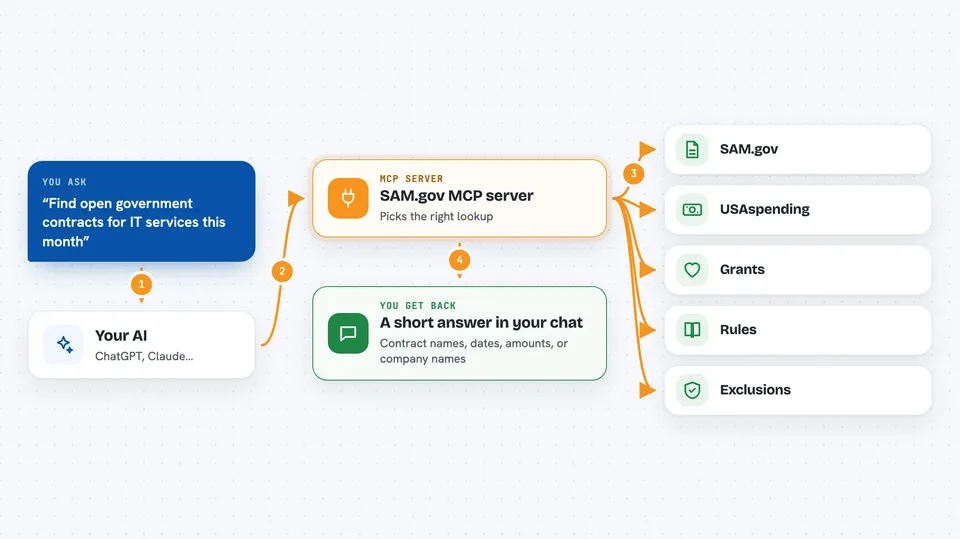
On its own, your AI can only chat with you using what it already learned. An MCP server is a small helper program that gives your AI a new skill or a connection to an outside service. This one connects your AI to public US government data sources like SAM.gov, USAspending, Grants.gov, and the Federal Register. Once it is connected, your AI can look things up there and bring answers back to your chat when you ask.
What this MCP server does
You type a question in plain English, like asking for open government contracts in a certain field. Your AI reads your question and decides which of the helper's many lookups to use. The helper then goes to the right government website, such as SAM.gov for opportunities or USAspending for past awards. It brings the results back, and your AI turns them into a short, readable answer in your chat. You never have to visit those websites yourself or know how they work.
 Click to zoom
What you can do with it
- Find open government contract opportunities by industry code or closing date
- Pull the details of a specific contract notice, including the description and contact person
- See who won past government contracts and how much they were paid
- Check a company against sanctions, exclusion, and compliance lists
- Look up federal rules and proposed regulations on a topic
- Search government grants and research funding
- Check recalls or enforcement actions against a supplier
Try asking your AI
- “Find active SAM.gov opportunities under NAICS 541512 closing this month”
- “Show me the top recipients of VA contracts in this industry last year”
- “Screen this company for sanctions and exclusions before we work with them”
- “What new rules about contractor cybersecurity were published this quarter”
What it gives back to you
You get back a short written answer in your chat, often with a list of items like contract names, dates, dollar amounts, or company names. If you ask about one specific notice, it can include the description, the contact person, and any attached files. For spending questions, you get numbers and totals, sometimes broken down by agency or year. Everything comes back as normal text you can read and copy.
Before you start
What you need
- The Claude desktop app, or another AI app that supports MCP helpers
- Node.js on your computer if you use the manual install path (the one-click file does not need it)
- A free key from a few optional data sources only if you want those extra lookups
Good to know
It only reads public government data, so it does not change or delete anything, but double-check important numbers and dates before you rely on them for a bid or a decision.
Install it with your AI
Add SAM.gov MCP server to your AI, no technical skills needed
You don't install anything by hand. You copy one prompt, paste it into an AI that can work on your computer, and it checks, installs and connects the server for you, asking you when it needs something.
Sign in to get the install prompt
Members get a ready-made prompt that lets the Claude desktop app check SAM.gov MCP server, install it and connect it for them, step by step. You don't need any technical skills: you copy, paste and answer a few questions. Your connected AI can also find and install any of the 4,361 MCP servers here for you.
Who it's for
People who work with government contracts, sales, grants, compliance, or research and need quick answers about public federal data.