MCP server · Finance and crypto
Shodai Agreements MCP server
by CNSLabs
Lets your AI check, validate and follow the progress of machine-readable agreements for you.
This is a helper that connects your AI assistant to Shodai, a service for turning agreements into a structured, checkable format. Instead of a plain document, an agreement here has clear terms, named participants, allowed actions and a running history. It is handy if you work with contracts, approvals or coordination tasks and want your AI to look things up or walk you through the steps.
What is an MCP server? The 30-second version
On its own, your AI can only chat with you. An MCP server is a small helper program that gives your AI a new skill or a connection to an app or service. This one connects your AI to Shodai's agreements service, so when you ask about an agreement, your AI can actually go and look it up or act on it. You do not need to understand how it works under the hood. You just ask in normal words.
What this MCP server does
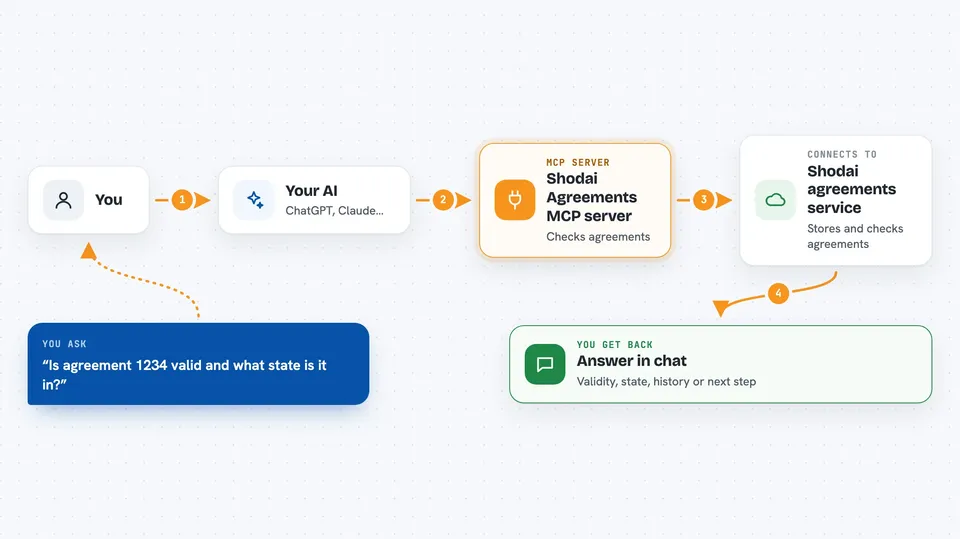
You ask your AI something about an agreement, like whether it is valid or what state it is in. Your AI passes that request to this helper, which talks to the Shodai agreements service. The service checks its records and sends back an answer, a list, or a summary. Your AI then explains it to you in the chat. For steps that need a signature, the helper prepares the paperwork and your AI tells you what still needs your approval.
 Click to zoom
What you can do with it
- Check whether an agreement definition is valid before anything is signed
- See the current state of an agreement and what the next allowed step is
- Look at the history of inputs that have been submitted
- Prepare a deployment so you can review it before signing
- Submit a signed input to move an agreement forward
- Read example agreements to learn the format
- List agreements you have access to
Try asking your AI
- “Is this agreement definition valid, or are there problems I should fix first?”
- “What state is agreement 1234 in right now, and what can happen next?”
- “Show me the history of inputs for this agreement.”
- “Prepare the deployment for this agreement so I can sign it.”
What it gives back to you
You get answers in plain chat: a yes or no on validity, a short list of problems, the current state of an agreement, or a list of past inputs with who did what and when. For signing steps, it gives you the exact data to approve. Nothing is changed on the service until a properly signed input is submitted.
Before you start
What you need
- A Shodai account and access through the developer portal
- An API key from Shodai (a kind of password for apps; the portal gives you one)
- An MCP-capable AI client, like the Claude desktop app
- Node.js installed if you run the helper on your own computer
Good to know
Some actions change the agreement on the service, so always read what your AI is about to do and only sign things you understand.
Install it with your AI
Add Shodai Agreements MCP server to your AI, no technical skills needed
You don't install anything by hand. You copy one prompt, paste it into an AI that can work on your computer, and it checks, installs and connects the server for you, asking you when it needs something.
Sign in to get the install prompt
Members get a ready-made prompt that lets the Claude desktop app check Shodai Agreements MCP server, install it and connect it for them, step by step. You don't need any technical skills: you copy, paste and answer a few questions. Your connected AI can also find and install any of the 4,361 MCP servers here for you.
Who it's for
People who deal with contracts, approvals or coordination work and want their AI to check and follow agreement status without reading technical docs.