
MCP server · Research
Crawlora MCP server
by Crawlora-org
Lets your AI pull clean, ready-to-use data from public websites like news, shops, maps and reviews.
Crawlora is a helper that connects your AI to a huge library of public web data. Instead of you copying and pasting from websites, your AI can fetch news, product details, hotel info, reviews and more, and hand it back in a tidy form. It is handy for anyone who spends time gathering information from the web for reports, research or comparisons.
What is an MCP server? The 30-second version
On its own, your AI can only chat with you using what it already knows. An MCP server is a small helper program that gives your AI a new skill or a connection to an outside service. This one connects your AI to Crawlora, a service that collects public web data. Once connected, your AI can ask Crawlora for information and bring the answers back into your chat.
What this MCP server does
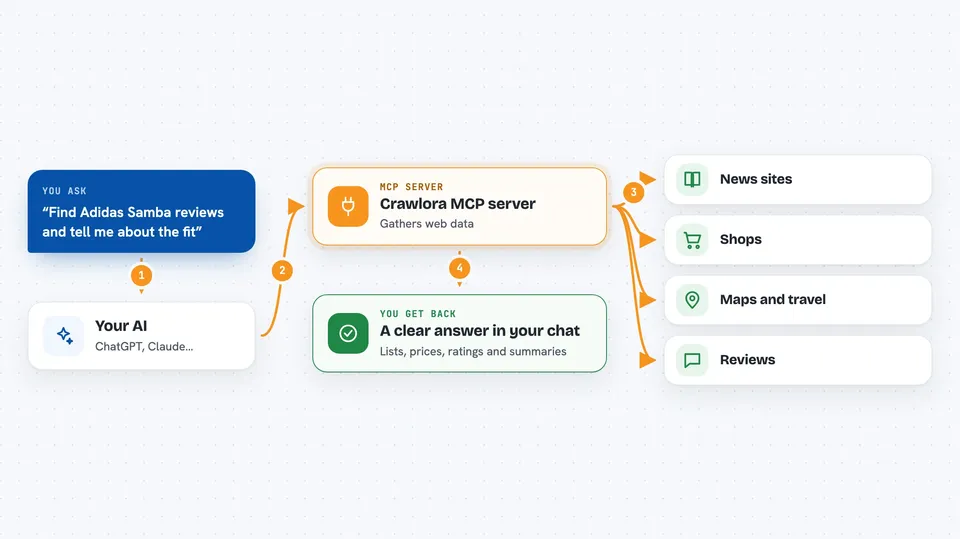
You ask your AI a question that needs fresh web data, like the latest headlines or details about a product. Your AI sends that request to Crawlora through this connection. Crawlora looks up the public website or feed and gathers the information. It cleans everything up and sends it back as neat, structured data. Your AI then turns that into a clear answer, list or summary for you in the chat.
 Click to zoom
What you can do with it
- Fetch the latest headlines from news sites like ABC News
- Look up product details, prices and reviews from shops like Adidas
- Search for hotels and destinations on Accor
- Get author profiles and article content from news sources
- Pull public data from search, maps, social, finance and travel sites
- Return results as clean structured data your AI can read
Try asking your AI
- “What are the top stories on ABC News right now?”
- “Find Adidas Samba reviews and tell me what people say about the fit.”
- “Show me Accor hotels in Paris and list their amenities.”
- “Get the latest headlines from ABC News Australia.”
What it gives back to you
You get back clean, organized information in your chat. That could be a list of headlines, product details with prices and ratings, hotel names and amenities, or review summaries. Your AI presents it as a readable answer, table or bullet points. You do not have to open a single website yourself.
Before you start
What you need
- A Crawlora account (free, includes 2,000 credits per month)
- Your Crawlora API key (a kind of password for apps; you get it from crawlora.net)
- An AI app that supports MCP connections, like Claude Desktop or Cursor
Good to know
It uses credits from your Crawlora account each time your AI fetches data, so keep an eye on your monthly free allowance.
Install it with your AI
Add Crawlora MCP server to your AI, no technical skills needed
You don't install anything by hand. You copy one prompt, paste it into an AI that can work on your computer, and it checks, installs and connects the server for you, asking you when it needs something.
Sign in to get the install prompt
Members get a ready-made prompt that lets the Claude desktop app check Crawlora MCP server, install it and connect it for them, step by step. You don't need any technical skills: you copy, paste and answer a few questions. Your connected AI can also find and install any of the 4,361 MCP servers here for you.
Who it's for
Anyone who regularly gathers public web data for research, market checks, news monitoring or travel planning, even without technical skills.


