MCP server · Health and learning
MusclesWorked MCP server
by csjoblom
Your AI can look up which muscles an exercise works, check your workout for gaps, and suggest alternatives.

This is a small helper that connects your AI to a big library of exercises and the muscles they train. It knows 856 exercises and 65 muscles, including which ones do the main work and which ones help out. It is handy if you plan your own workouts or write training plans for other people.
What is an MCP server? The 30-second version
On its own, your AI can only chat with you. An MCP server is a small helper program that gives your AI a new skill or a connection to an app or service. This one connects your AI to musclesworked.com, a site that maps exercises to muscles. Once it is set up, your AI can look things up there and answer your questions with real data instead of guessing.
What this MCP server does
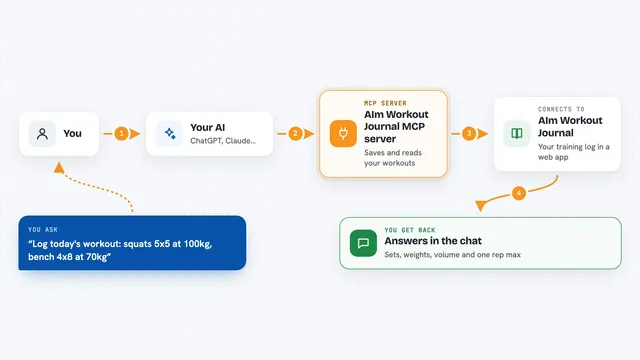
You ask your AI something like which muscles the bench press works. Your AI passes that question to this helper, and the helper asks musclesworked.com. The site sends back the list of muscles, split into the main ones, the helpers, and the small stabilizers. Your AI then explains it all to you in normal words. You can also hand it a whole workout and it will point out what you are missing.
 Click to zoom
What you can do with it
- Look up the muscles an exercise works
- Find exercises for a specific muscle, with filters like bodyweight only
- Analyze a workout for coverage, gaps, and imbalances
- Find alternative exercises ranked by how similar they are
- Search exercises by name to find the right one
- Search muscles by name when you are not sure what it is called
Try asking your AI
- “What muscles does the barbell bench press work?”
- “Find bodyweight exercises for my chest”
- “Analyze my push day: bench press, overhead press, tricep pushdown, lateral raise”
- “What are some alternatives to barbell squats?”
What it gives back to you
You get answers in plain text in the chat. For a single exercise, that is a list of muscles grouped into main, secondary, and stabilizer. For a workout, you get a short report on what is covered and what is missing. For alternatives, you get a ranked list of other exercises with how much they overlap.
Before you start
What you need
- An API key from musclesworked.com (a kind of password for apps; you get one free on their dashboard page)
- Node.js installed on your computer, version 18 or newer
- An MCP client like Claude Desktop, Claude Code, or Cursor
Good to know
It only looks things up, so it will not change or delete anything, but it does need your API key, so keep that key private.
Install it with your AI
Add MusclesWorked MCP server to your AI, no technical skills needed
You don't install anything by hand. You copy one prompt, paste it into an AI that can work on your computer, and it checks, installs and connects the server for you, asking you when it needs something.
Sign in to get the install prompt
Members get a ready-made prompt that lets the Claude desktop app check MusclesWorked MCP server, install it and connect it for them, step by step. You don't need any technical skills: you copy, paste and answer a few questions. Your connected AI can also find and install any of the 4,609 MCP servers here for you.
Who it's for
People who plan their own training, personal trainers, and anyone who writes workout programs and wants a quick check on muscle coverage.