
MCP server · Finance and crypto
CyberWareX MCP servers
by cyberwareX
Lets your AI check crypto tokens, look up wallet and chain data, grab web pages, and transcribe voice notes.
CyberWareX is a set of small helper programs that connect your AI to a bundle of pay-as-you-go web services. You can ask your AI to check whether a crypto token looks safe, look up wallet balances and gas prices, turn a web page into clean text, take a screenshot, or turn a voice recording into words. It is handy if you work with crypto data or need quick web lookups, and you are okay paying a few cents per request.
What is an MCP server? The 30-second version
On its own, your AI can only chat with you using what it already knows. An MCP server is a small helper program that gives your AI a new skill or a connection to an outside service. This one connects your AI to the CyberWareX services, so when you ask about a token, a wallet, a web page, or a voice file, the AI can actually go and fetch that answer for you. You do not need an account or a password; each request is paid for in small amounts of crypto, and the first paid call is the whole setup.
What this MCP server does
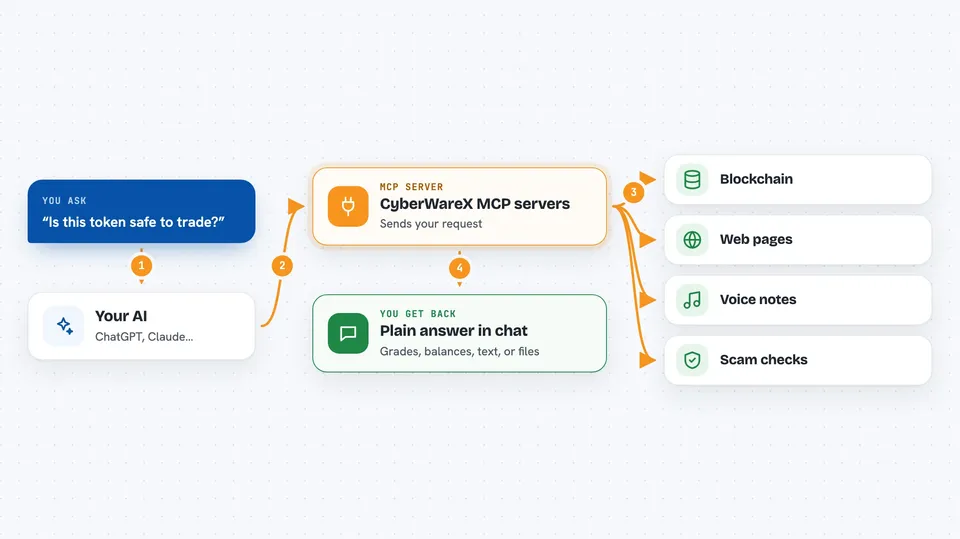
You ask your AI a question, like whether a token is safe or what a wallet holds. The AI passes your request to this helper program. The helper program talks to the CyberWareX web services, which do the real work: simulating a trade, reading the blockchain, loading a web page, or transcribing audio. The result comes back to your AI, and your AI explains it to you in the chat. Each request costs a small amount, usually between half a cent and a few cents.
 Click to zoom
What you can do with it
- Check if a crypto token is safe to trade, with a letter grade
- Look up wallet balances, token prices, gas fees, and transactions on several chains
- Turn a live web page into clean text your AI can read
- Take a screenshot or make a PDF of a web page
- Transcribe a voice message into text
- Simulate a crypto transaction before you sign it
- Screen an address or a URL for scams and phishing
Try asking your AI
- “Is this token safe to trade? Contract address 0x... on Base.”
- “What is the balance of wallet 0x... on Ethereum?”
- “Turn this page into markdown for me: https://example.com/article”
- “Transcribe this voice note for me: /path/to/audio.mp3”
What it gives back to you
You get back plain answers in the chat: a safety grade with reasons, a list of balances or prices, the text of a web page, or the words from a voice recording. For screenshots and PDFs, you get a file you can open. For transaction simulations, you get a summary of what would happen if you signed. Everything is written out in normal language so you do not have to read raw data.
Before you start
What you need
- Python installed on your computer
- The mcp and requests Python packages (installed with one command)
- A way to pay small amounts in USDC on Base for each request (no account needed, but you need a funded wallet or a payment header)
- The Claude desktop app or another AI tool that supports MCP servers
Good to know
Each request costs real money in crypto, and some tools can change things or spend money, so check the price and the result before you act on it.
Install it with your AI
Add CyberWareX MCP servers to your AI, no technical skills needed
You don't install anything by hand. You copy one prompt, paste it into an AI that can work on your computer, and it checks, installs and connects the server for you, asking you when it needs something.
Sign in to get the install prompt
Members get a ready-made prompt that lets the Claude desktop app check CyberWareX MCP servers, install it and connect it for them, step by step. You don't need any technical skills: you copy, paste and answer a few questions. Your connected AI can also find and install any of the 4,361 MCP servers here for you.
Who it's for
People who work with crypto data, do quick web research, or need voice notes turned into text, and who are comfortable paying a few cents per request.




