MCP server · Analytics
DataCharter MCP server
by datacharter
Lets your AI query your files and databases locally, with only the columns you allow and private details hidden.

DataCharter is a small program you run on your own computer that lets your AI ask questions of your data files and databases. You write a simple rules file that says what the AI is allowed to see, and it sticks to those rules. It is handy if you have spreadsheets, CSV files, or databases and want an AI to help you look things up without handing over everything.
What is an MCP server? The 30-second version
On its own, your AI can only chat. An MCP server is a small helper program that gives your AI a new skill or a connection to an app or service. This one connects your AI to DataCharter, which sits on top of your files and databases. So when you ask a question, the AI can actually look at your data through DataCharter and come back with an answer, instead of just guessing.
What this MCP server does
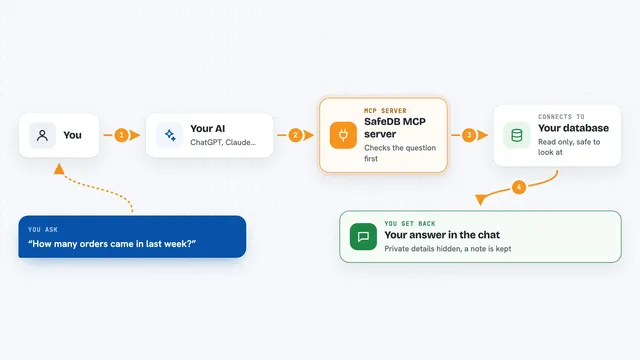
You ask your AI a question about your data, like how many orders came in last month. The AI passes that question to DataCharter, which runs it against your files and databases using a tool called DuckDB. DataCharter checks your rules file first, so it only looks at the columns and rows you allowed, and it hides anything marked as private. Then it sends the result back to the AI, and the AI explains it to you in the chat. You can also use DataCharter on its own without an AI, but the MCP part is what lets your AI do the asking for you.
 Click to zoom
What you can do with it
- Ask questions about CSV, Excel, and Parquet files on your computer
- Query Postgres, Snowflake, BigQuery, and DuckDB databases in one place
- Keep certain columns hidden from the AI with simple rules
- Limit results to rows that match a filter you set
- Run read-only queries so nothing in your data gets changed
- Check a log of what the AI looked at and when
- Wrap another MCP server so its answers also follow your rules
Try asking your AI
- “How many orders did we get last month, broken down by region?”
- “Show me the average order value for each customer segment.”
- “Which products had the biggest drop in sales this quarter?”
- “List the top 10 customers by total spend, but hide their email addresses.”
What it gives back to you
You get answers in the chat, usually as a short summary plus a small table of numbers or a list of rows. If you asked for a chart, DataCharter can produce one. It can also show you which columns were hidden and why, so you know the rules were followed. Nothing in your original files or databases gets changed.
Before you start
What you need
- Python 3.11 or newer, or the desktop app for macOS or Windows
- A folder with your data files, or connection details for your database
- A charter.yaml file that says what the AI is allowed to see
Good to know
It is read-only by design, so it will not change your data, but it can still read whatever your rules file allows, so check that file before pointing it at sensitive tables.
Install it with your AI
Add DataCharter MCP server to your AI, no technical skills needed
You don't install anything by hand. You copy one prompt, paste it into an AI that can work on your computer, and it checks, installs and connects the server for you, asking you when it needs something.
Sign in to get the install prompt
Members get a ready-made prompt that lets the Claude desktop app check DataCharter MCP server, install it and connect it for them, step by step. You don't need any technical skills: you copy, paste and answer a few questions. Your connected AI can also find and install any of the 4,361 MCP servers here for you.
Who it's for
Anyone who works with spreadsheets or databases and wants an AI to help answer questions without exposing private columns or handing over the whole dataset.