MCP server · Analytics
SchemaBrain MCP server
by Arun-kc
Ask your AI questions about your Postgres database and get safe, read-only answers with sensitive data blocked.
SchemaBrain is a helper that lets your AI look inside a Postgres database and answer questions about it, without ever being able to change anything. It is handy if you have data in Postgres and want to ask questions in plain English, but you are nervous about giving an AI free access. It is built for people who care about safety first.
What is an MCP server? The 30-second version
On its own, your AI can only chat. It cannot see your database or run a query. An MCP server is a small helper program that gives your AI a new skill or a connection to another service. SchemaBrain is that helper for your Postgres database: it lets your AI look things up there and report back, but only in ways you have approved in advance.
What this MCP server does
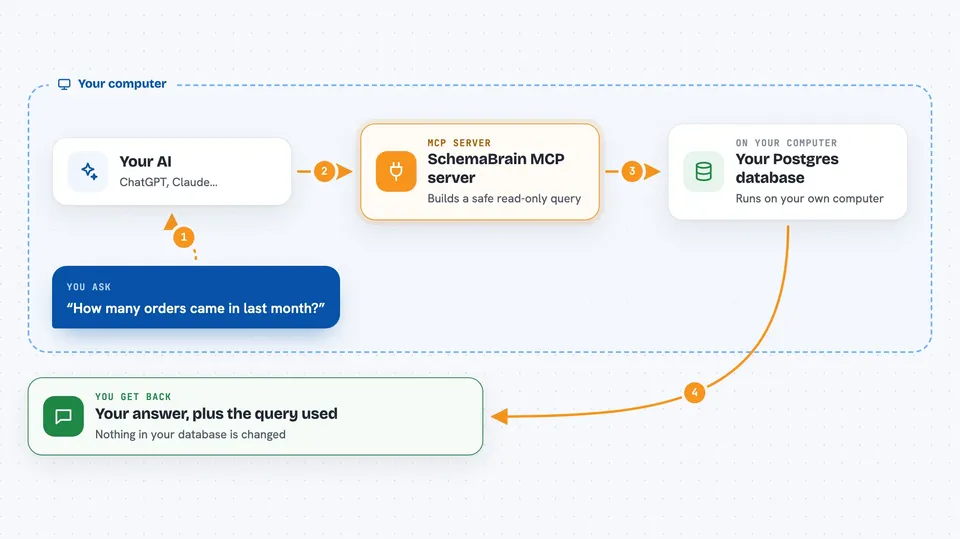
You ask your AI a question about your data, like how many orders came in last month. Your AI does not write any database code itself. Instead, it asks SchemaBrain, which uses definitions you set up earlier to build a safe, read-only query. SchemaBrain runs that query, checks whether it touches anything sensitive, and if it does, it refuses and tells your AI why. Otherwise it sends back the rows and the exact query that ran, so you can see what happened.
 Click to zoom
What you can do with it
- List the tables and entities SchemaBrain knows about in your database
- Describe what columns a table has and flag any sensitive ones
- Answer questions about your data using pre-approved metrics you defined
- Refuse a request that would touch private data like card numbers or IDs
- Suggest a different, safe question when your original one cannot be answered
- Show a log of every request, including the ones it turned down
- Verify that the audit log has not been quietly changed
Try asking your AI
- “List the entities SchemaBrain knows about”
- “What was our total contracted revenue by plan tier last quarter?”
- “Describe the users table and tell me which columns are sensitive”
- “Show me the last ten refusals and why they were blocked”
What it gives back to you
You get answers in the chat as lists, tables, or short summaries, depending on what you asked. When SchemaBrain refuses a request, you get a clear reason and often a suggestion for a safer question to try instead. You can also ask it to show the audit log, which lists every call and every refusal. Nothing in your database is ever changed, so there is nothing to undo.
Before you start
What you need
- A Postgres database you can connect to (or use the bundled demo with no setup)
- Python installed on your computer, plus uv or pipx to run the installer
- Docker if you want to try the bundled demo database
- An Anthropic API key (optional, only needed to auto-suggest definitions for your own database)
Good to know
SchemaBrain is read-only and cannot change your database, but it can still show data your AI sees, so review your PII policy before pointing it at a real database.
Install it with your AI
Add SchemaBrain MCP server to your AI, no technical skills needed
You don't install anything by hand. You copy one prompt, paste it into an AI that can work on your computer, and it checks, installs and connects the server for you, asking you when it needs something.
Sign in to get the install prompt
Members get a ready-made prompt that lets the Claude desktop app check SchemaBrain MCP server, install it and connect it for them, step by step. You don't need any technical skills: you copy, paste and answer a few questions. Your connected AI can also find and install any of the 4,361 MCP servers here for you.
Who it's for
Anyone who has data in Postgres and wants to ask questions about it with an AI, especially people in data, operations, or analytics roles who need safety and a clear audit trail.