
MCP server · Analytics
SafeDB MCP server
by narekmalk
Lets your AI look at your database in a safe, read-only way, with sensitive fields hidden.
SafeDB MCP is a small helper that lets your AI assistant look inside a database and answer questions about it, without being able to change anything. It works with Postgres, MySQL, MariaDB, and SQLite. It is handy if you want your AI to help with data questions but you do not want to hand it full access to your live database.
What is an MCP server? The 30-second version
On its own, your AI can only chat. An MCP server is a small helper program you connect to your AI, and it gives the AI a new skill or a connection to another app. This one connects your AI to your database, but only in a careful, read-only way. So when you ask a question about your data, the AI can look it up for you through this helper instead of guessing.
What this MCP server does
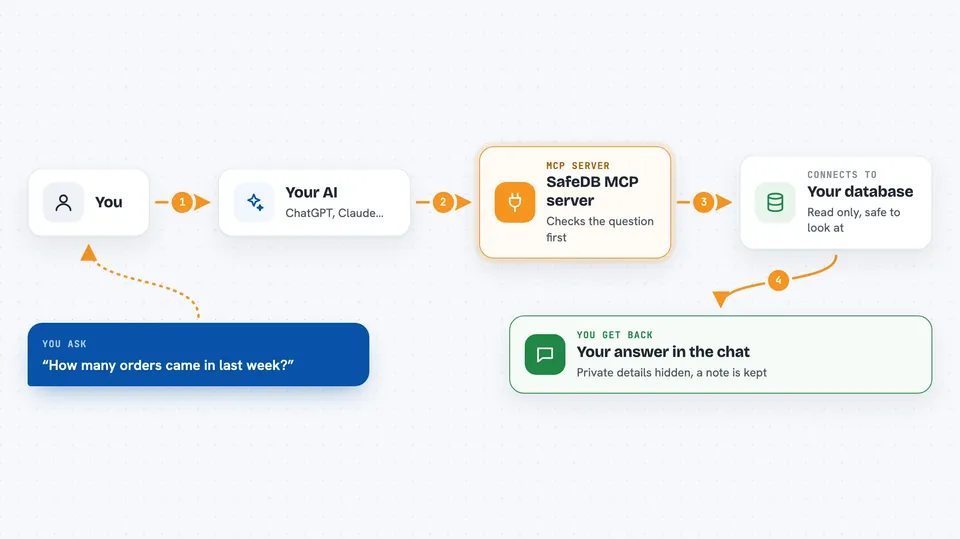
You ask your AI a question about your data, like how many orders came in last week. Your AI uses this helper to send a read-only query to your database. The helper checks the query first, makes sure only the tables you allowed are touched, and blocks anything that would change data. It also hides sensitive fields like emails or passwords before showing results. Then you get the answer back in your chat, and the helper quietly writes a note in a log about what was asked.
 Click to zoom
What you can do with it
- List the schemas and tables your AI is allowed to see
- Describe the columns of a table so your AI understands the data
- Run read-only queries and get capped results back
- Explain how a query would run without actually running it
- Hide or mask sensitive fields like emails, phone numbers, or passwords
- Keep a log of every query attempt for later review
- Limit how many rows come back so a query cannot run away
Try asking your AI
- “How many users signed up last month?”
- “Show me the top 10 products by number of orders”
- “What columns does the orders table have?”
- “Explain how a query joining users and orders would run”
What it gives back to you
You get answers in your chat, usually as a short list or a small table of rows. The helper caps how many rows come back, so you will not get a giant dump. Sensitive fields are masked before you see them, so an email might show as a pattern instead of the real address. If a query is blocked, you get a short message saying it was not allowed.
Before you start
What you need
- A database you can connect to (Postgres, MySQL, MariaDB, or SQLite)
- A read-only database login, ideally a dedicated account just for this
- Node.js installed if you run it with npx
- A config file listing which tables are allowed and which fields to mask
Good to know
It is designed to be read-only and to hide sensitive fields, but it is an early version, so always use a read-only database account and review the config before pointing it at real data.
Install it with your AI
Add SafeDB MCP server to your AI, no technical skills needed
You don't install anything by hand. You copy one prompt, paste it into an AI that can work on your computer, and it checks, installs and connects the server for you, asking you when it needs something.
Sign in to get the install prompt
Members get a ready-made prompt that lets the Claude desktop app check SafeDB MCP server, install it and connect it for them, step by step. You don't need any technical skills: you copy, paste and answer a few questions. Your connected AI can also find and install any of the 4,361 MCP servers here for you.
Who it's for
Anyone who wants AI help with database questions but needs to keep the data safe, like analysts, support leads, or small teams without a dedicated data engineer.


