MCP server · Analytics
mcpolyglot MCP server
by ishay60
Let your AI read your Postgres, MySQL, SQLite or MongoDB data safely, with private columns hidden and every query checked.
mcpolyglot is a helper that connects your AI assistant to the databases and web services you already use, like Postgres, MySQL, SQLite, MongoDB and OpenAPI REST APIs. It is handy if you want to ask your AI questions about your data without giving it the keys to change or delete anything. The server checks every request first, hides sensitive columns, and keeps a record of what was asked.
What is an MCP server? The 30-second version
On its own, your AI can only chat with you. An MCP server is a small helper program that gives your AI a new skill or a connection to an app or service. This one connects your AI to your databases and REST APIs, so it can look things up for you when you ask. You stay in control because the helper follows rules you set, and it refuses anything outside those rules.
What this MCP server does
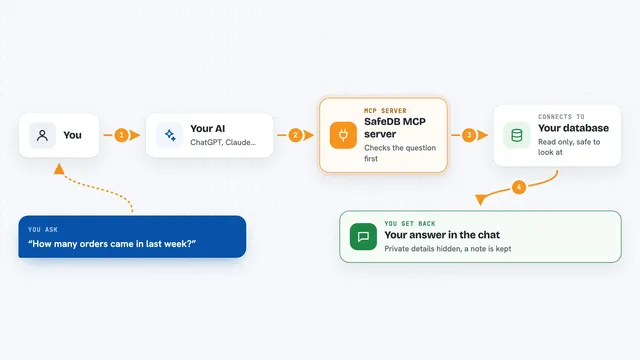
You ask your AI a question in plain words, like which customers signed up last month. The AI turns that into a database request and sends it to this helper. The helper checks the request against your rules, blocks anything not allowed, and runs it on a read-only connection. Sensitive values like emails and card numbers are hidden before the answer comes back. You see the results in the chat, and a quiet log records what happened.
What you can do with it
- List the tables or collections in your database
- Describe the columns in a table so you know what is there
- Run read-only queries and see the rows in the chat
- Look up records in MongoDB with find or aggregate
- Call allowed operations from an OpenAPI service
- Write to a table only if your policy clearly allows it
- Hide columns like passwords, tokens and SSNs from results
Try asking your AI
- “List the tables in my database, then sample 5 rows from users.”
- “How many orders were placed last week, grouped by day?”
- “Show me the top 10 customers by total spend, but hide their emails.”
- “Find all support tickets in MongoDB that mention refund and are still open.”
What it gives back to you
You get back a small table of columns and rows, or a summary answer, right in the chat. Sensitive values appear as [REDACTED] instead of the real data. If a request is not allowed, you get a short reason like forbidden.policy instead of a crash. Nothing is changed unless your policy clearly allows writes.
Before you start
What you need
- Node.js 18 or newer on your computer
- A database you can connect to, like Postgres, MySQL, SQLite or MongoDB, or an OpenAPI service
- A connection address for that database, often called a DATABASE_URL
- The Claude desktop app or another AI tool that supports MCP servers
Good to know
It can change data if your policy allows writes, and anything the AI is allowed to read it can repeat back to you, so only give it access to what it really needs.
Install it with your AI
Add mcpolyglot MCP server to your AI, no technical skills needed
You don't install anything by hand. You copy one prompt, paste it into an AI that can work on your computer, and it checks, installs and connects the server for you, asking you when it needs something.
Sign in to get the install prompt
Members get a ready-made prompt that lets the Claude desktop app check mcpolyglot MCP server, install it and connect it for them, step by step. You don't need any technical skills: you copy, paste and answer a few questions. Your connected AI can also find and install any of the 4,609 MCP servers here for you.
Who it's for
Office workers, analysts and small teams who want to ask their AI questions about company data without risking changes or leaking private details.