MCP server · Developer tools
ProxyKit MCP server
by getproxykit
Lets your AI look at captured web traffic and set up fake responses, delays, and replays in ProxyKit.
This is a helper that connects your AI assistant to ProxyKit, a tool that sits on your own computer and watches the web traffic going in and out of your apps. Once connected, you can ask your AI in plain words to look at that traffic, create fake replies, or replay requests. It is handy for developers and testers who debug how apps talk to servers.
What is an MCP server? The 30-second version
On its own, your AI can only chat with you. An MCP server is a small helper program that gives your AI a new skill or a connection to another app. This one connects your AI to ProxyKit running on your machine, so the AI can look things up there or make changes for you when you ask. You stay in your editor or chat window, and the helper does the talking to ProxyKit behind the scenes.
What this MCP server does
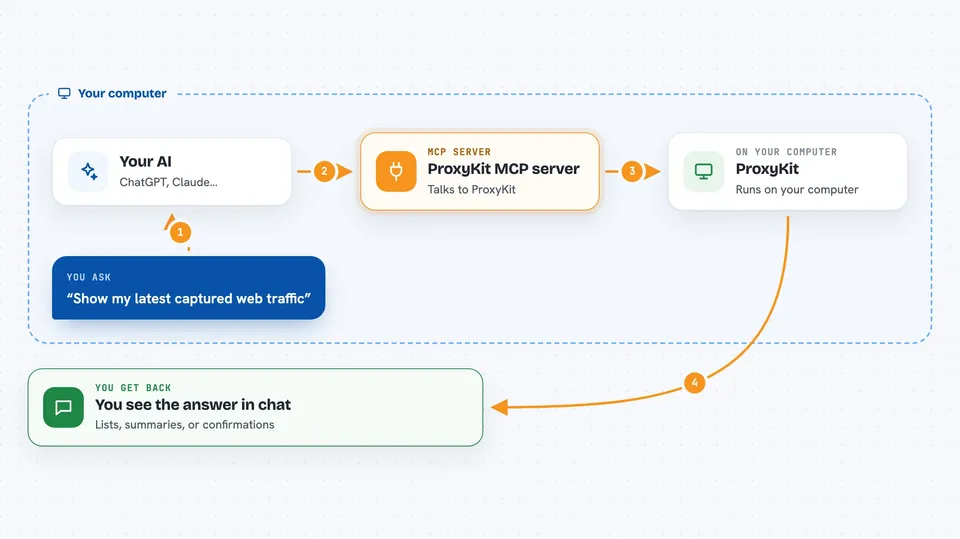
You type a request in plain words, like asking to see recent traffic or to make an endpoint fail sometimes. Your AI sends that request to this helper program. The helper then talks to ProxyKit on your computer, which is already capturing traffic. ProxyKit does the work, like listing requests or adding a new rule, and sends the result back. Your AI shows you the answer in the chat, as a list, a summary, or a confirmation that something changed.
 Click to zoom
What you can do with it
- List recent captured requests and filter them by method, URL, or status
- Search across captured URLs for a word or phrase
- Create a mock rule so an endpoint returns a fake response
- Add latency or errors to a route with a chaos rule
- Replay a whole session or a single request
- Compare two capture sessions to spot differences
- Check findings like privacy or performance issues
Try asking your AI
- “List my latest captured traffic in ProxyKit”
- “Mock the checkout endpoint to fail half the time”
- “Add 800 ms of latency to /api/payments and replay the session”
- “Summarize the last 500 captured requests against my baseline”
What it gives back to you
You get back lists of requests, summaries of findings, or details of a single request with headers and a redacted body. When you change something, like creating a mock rule, you get a confirmation that it was added. Everything shows up right in your chat window, so you can keep working without switching apps.
Before you start
What you need
- ProxyKit installed on your computer (the free tier works)
- The ProxyKit engine running, either from the desktop app or with proxykit start --headless
- The path to the control.token file that ProxyKit writes when it starts
- An MCP host like Claude Desktop, Cursor, or another tool that supports MCP servers
Good to know
By default it can only read, but if you turn on other tiers it can change rules, control capture, and replay traffic, so be careful what you allow.
Install it with your AI
Add ProxyKit MCP server to your AI, no technical skills needed
You don't install anything by hand. You copy one prompt, paste it into an AI that can work on your computer, and it checks, installs and connects the server for you, asking you when it needs something.
Sign in to get the install prompt
Members get a ready-made prompt that lets the Claude desktop app check ProxyKit MCP server, install it and connect it for them, step by step. You don't need any technical skills: you copy, paste and answer a few questions. Your connected AI can also find and install any of the 4,361 MCP servers here for you.
Who it's for
Developers, testers, and anyone who debugs how apps talk to servers and wants to control that from their AI chat.