MCP server · Generative art
Aseprite MCP server
by diivi
Let your AI draw, animate and export pixel art in Aseprite for you, just by asking.
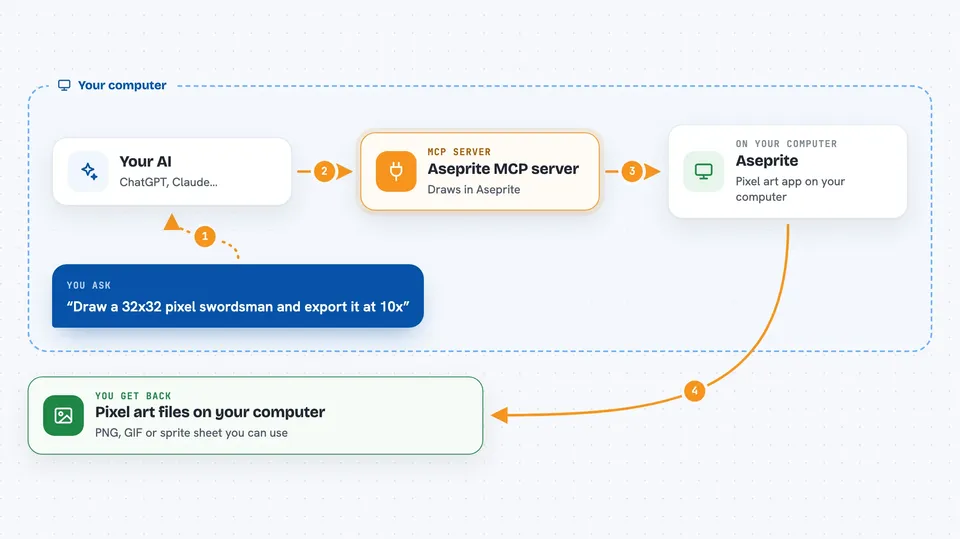
This is a helper that connects your AI assistant to Aseprite, the popular pixel art program. Once it is set up, you can ask your AI in plain words to draw a character, build an animation, or export a sprite sheet, and it will actually do the work in Aseprite. It is handy for hobbyist game makers, pixel artists, and anyone who wants pixel art but is not sure how to draw it by hand.
What is an MCP server? The 30-second version
On its own, your AI can only chat and write text. An MCP server is a small helper program that gives your AI a new skill or a connection to another app. This one connects your AI to Aseprite on your own computer, so the AI can create canvases, draw pixels, make frames, and save image files for you. You stay in charge: the AI only does something when you ask it to.
What this MCP server does
You tell your AI what you want, like a 32 by 32 pixel swordsman or a four frame sword swing. The AI then uses this helper to send drawing commands to Aseprite on your machine. The helper creates the sprite, draws the pixels, adds layers and frames, and can even check its own work by exporting a preview image. When it is done, you get image files like PNGs or a sprite sheet you can use in a game or share with others.
 Click to zoom
What you can do with it
- Draw pixel art characters, items and scenes from a text description
- Build multi frame animations with movement and easing
- Apply retro palettes like Game Boy or Pico-8 to your art
- Add outlines, shading ramps and dithering effects
- Export your work as PNG, GIF or a sprite sheet
- Check animation frames with onion skin previews
- Import an existing image as a layer to trace or reuse
Try asking your AI
- “Draw me a 32x32 pixel art swordsman and export it at 10x so I can see it.”
- “Make a four frame sword slash animation from windup to follow-through.”
- “Apply the gameboy palette to this sprite and add a dark outline.”
- “Export the walk animation as a GIF and also as a sprite sheet.”
What it gives back to you
You get back answers in the chat plus actual files on your computer. The AI can show you previews of the sprite, tell you the size and number of frames, or list the colors used. When you ask for an export, you get a PNG, GIF or sprite sheet file you can open or use right away.
Before you start
What you need
- Aseprite installed on your computer (it is a paid program, around 20 dollars)
- Python installed, since this server is written in Python
- The Aseprite MCP server set up and connected to your AI app
Good to know
This server can create, change and delete files on your computer through Aseprite, so keep an eye on what you ask it to do and back up art you care about.
Install it with your AI
Add Aseprite MCP server to your AI, no technical skills needed
You don't install anything by hand. You copy one prompt, paste it into an AI that can work on your computer, and it checks, installs and connects the server for you, asking you when it needs something.
Sign in to get the install prompt
Members get a ready-made prompt that lets the Claude desktop app check Aseprite MCP server, install it and connect it for them, step by step. You don't need any technical skills: you copy, paste and answer a few questions. Your connected AI can also find and install any of the 4,361 MCP servers here for you.
Who it's for
Hobbyist game developers, pixel artists, and anyone who wants pixel art or simple animations without drawing every pixel by hand.