MCP server · Generative art
Nakkas SVG art server
by arikusi
Your AI can draw animated SVG logos, spinners, and banners, then look at a preview and improve them.
Nakkas is a helper that lets your AI create animated pictures in SVG, which is a common image format for logos, icons, and banners. You describe what you want in normal words, and the AI builds the picture and shows you a preview. It is handy for anyone who needs a simple animated graphic but does not want to learn design software.
What is an MCP server? The 30-second version
On its own, your AI can only chat and write text. An MCP server is a small helper program that gives your AI a new skill or a connection to an app. This one gives your AI the skill of drawing animated SVG art, like a tiny art studio it can use on request. You ask in plain words, and the AI uses this helper to turn your idea into a real picture.
What this MCP server does
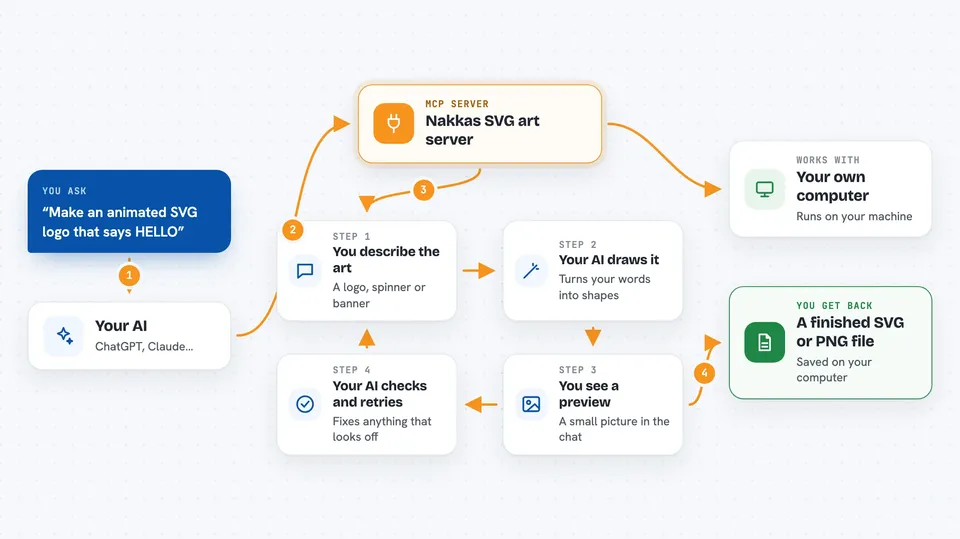
You describe the graphic you want, for example a glowing logo or a loading spinner. Your AI turns that into a set of drawing instructions and hands them to Nakkas. Nakkas draws the picture and sends back a small preview image so your AI can see the result. Your AI looks at the preview, spots anything off, and tries again until it looks right. When you are happy, you can save the result as an SVG or PNG file.
 Click to zoom
What you can do with it
- Create animated SVG logos and icons from a short description
- Make loading spinners with looping motion
- Build animated bar charts and simple data visuals
- Design profile badges and GitHub README banners
- Add glow, neon, blur, and shadow effects to shapes
- Preview the drawing and revise it before saving
- Save the finished art as an SVG or PNG file
Try asking your AI
- “Make an animated SVG logo: dark rounded box, glowing cyan text that says HELLO, fade-in on load”
- “Create a loading spinner: a circle with a draw-on stroke animation that loops every 1.5 seconds”
- “Design a profile badge 400 by 120 with a blue to purple gradient and a soft pulse”
- “Make an animated bar chart with 5 bars, each fading in with a small delay”
What it gives back to you
After each drawing, you get a small preview image in the chat so you can see how it looks. You also get a short note with an id for the drawing, and sometimes tips about things like text running off the edge or low contrast. When you save it, you get a file on your computer, either as SVG or as a PNG picture.
Before you start
What you need
- Node.js 18 or newer installed on your computer
- An MCP client such as the Claude desktop app, Claude Code, Cursor, or Zed
Good to know
It saves files to your computer, so check the output path before saving, and it will not overwrite an existing file without adding a number to the name.
Install it with your AI
Add Nakkas SVG art server to your AI, no technical skills needed
You don't install anything by hand. You copy one prompt, paste it into an AI that can work on your computer, and it checks, installs and connects the server for you, asking you when it needs something.
Sign in to get the install prompt
Members get a ready-made prompt that lets the Claude desktop app check Nakkas SVG art server, install it and connect it for them, step by step. You don't need any technical skills: you copy, paste and answer a few questions. Your connected AI can also find and install any of the 4,361 MCP servers here for you.
Who it's for
People who need quick animated graphics, like developers making README banners, designers testing ideas, and anyone who wants a logo or icon without design software.