MCP server · Generative art
SVGMaker MCP server
by GenWaveLLC
Your AI can make and change SVG pictures from a plain text description, right in the chat.
SVGMaker is a helper for your AI that lets it create and edit SVG images. You describe what you want in normal words, and it draws it. It is handy for anyone who needs simple icons, logos or illustrations but does not use design software.
What is an MCP server? The 30-second version
On its own, your AI can only chat with you. An MCP server is a small helper program that gives your AI a new skill or a connection to another service. This one connects your AI to SVGMaker, an online image service. So when you ask for a picture, your AI can actually go and make it for you.
What this MCP server does
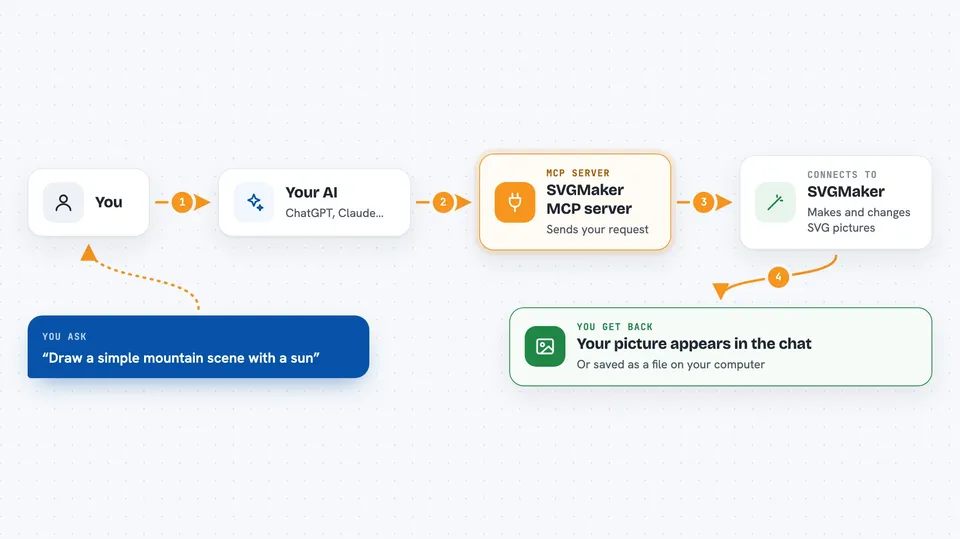
You ask your AI for a picture in plain words, like a simple mountain scene. Your AI passes your request to this helper, and the helper sends it to the SVGMaker service. SVGMaker creates the SVG image and sends it back. The helper then shows it to you in the chat, or saves it as a file if you are running it on your own computer.
 Click to zoom
What you can do with it
- Create a new SVG image from a text description
- Edit an existing SVG by describing the change you want
- Convert a regular image like a PNG or JPG into an SVG
- Remove the background from an image and get a clean SVG
- Get a quick PNG instead of an SVG when you just want a preview
- Preview images right inside the chat
- Upload a file from your computer so the cloud service can use it
Try asking your AI
- “Generate an SVG of a minimalist mountain landscape with a sun”
- “Make this logo more modern and minimalist”
- “Convert my logo.png into an SVG”
- “Remove the background from this photo and give me a clean SVG”
What it gives back to you
You get back an image, shown right in the chat so you can look at it. If you are running the helper on your own computer, it can also save the file to a folder you choose. In the cloud version, you get a web link to the finished image instead. You may also see short progress updates while it works.
Before you start
What you need
- An SVGMaker API key (a kind of password for apps; you get one free from the SVGMaker website)
- Node.js version 20.9.0 or newer, if you run it on your own computer
- The Claude desktop app or another AI app that supports MCP servers
Good to know
The cloud version cannot see files on your computer, so you must upload them first, and anything you make or upload goes to the SVGMaker service online.
Install it with your AI
Add SVGMaker MCP server to your AI, no technical skills needed
You don't install anything by hand. You copy one prompt, paste it into an AI that can work on your computer, and it checks, installs and connects the server for you, asking you when it needs something.
Sign in to get the install prompt
Members get a ready-made prompt that lets the Claude desktop app check SVGMaker MCP server, install it and connect it for them, step by step. You don't need any technical skills: you copy, paste and answer a few questions. Your connected AI can also find and install any of the 4,361 MCP servers here for you.
Who it's for
Anyone who needs simple images, icons or logos but does not use design software, like office workers, marketers or small business owners.