
MCP server · Research
Discava MCP server
by discava
Lets your AI search local businesses worldwide, with confidence scores and trust rankings.
This is a small helper that connects your AI assistant to Discava, a service that lists local businesses around the world. Once it is set up, you can ask your AI things like "find bakeries in Lisbon" and it will look them up for you. It is handy for anyone who needs to find or check local businesses without opening a dozen browser tabs.
What is an MCP server? The 30-second version
On its own, your AI can only chat with you using what it already knows. An MCP server is a small helper program that gives your AI a new skill or a connection to an app or service. This one connects your AI to Discava, a directory of local businesses worldwide. So when you ask about a business or a city, your AI can actually look it up there instead of guessing.
What this MCP server does
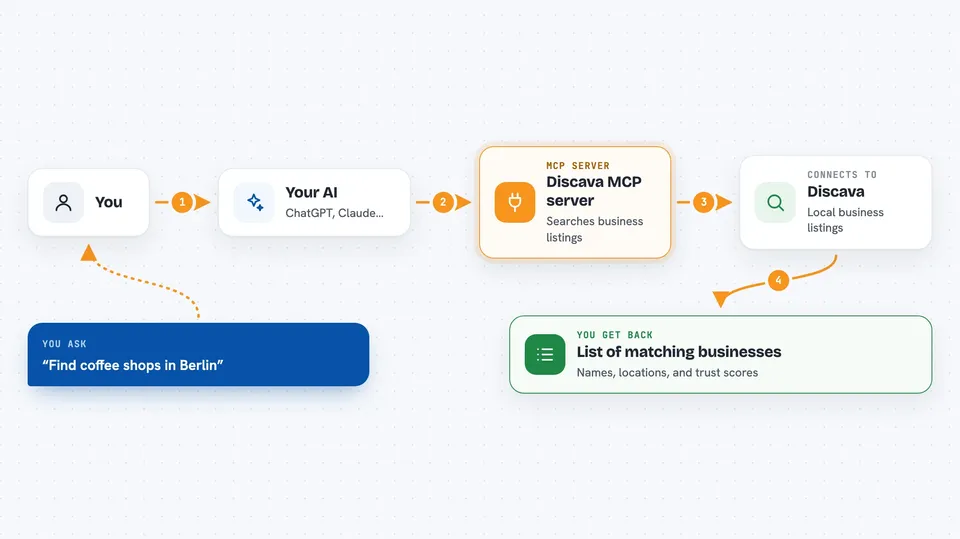
You ask your AI a question about local businesses, like a type of shop in a certain city or country. Your AI passes that request to this helper program. The helper talks to the Discava service, which searches its listings and returns matching businesses with details and scores. Your AI then shows you the results in plain language in the chat. You can also ask for full details on one business, see top-ranked businesses, or get autocomplete suggestions for cities and categories.
 Click to zoom
What you can do with it
- Search for businesses by name, city, or country
- Get full details for a specific business by its ID
- See top businesses ranked by demand score
- Get autocomplete suggestions for cities and categories
- Report a data quality issue about a listing
- Compare businesses using their confidence scores
Try asking your AI
- “Find coffee shops in Berlin”
- “Show me the details for business ID 4821”
- “What are the top-ranked businesses in this category”
- “Suggest cities that start with 'Manch'”
What it gives back to you
You get back a list of businesses that match your search, each with its name, location, and scores like confidence and trust ranking. For a single business, you get a fuller profile with its details. For rankings, you get a sorted list of top businesses by demand score. It all appears as normal text in your chat, so you can read it right away.
Before you start
What you need
- The Claude desktop app or Claude Code
- Node.js installed on your computer
- The Discava server file on your machine
Good to know
The feedback tool can send reports about listings, so only use it when you really mean to flag something.
Install it with your AI
Add Discava MCP server to your AI, no technical skills needed
You don't install anything by hand. You copy one prompt, paste it into an AI that can work on your computer, and it checks, installs and connects the server for you, asking you when it needs something.
Sign in to get the install prompt
Members get a ready-made prompt that lets the Claude desktop app check Discava MCP server, install it and connect it for them, step by step. You don't need any technical skills: you copy, paste and answer a few questions. Your connected AI can also find and install any of the 4,609 MCP servers here for you.
Who it's for
Anyone who needs to find or check local businesses worldwide, like salespeople, researchers, or people planning a move or a trip.



