
MCP server · Notes
ContextMCP documentation server
by dodopayments
Turn your own docs into a searchable knowledge base your AI can look things up in.
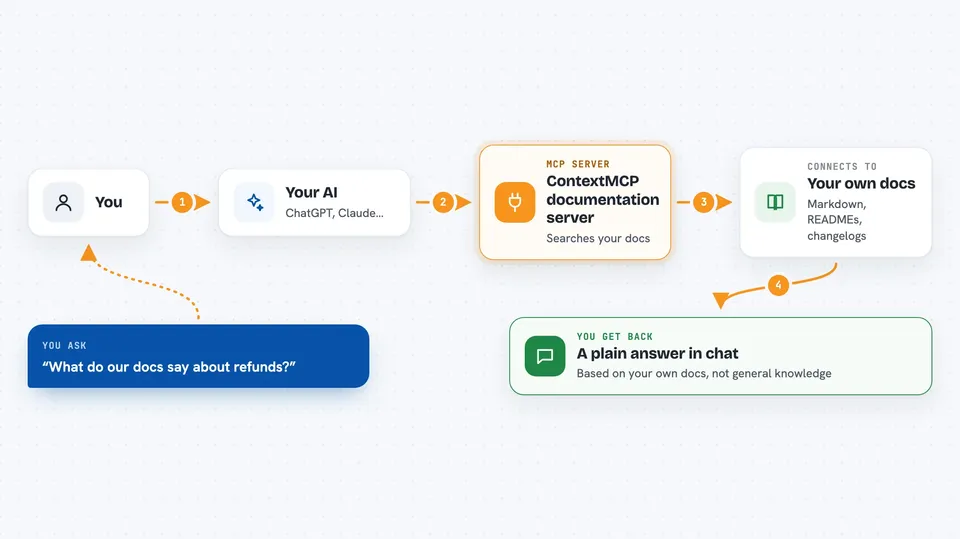
ContextMCP is a helper you set up yourself that turns your documentation into something your AI assistant can search. You point it at your docs, it reads and organizes them, and then your AI can answer questions using your own content instead of guessing. It is handy if you have a pile of docs, READMEs, or API notes and want quick, accurate answers from them.
What is an MCP server? The 30-second version
On its own, your AI can only chat with what it already learned. An MCP server is a small helper program that gives your AI a new skill or a connection to a service. This one connects your AI to your own documentation, so it can look things up there when you ask. You set it up once, and after that your AI can search your docs for you.
What this MCP server does
You ask your AI a question about your product or docs. The AI sends that question to this helper. The helper searches the index it built earlier from your documentation. It finds the most relevant pieces and sends them back. Your AI then writes an answer for you based on what it found.
 Click to zoom
What you can do with it
- Search your own documentation by asking a plain question
- Index Markdown, MDX, and OpenAPI/Swagger files
- Pull content from READMEs and changelogs
- Keep a searchable copy of your docs in a vector database
- Answer questions using your docs instead of general knowledge
- Serve your docs to AI assistants through a standard connection
Try asking your AI
- “What does our API say about refunds?”
- “Find the part of our docs that explains authentication”
- “Summarize what changed in the last release notes”
- “How do I set up a webhook according to our documentation?”
What it gives back to you
You get answers in the chat, written in plain language and based on your own docs. The helper sends back the most relevant passages it found, and your AI turns them into a reply. You can also get short summaries or lists of matching sections. It does not change your files; it only reads and searches them.
Before you start
What you need
- Node.js 18 or newer installed on your computer
- A Pinecone account and API key (Pinecone is a service that stores searchable text; it gives you a key for free to start)
- An OpenAI or Gemini API key (a kind of password for the AI service that turns your text into searchable numbers)
- A Cloudflare account to deploy the server (Cloudflare hosts the helper online)
Good to know
It reads your documentation and stores a copy in Pinecone, so do not point it at private or secret files unless you are fine with that content being indexed there.
Install it with your AI
Add ContextMCP documentation server to your AI, no technical skills needed
You don't install anything by hand. You copy one prompt, paste it into an AI that can work on your computer, and it checks, installs and connects the server for you, asking you when it needs something.
Sign in to get the install prompt
Members get a ready-made prompt that lets the Claude desktop app check ContextMCP documentation server, install it and connect it for them, step by step. You don't need any technical skills: you copy, paste and answer a few questions. Your connected AI can also find and install any of the 4,609 MCP servers here for you.
Who it's for
People who maintain documentation, developer relations folks, and small teams who want their own docs to be searchable by an AI assistant.





