
MCP server · Notes · official
Pinecone Assistant MCP server
by pinecone-io · official
Let your AI search your Pinecone Assistant knowledge base and bring back answers with sources.
This is a small helper made by Pinecone that connects your AI assistant to your Pinecone Assistant. Pinecone Assistant is a service where you upload documents and then ask questions about them. If you already keep files there, this lets your AI look things up in that same pile of documents without you copying and pasting anything.
What is an MCP server? The 30-second version
On its own, your AI can only chat with you using what it already knows. An MCP server is a small helper program that gives your AI one extra skill or one extra connection. This helper connects your AI to Pinecone Assistant, your own document library in the cloud. Once it is set up, you can ask a question in plain words and the AI will go check your Pinecone Assistant for the answer.
What this MCP server does
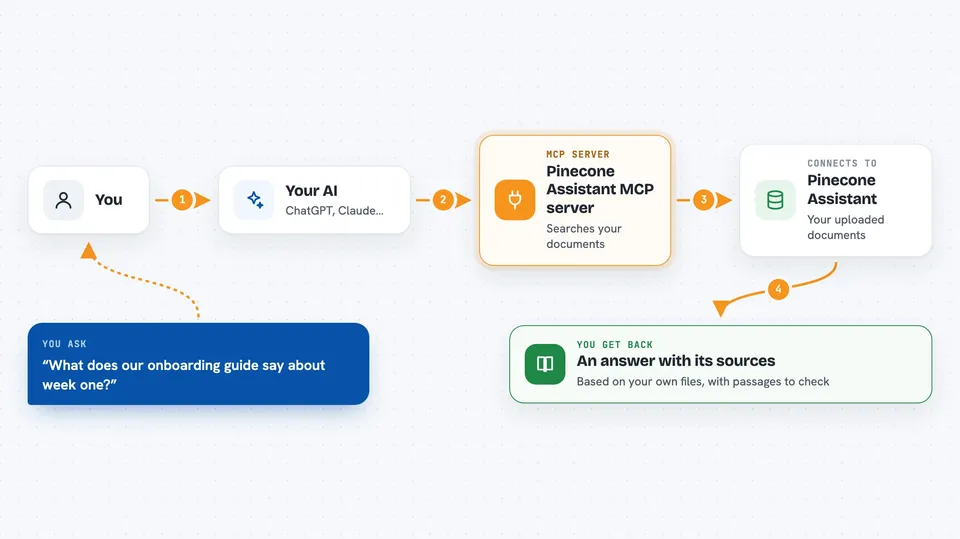
You ask your AI a question in normal language, like you always do. The AI passes that question to this helper program. The helper sends the question to your Pinecone Assistant, which searches the documents you have stored there. Pinecone Assistant sends back the most relevant pieces of text it found. The AI then reads those pieces and writes you a normal answer in the chat, often pointing to which document it came from.
 Click to zoom
What you can do with it
- Ask questions about documents you uploaded to Pinecone Assistant
- Get answers grounded in your own files instead of the AI's general knowledge
- Pull several matching passages at once when one answer is not enough
- Check what your knowledge base says about a topic before you write something
- Look up internal notes, manuals, or reports you have stored in Pinecone
- Get the source text behind an answer so you can verify it yourself
Try asking your AI
- “What does our onboarding guide say about the first week for new hires?”
- “Search my Pinecone Assistant for anything about the 2024 pricing change and summarise it”
- “Give me three passages from my documents that mention refund policy”
- “According to my uploaded reports, what were the main risks mentioned last quarter?”
What it gives back to you
You get a written answer in the chat, based on the documents in your Pinecone Assistant. Along with it you usually see the matching passages or snippets that were used, so you can check where the answer came from. If nothing relevant is found, the AI will tell you that instead of making something up. It does not change or delete anything in your knowledge base.
Before you start
What you need
- A Pinecone account and an API key from the Pinecone Console (an API key is a long password that lets apps talk to your account)
- A Pinecone Assistant already created, with documents uploaded to it
- The Assistant host address, found on the Assistant details page in the Pinecone Console
- Docker installed on your computer if you use the Docker setup
Good to know
The helper can read whatever is inside your Pinecone Assistant, so treat your API key like a password and do not share it.
Install it with your AI
Add Pinecone Assistant MCP server to your AI, no technical skills needed
You don't install anything by hand. You copy one prompt, paste it into an AI that can work on your computer, and it checks, installs and connects the server for you, asking you when it needs something.
Sign in to get the install prompt
Members get a ready-made prompt that lets the Claude desktop app check Pinecone Assistant MCP server, install it and connect it for them, step by step. You don't need any technical skills: you copy, paste and answer a few questions. Your connected AI can also find and install any of the 4,361 MCP servers here for you.
Who it's for
People who keep their company documents in Pinecone Assistant and want their AI to answer questions from those documents, such as support teams, researchers, and anyone doing internal knowledge work.





