
MCP server · API
MCPJungle MCP server
by duaraghav8
Keep all your AI helper tools in one place and reach them through a single connection.
MCPJungle is a small program you run yourself that acts as a central hub for all your AI helper tools. Instead of setting up each tool separately in every AI app you use, you set them up once here. It is handy for people who use more than one AI tool and want to keep things tidy.
What is an MCP server? The 30-second version
On its own, your AI can only chat with you. An MCP server is a small helper program that gives your AI a new skill or a connection to another app. MCPJungle is a helper that gathers other helpers together, so your AI talks to just one place and reaches all of them. You connect your AI to MCPJungle once, and it can then use everything you registered inside it.
What this MCP server does
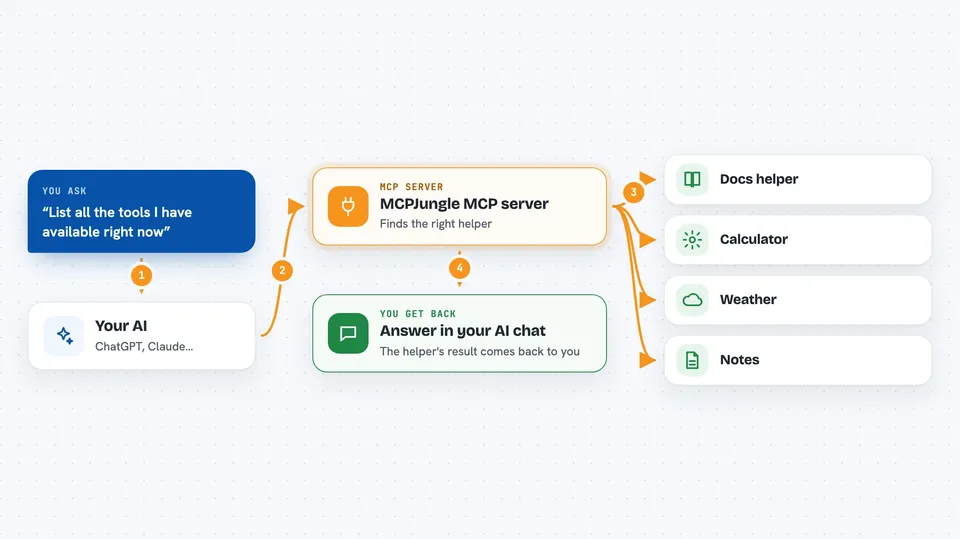
You install MCPJungle on your own computer and start it running. Then you tell it about the other AI helper tools you want to use, one by one. Your AI app connects to MCPJungle instead of to each tool directly. When you ask your AI to do something, it asks MCPJungle, which passes the request to the right helper and brings the answer back to you.
 Click to zoom
What you can do with it
- Register all your AI helper tools in one place
- Connect Claude, Cursor, or Copilot to a single address
- See a list of every tool available across your helpers
- Turn individual tools on or off
- Group tools so a client only sees what it should
- Run it just for yourself or share it with a team
Try asking your AI
- “Use context7 to get the documentation for the lodash library”
- “List all the tools I have available right now”
- “Turn off the calculator tools for this session”
- “Show me which helper servers are registered”
What it gives back to you
You get answers and results in your AI chat, just like normal. Behind the scenes MCPJungle also keeps lists of your registered helpers and their tools, which you can view with its command line tool. When you call a tool, the result from that helper comes back into the chat.
Before you start
What you need
- Docker installed on your computer to run the server
- The mcpjungle command line tool, installed with Homebrew on a Mac
- The Claude desktop app or another AI client that supports MCP
- Node.js if you plan to use helper tools that run with npx
Good to know
MCPJungle can run other helper tools that may read files or change things on your computer, so only register tools you trust.
Install it with your AI
Add MCPJungle MCP server to your AI, no technical skills needed
You don't install anything by hand. You copy one prompt, paste it into an AI that can work on your computer, and it checks, installs and connects the server for you, asking you when it needs something.
Sign in to get the install prompt
Members get a ready-made prompt that lets the Claude desktop app check MCPJungle MCP server, install it and connect it for them, step by step. You don't need any technical skills: you copy, paste and answer a few questions. Your connected AI can also find and install any of the 4,609 MCP servers here for you.
Who it's for
Developers and small teams who use several AI helper tools and want one tidy place to manage them.


