
MCP server · Developer tools
Skylos MCP server
by duriantaco
Lets your AI scan your code for dead code, security problems, and quality issues before you merge.
Skylos is a free tool that checks your code for problems before you share it with your team. It looks for code nobody uses anymore, security holes, and mistakes that AI-written code often makes. It is handy if you write or review code and want a second pair of eyes without reading every single line yourself.
What is an MCP server? The 30-second version
On its own, your AI can only chat with you. It cannot open your project or run checks on it. An MCP server is a small helper program that gives your AI a new skill. This one connects your AI to Skylos, so when you ask about your code, the AI can run Skylos for you and tell you what it found.
What this MCP server does
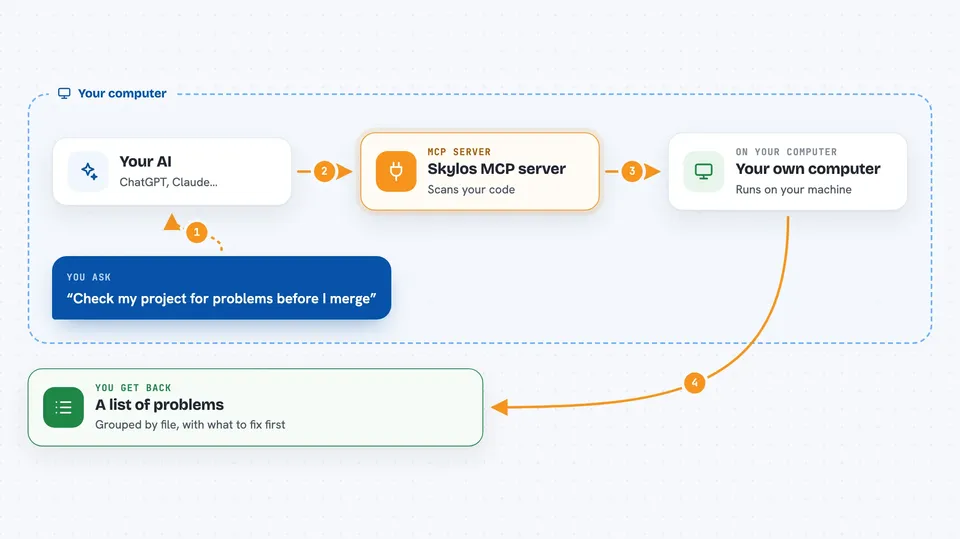
You ask your AI something like check my project for problems. The AI passes that request to this helper. The helper runs Skylos on your code, which looks for unused functions, security issues, hard-coded passwords, and other common mistakes. Then the AI reads the results and explains them to you in plain words, right in the chat.
 Click to zoom
What you can do with it
- Find dead code, like functions and files nobody uses anymore
- Spot security problems and dangerous data flows
- Catch secrets and passwords accidentally left in your code
- Check for common mistakes in AI-generated code
- Review code quality issues like deep nesting and duplicate branches
- Preview which unused Python imports and functions could be cleaned up
- Generate a report you can share with your team
Try asking your AI
- “Run Skylos on my project and tell me what is wrong”
- “Are there any unused functions in my code?”
- “Check this file for security problems before I merge it”
- “Did any passwords or secret keys get left in my code?”
What it gives back to you
You get a list of findings grouped by file, with a short description of each problem and how serious it is. The AI can summarize the most important ones and suggest what to fix first. For some checks you can also get a clean pass or fail answer. Everything shows up as normal text in your chat.
Before you start
What you need
- Python installed on your computer
- Skylos installed with pip install skylos
- Your project files on the same computer
Good to know
Skylos can suggest removing unused code, and the clean command can actually delete code if you confirm it, so always review before applying changes.
Install it with your AI
Add Skylos MCP server to your AI, no technical skills needed
You don't install anything by hand. You copy one prompt, paste it into an AI that can work on your computer, and it checks, installs and connects the server for you, asking you when it needs something.
Sign in to get the install prompt
Members get a ready-made prompt that lets the Claude desktop app check Skylos MCP server, install it and connect it for them, step by step. You don't need any technical skills: you copy, paste and answer a few questions. Your connected AI can also find and install any of the 4,609 MCP servers here for you.
Who it's for
Developers, reviewers, and anyone who writes or checks code and wants a quick safety and quality check before merging.




