MCP server · Social media
YouTube MCP server (yutu)
by eat-pray-ai
Lets your AI look after your YouTube channel: upload videos, tidy playlists, and handle comments.
yutu is a helper that connects your AI assistant to your own YouTube channel. Once it is set up, you can ask your AI in plain words to upload a video, fix a title, or reply to comments, and it does the clicking for you. It is handy if you run a channel and want to spend less time in YouTube Studio.
What is an MCP server? The 30-second version
On its own, your AI can only chat with you. An MCP server is a small helper program that gives your AI a new skill, in this case a connection to your YouTube channel. You install yutu once, your AI talks to it, and yutu talks to YouTube using your own Google account. After that, when you ask for something on your channel, your AI can actually go and do it.
What this MCP server does
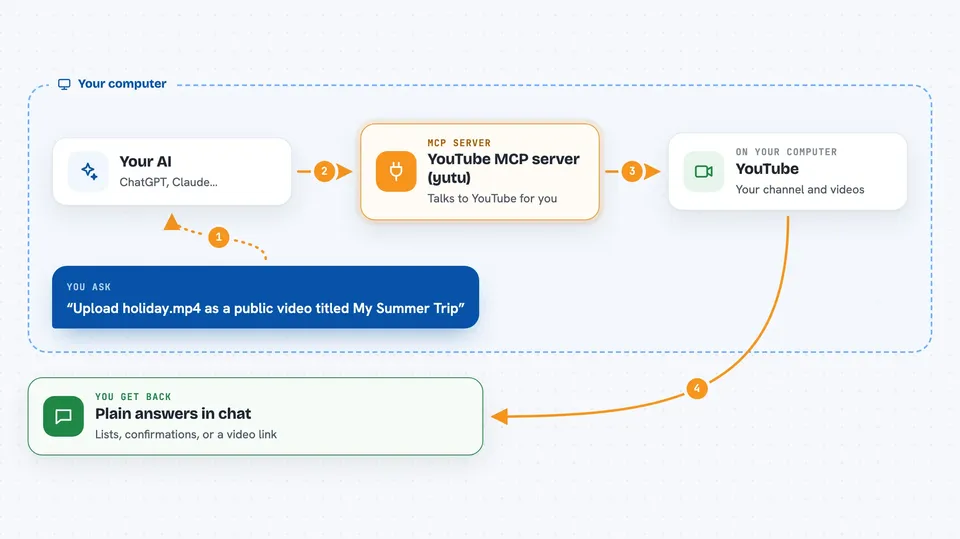
You ask your AI something about your channel, like uploading a video or listing your playlists. Your AI passes that request to yutu, which is running quietly on your computer. yutu then talks to YouTube using the permission you gave it earlier. YouTube sends back the answer or makes the change, and yutu hands the result to your AI. Your AI then tells you what happened, in normal words.
 Click to zoom
What you can do with it
- Upload a video with a title, description, and tags
- List, create, and update your playlists
- Read comments and post replies
- Change your video thumbnails
- Update channel details and branding
- Look up videos, channels, and categories
- Manage captions and subscriptions
Try asking your AI
- “Upload the video file holiday.mp4 as a public video titled My Summer Trip”
- “Show me the comments on my latest video and reply politely to the questions”
- “Make a new playlist called Tutorials and add my three newest videos to it”
- “Change the description of my most recent video to include my website link”
What it gives back to you
You get back plain answers in the chat: lists of videos or comments, confirmation that something was uploaded or changed, or small details like a video link or a count. If you asked for a list, it usually shows up as a short bullet list you can read. If you asked for a change, the AI tells you it is done. Nothing appears as a file unless you ask for one.
Before you start
What you need
- The yutu program installed on your computer
- A Google account, since YouTube runs on Google
- A free Google Cloud project with the YouTube Data API switched on
- A client_secret.json file from Google and a youtube.token.json file created by signing in once
Good to know
This helper can change or delete things on your real YouTube channel, so double check what you ask it to do before saying yes.
Install it with your AI
Add YouTube MCP server (yutu) to your AI, no technical skills needed
You don't install anything by hand. You copy one prompt, paste it into an AI that can work on your computer, and it checks, installs and connects the server for you, asking you when it needs something.
Sign in to get the install prompt
Members get a ready-made prompt that lets the Claude desktop app check YouTube MCP server (yutu), install it and connect it for them, step by step. You don't need any technical skills: you copy, paste and answer a few questions. Your connected AI can also find and install any of the 4,609 MCP servers here for you.
Who it's for
YouTubers, social media managers, and small teams who run a channel and want their AI to handle the repetitive YouTube chores.