MCP server · Browser automation
CaiShi MCP server
Let your AI read Bilibili, Douyin, Xiaohongshu and any web page through your own logged-in Chrome.
CaiShi is a helper pack that lets your AI read Chinese websites. It works through your own browser, the one where you are already logged in. It is handy if you often want to check a Douyin video, a Xiaohongshu note, a Bilibili film or a news page, and would rather ask your AI than click around yourself.
What is an MCP server? The 30-second version
On its own, your AI can only chat with you. An MCP server is a small helper program you connect to your AI, and it gives the AI one new skill. This one gives your AI the skill of reading websites, here Bilibili, Douyin, Xiaohongshu and any page you point it at. Once it is connected, you just ask a normal question and the AI does the reading for you.
What this MCP server does
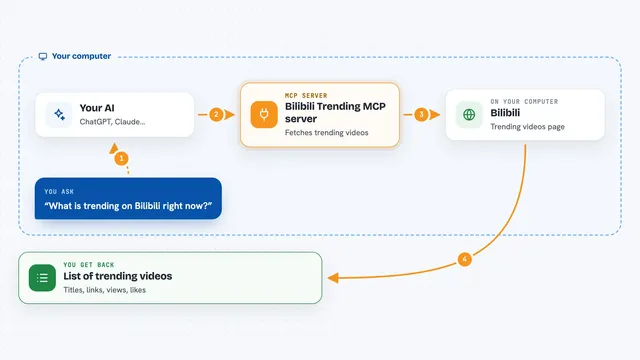
You paste a link or a search word and ask your AI about it. The AI sends that request to CaiShi, which opens the page through your own logged-in browser, as if you were looking at it yourself. CaiShi picks out the useful parts, like the title, the caption, the numbers under a post, or the link to the video without the logo. Then it hands the result back to your AI, and your AI writes it out for you in the chat.
What you can do with it
- Read a Douyin video and get its caption, author and view counts
- Search Xiaohongshu and list the top notes
- Look up a Bilibili video and read its subtitles
- Fetch the hot list from Weibo or Toutiao
- Export a WeChat article or a Zhihu answer as clean Markdown
- Read the main text of any web page you give it
Try asking your AI
- “Help me see what this Douyin video says https://v.douyin.com/xxxx/”
- “Search Xiaohongshu for piano lessons and list the first few notes”
- “Export this WeChat article as markdown: <link>”
- “Read this web page and give me a short summary of the main points”
What it gives back to you
You get back plain text in the chat: titles, captions, authors, view and like numbers, comment lists, subtitles, or a clean Markdown copy of an article. The AI usually shows it as a short list or a paragraph, so you can read it right there without opening the site. If it saved an article, you also get a file on your computer.
Before you start
What you need
- A Mac or any desktop computer that can run Node
- Google Chrome or Chromium installed
- A one-time setup: run bash install.sh, then load the browser extension in Chrome
- Log in to the sites you want in that same browser, ideally with a spare account
Good to know
It reads pages through your logged-in browser and can only read, never post or change anything, but the project itself says to use a spare account and to keep the reading low and one link at a time.
Install it with your AI
Add CaiShi MCP server to your AI, no technical skills needed
You don't install anything by hand. You copy one prompt, paste it into an AI that can work on your computer, and it checks, installs and connects the server for you, asking you when it needs something.
Sign in to get the install prompt
Members get a ready-made prompt that lets the Claude desktop app check CaiShi MCP server, install it and connect it for them, step by step. You don't need any technical skills: you copy, paste and answer a few questions. Your connected AI can also find and install any of the 4,609 MCP servers here for you.
Who it's for
Anyone who reads Chinese social media and websites for work or study, like marketers, writers, researchers, students, and curious office workers who just want to stop clicking around.