
MCP server · Research
JobDataLake MCP server
by echojobsio
Ask your AI to search over a million job listings by skills, salary, location and more.
This is a small helper that connects your AI assistant to JobDataLake, a big collection of job listings from thousands of companies. Once it is set up, you can just ask your AI in normal words to find jobs that match what you want. It is handy for anyone job hunting, or for recruiters and researchers who need to look at many openings at once.
What is an MCP server? The 30-second version
On its own, your AI can only chat with you using what it already knows. An MCP server is a small helper program that gives your AI a new skill or a connection to an app or service. This one connects your AI to JobDataLake, so it can look up real job listings for you. You ask a question, and the AI uses this helper to go and find the answers.
What this MCP server does
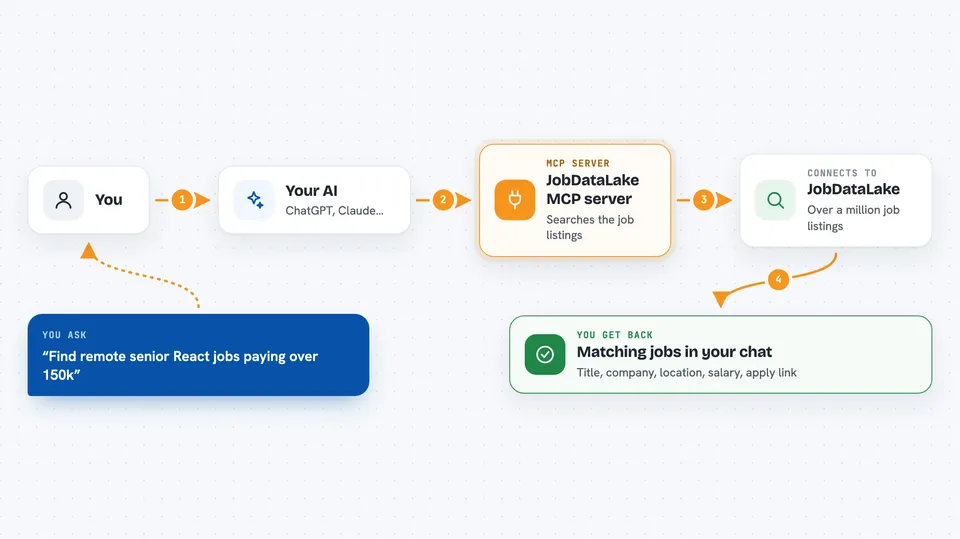
You type a request like find remote senior React jobs paying over 150k. Your AI passes that to this helper, which searches the JobDataLake listings using your filters. The helper sends back matching jobs, and the AI shows them to you in the chat. You can then ask for more details on any single job, or ask about the company behind it. It all happens in plain conversation, no forms to fill in.
 Click to zoom
What you can do with it
- Search jobs by keyword, skills, salary, location and more
- Filter by remote type, seniority, job function and posting date
- Get full details for a specific job, including the apply link
- Look up a company profile with industry, size and funding
- Find jobs similar to one you already like
- Explore which filter values exist and how many jobs each has
- Sort results by newest or by highest salary
Try asking your AI
- “Find me remote senior React jobs paying over $150k”
- “Entry level data science jobs posted this week”
- “Jobs at Anthropic paying over $200k”
- “React and TypeScript jobs in Europe”
What it gives back to you
You get back a list of matching jobs, usually with the title, company, location, salary and a short summary for each. If you ask about one job in particular, you get the full description, requirements, salary and a link to apply. Company questions come back as a short profile. It all appears as normal text in your chat, so you can read it and ask follow-up questions.
Before you start
What you need
- The Claude desktop app, Claude Code, or another AI tool that supports MCP
- Node.js installed on your computer (the free tier works without any signup or key)
Good to know
The free tier allows 500 calls a day, and if you add your own paid key, each search uses up credits, so keep an eye on how much you use.
Install it with your AI
Add JobDataLake MCP server to your AI, no technical skills needed
You don't install anything by hand. You copy one prompt, paste it into an AI that can work on your computer, and it checks, installs and connects the server for you, asking you when it needs something.
Sign in to get the install prompt
Members get a ready-made prompt that lets the Claude desktop app check JobDataLake MCP server, install it and connect it for them, step by step. You don't need any technical skills: you copy, paste and answer a few questions. Your connected AI can also find and install any of the 4,361 MCP servers here for you.
Who it's for
Job seekers, recruiters, and anyone researching the job market who wants to search listings by talking to their AI.


